# .NET MAUI DataGrid Property Aggregate Descriptor
The `PropertyAggregateDescriptor` allows you to define a property and a function that are applied over the property values of the [.NET MAUI DataGrid](https://www.telerik.com/maui-ui/documentation/controls/datagrid/overview), which accumulates an aggregated result based on the component data.
To set up the `PropertyAggregateDescriptor`, use the following properties:
* `PropertyName`—Defines the name of the property that is used to compute the aggregate value.
* `Function`—Defines a `KnownFunction` value that will be applied to the aggregate.
* `Caption`—Defines the caption of the aggregate. You can use `Caption` to display text in the UI.
* `Format`—Defines the string format that will be applied over the aggregated value.
The `PropertyAggregateDescriptor` supports the following `KnownFunction` aggregates:
* `Sum`—The `Sum` function summarizes all values in the column.
* `Min`—The `Minimum` value of the cells in the column.
* `Max`—The `Maximum` value of the cells in the column.
* `Average`—The `Average` value of the cells in the column.
* `Count`—The `COUNT` function counts the items in the column.
* `Product`—The `PRODUCT` function multiplies all the numbers given as arguments and returns the product.
* `StdDev`—The `Standard Deviation` is a measure of how widely values are dispersed from the average value, based on a sample function.
* `StdDevP`—The `Standard Deviation` is a measure of how widely values are dispersed from the average value, based on the entire population function.
* `Var`—The `Variance` is a measure of dispersion, based on a sample function.
* `VarP`—The `Variance` is a measure of dispersion, based on the entire population function.
The following example shows how to add a `PropertyAggregateDescriptor` to the DataGrid's columns.
The DataGrid takes the values from the `Name`, `Price`, `DeliveryPrice` and `Quantity` properties of the row model and the result will be the `Min`, `Max`, and `Average` delivery prices, as well as the `Count` of the listed items.
**1.** Define the DataGrid in XAML:
```XAML
```
**2.** Add the `telerik` namespace:
```XAML
xmlns:telerik="http://schemas.telerik.com/2022/xaml/maui"
```
**3.** Define a sample data:
```C#
public class Data : NotifyPropertyChangedBase
{
private string name;
private double price;
private double deliveryPrice;
private int quantity;
public string Name
{
get => this.name;
set
{
if (value != this.name)
{
this.name = value;
this.OnPropertyChanged();
}
}
}
public double Price
{
get => this.price;
set
{
if (value != this.price)
{
this.price = value;
this.OnPropertyChanged();
}
}
}
public double DeliveryPrice
{
get => this.deliveryPrice;
set
{
if (value != this.deliveryPrice)
{
this.deliveryPrice = value;
this.OnPropertyChanged();
}
}
}
public int Quantity
{
get => this.quantity;
set
{
if (value != this.quantity)
{
this.quantity = value;
this.OnPropertyChanged();
}
}
}
}
```
**4.** Define the `ViewModel`:
```C#
public class ViewModel
{
public ViewModel()
{
this.Peripherals = new ObservableCollection
{
new Data { Name = "KeyBoard", Price = 24.6, DeliveryPrice = 2, Quantity = 32 },
new Data { Name = "Mouse", Price = 30.9, DeliveryPrice = 2, Quantity = 54 },
new Data { Name = "Video Card", Price = 760.7, DeliveryPrice = 3, Quantity = 17 },
new Data { Name = "Motherboard", Price = 210.4, DeliveryPrice = 4, Quantity = 12 },
new Data { Name = "SSD", Price = 42.9, DeliveryPrice = 3, Quantity = 88 },
new Data { Name = "RAM", Price = 50, DeliveryPrice = 4, Quantity = 126 }
};
}
public ObservableCollection Peripherals { get; set; }
}
```
The following image shows the end result.
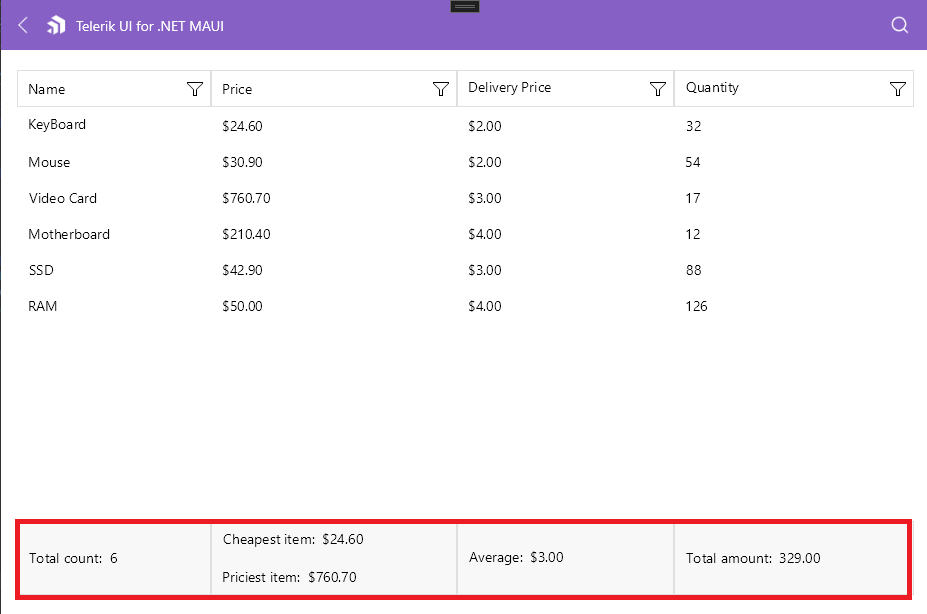
> important For the DataGrid `PropertyAggregateDescriptor` example refer to the [SDKBrowser Demo application](https://www.telerik.com/maui-ui/documentation/demos-and-sample-apps/sdkbrowser-app) and navigate to the **DataGrid > Aggregates** category.
## See Also
* [Delegate Aggregate Descriptor](https://www.telerik.com/maui-ui/documentation/controls/datagrid/aggregates/delegate-aggregate-descriptor)