# .NET MAUI DataForm Group Styling
The DataForm control for .NET MAUI provides styling options for customizing the appearance of its group headers. You can apply a style to the whole header, or only to the header label.
The `DataFormGroup` class exposes the following `Style` properties:
* `HeaderStyle`(of type `Style` with target type `DataFormGroupHeaderView`)—Defines the header view style.
* `HeaderLabelStyle`(of type `Style` with target type `Label`)—Defines the header label style.
## HeaderStyle
To style the `DataFormGroupHeaderView` use the following properties:
* `BackgroundColor`—Defines the background color of the header.
* `BorderColor`—Defines the border color of the header.
* `BorderThickness`—Specifies the border thickness of the header.
* `HeaderLabelStyle` (of type `Style` with target type `Label`)—Defines the header label style.
## Example
The following examples demonstrate how to use the styling properties of the DataFormGroup.
**1.** Define the `RadDataForm` and the groups:
```XAML
```
Note that `local` in the snippet above points to the namespace where the `DataTypeEditorsModel` is defined.
**2.** Define the `HeaderStyle`:
```XAML
```
**3.** Define the `HeaderLabelStyle` of the first DataForm group:
```XAML
```
**4.** Define the `HeaderLabelStyle` of the second DataForm group:
```XAML
```
**5.** Add the following namespace:
```XAML
xmlns:telerik="http://schemas.telerik.com/2022/xaml/maui"
```
**6.** Define the `ViewModel` used as a `BindingContext` for the `RadDataForm`:
```C#
public class DataTypeEditorsModel : NotifyPropertyChangedBase
{
private string name;
private DateOnly? startDate;
private TimeOnly? startTime;
private DateTime? endDateTime;
private double? people = 1;
private bool visited;
private string phoneNumber;
private string email;
private string password;
private string? url;
private decimal? cost;
private string? notes;
private TimeSpan? duration;
private EnumValue accommodation = EnumValue.Apartment;
public enum EnumValue
{
SingleRoom,
Apartment,
House
}
[Required]
[Display(Name = "First Name")]
[DataType(DataType.Text)]
public string FirstName
{
get => this.name;
set => this.UpdateValue(ref this.name, value);
}
[Required]
[Display(Name = "Email address")]
[DataType(DataType.EmailAddress)]
[RegularExpression("^([\\w\\.\\-]+)@([\\w\\-]+)((\\.(\\w){2,3})+)$", ErrorMessage = "Please enter valid email address.")]
public string Email
{
get => this.email;
set => this.UpdateValue(ref this.email, value);
}
[Required]
[Display(Name = "Phone number")]
[DataType(DataType.PhoneNumber)]
[RegularExpression("^(?!0+$)(\\+\\d{1,3}[- ]?)?(?!0+$)\\d{10,15}$", ErrorMessage = "Please enter valid phone number.")]
public string PhoneNumber
{
get => this.phoneNumber;
set => this.UpdateValue(ref this.phoneNumber, value);
}
[Required]
[Display(Name = "Enter password")]
[RegularExpression("^(?=.*?[A-Z])(?=.*?[a-z])(?=.*?[0-9])(?=.*?[#?!@$%^&*-]).{8,}", ErrorMessage = "Password must contain: -at least one upper case, " +
"at least one lower case, at least one digit, at least one special character and to be at least 8 symbols")]
[DataType(DataType.Password)]
public string Password
{
get => this.password;
set => this.UpdateValue(ref this.password, value);
}
[Required]
[Display(Name = "Star date")]
[DataType(DataType.Date)]
public DateOnly? StartDate
{
get => this.startDate;
set => this.UpdateValue(ref this.startDate, value);
}
[Required]
[Display(Name = "Start time")]
[DataType(DataType.Time)]
public TimeOnly? StartTime
{
get => this.startTime;
set => this.UpdateValue(ref this.startTime, value);
}
[Required]
[Display(Name = "End date and time")]
[DataType(DataType.DateTime)]
public DateTime? EndDateTime
{
get => this.endDateTime;
set => this.UpdateValue(ref this.endDateTime, value);
}
[Display(Name = "Number of People")]
public double? People
{
get => this.people;
set => this.UpdateValue(ref this.people, value);
}
[Display(Name = "Select accomodation")]
public EnumValue Accommodation
{
get
{
return this.accommodation;
}
set
{
if (this.accommodation != value)
{
this.accommodation = value;
this.OnPropertyChanged();
}
}
}
[Display(Name = "Visited before")]
public bool Visited
{
get => this.visited;
set => this.UpdateValue(ref this.visited, value);
}
[Display(Name = "Duration")]
public TimeSpan? Duration
{
get => this.duration;
set => this.UpdateValue(ref this.duration, value);
}
[Display(Name = "Web address")]
[DataType(DataType.Url)]
[RegularExpression("^(http:\\/\\/www\\.|https:\\/\\/www\\.|http:\\/\\/|https:\\/\\/)?[a-z0-9]+([\\-\\.]{1}[a-z0-9]+)*\\.[a-z]{2,5}(:[0-9]{1,5})?(\\/.*)?$", ErrorMessage = "Please enter valid url.")]
public string? URL
{
get => this.url;
set => this.UpdateValue(ref this.url, value);
}
[Display(Name = "Total cost")]
[DataType(DataType.Currency)]
[DisplayFormat(DataFormatString = "C")]
public decimal? Cost
{
get => this.cost;
set => this.UpdateValue(ref this.cost, value);
}
[Display(Name = "Notes")]
[DataType(DataType.MultilineText)]
public string? Notes
{
get => this.notes;
set => this.UpdateValue(ref this.notes, value);
}
}
```
Note that `local` in the snippet above points to the namespace where the `DataTypeEditorsModel` is defined.
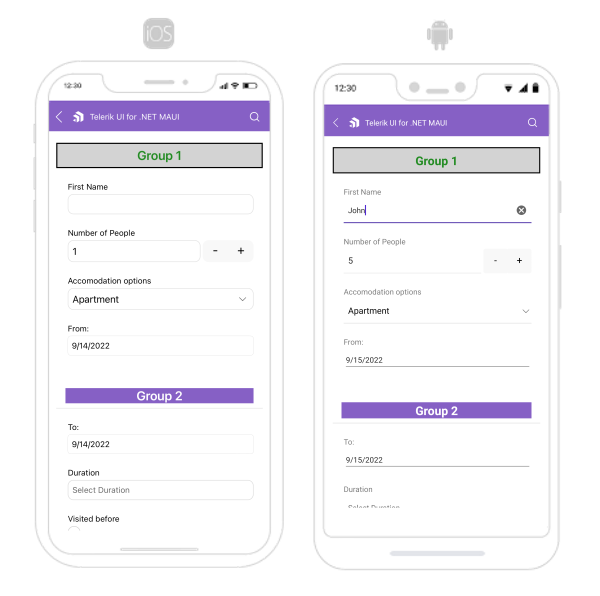
The following image shows what the DataForm control looks like when the styles described above are applied:
> For a runnable example with the DataForm Group Styling scenario, see the [SDKBrowser Demo Application](https://www.telerik.com/maui-ui/documentation/demos-and-sample-apps/sdkbrowser-app) and go to **DataForm > Styling** category.
## See Also
* [Editors Styling](https://www.telerik.com/maui-ui/documentation/controls/dataform/styling/editors-styling)
* [Error Message Styling](https://www.telerik.com/maui-ui/documentation/controls/dataform/styling/error-message-styling)
* [Validation Styling](https://www.telerik.com/maui-ui/documentation/controls/dataform/styling/validation-styling)
* [Header Styling](https://www.telerik.com/maui-ui/documentation/controls/dataform/styling/header-styling)