# Configure the Groups in .NET MAUI DataForm
The DataForm control for .NET MAUI provides the following properties to configure and customize the groups appearance.
* `GroupName`(`string`)—Specified the unique name of the group.
* `Spacing`(`double`)—Specifies the spacing in pixels between the header view and the content view(where the editors are defined).
## Header
Each group has a header. Here are the properties you can use to configure the group header:
* `HeaderText`(`string`)—Specifies the text of the header.
* `HeaderImageSource`(`Microsoft.Maui.Controls.ImageSource`)—Specifies the image in the header.
* `HeaderDisplayOptions`(`Telerik.Maui.Controls.DataFormHeaderDisplayOptions`)—Specifies the display options of the header. The available options are:
* `None`—Header image and text are not visualized.
* `Text`—Visualizes the header text. For this option `HeaderText` has to be defined.
* `Image`—Visualizes the image in the header. For this option `HeaderImageSource` has to be defined.
You can combine the `Text` and the `Image` in the `HeaderDisplayOption`:
```XAML
HeaderDisplayOptions="Image, Text"
```
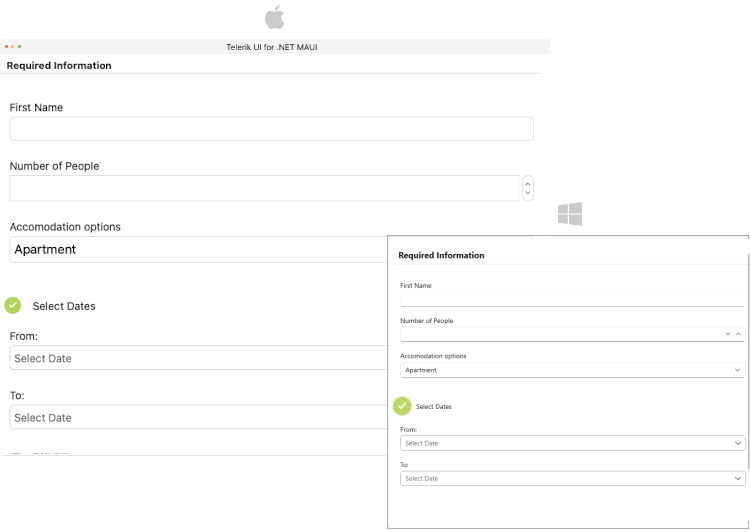
Here is an example for defining Dataform header options:
```XAML
```
## Layouts
DataForm supports different group layouts. You can apply a layout to a particular group by setting the `LayoutDefinition` property to the `DataFormGroup`. The available layouts are described in the [DataForm Layouts](https://www.telerik.com/maui-ui/documentation/controls/dataform/layouts/overview) article.
This is an example when the `DataFormGroup.LayoutDefinition` is set to `DataFormGridLayout`:
```XAML
```
## Templates
* `HeaderTemplate`(`Microsoft.Maui.Controls.ControlTemplate`)—Specifies the template of the header view.
* `ContentTemplate`(`Microsoft.Maui.Controls.ControlTemplate`)—Specifies the template of the content view. The view where the editors are defined.
Here is an example for defining Dataform `HeaderTemplate`:
```XAML
```
> For a runnable example with the DataForm Grouping Configuration scenario, see the [SDKBrowser Demo Application](https://www.telerik.com/maui-ui/documentation/demos-and-sample-apps/sdkbrowser-app) and go to **DataForm > Grouping** category.
## Styling
You can customize the groups using the flexible styling API. For more details review the [Groups Styling](https://www.telerik.com/maui-ui/documentation/controls/dataform/styling/groups-styling) article.
## See Also
* [Editors](https://www.telerik.com/maui-ui/documentation/controls/dataform/editors/overview)
* [Commit Data](https://www.telerik.com/maui-ui/documentation/controls/dataform/commit-data)
* [Validation](https://www.telerik.com/maui-ui/documentation/controls/dataform/validation)