# .NET MAUI CollectionView LoadOnDemand Automatic and Manual Templates

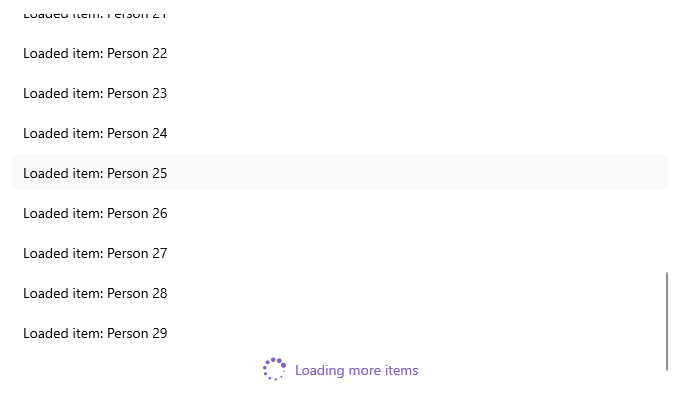
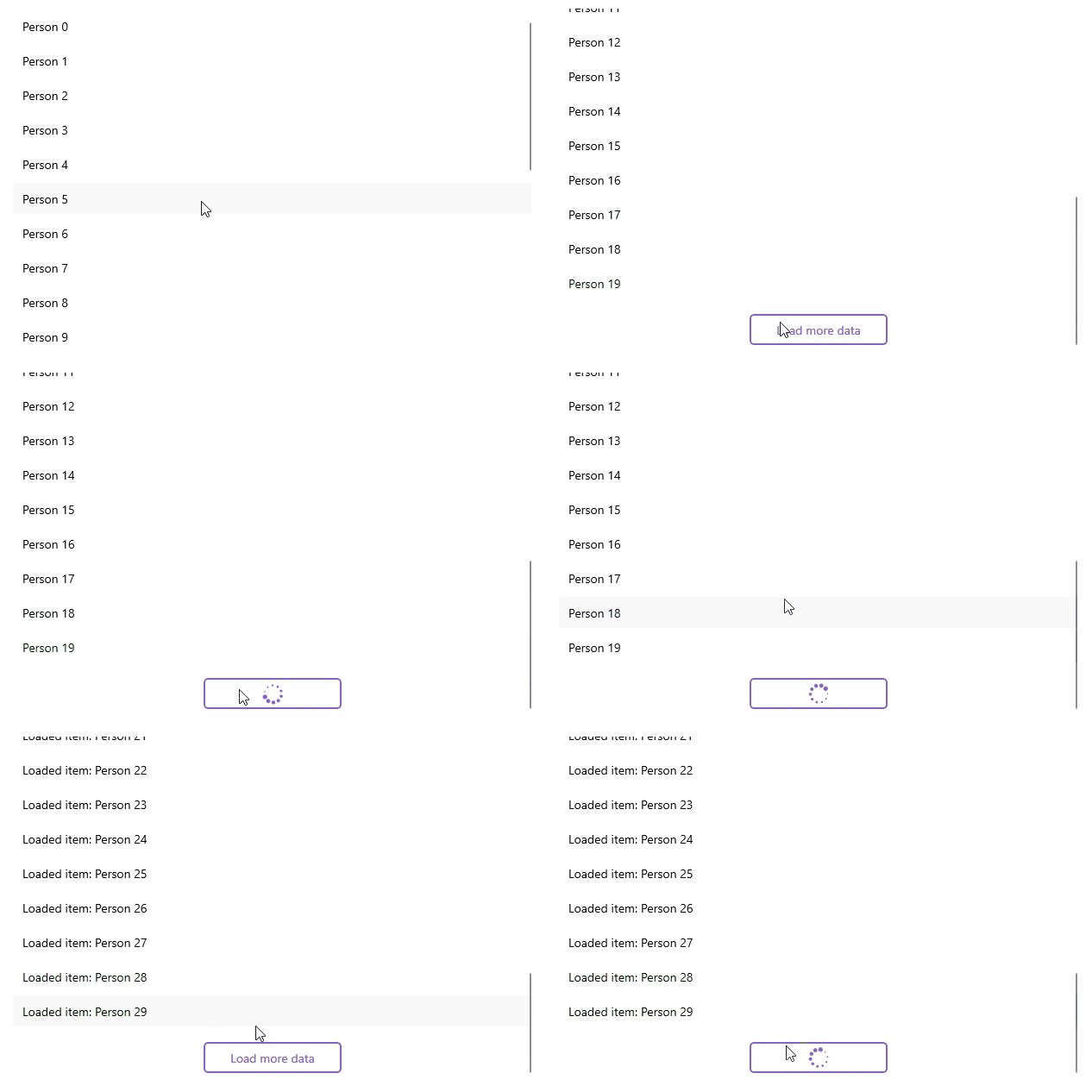
You can customize the appearance of the automatic and manual elements by using the following templates:

* `AutomaticLoadOnDemandTemplate` (`DataTemplate`)—Specifies the template of the view visualized for `Automatic` loading.
* `ManualLoadOnDemandTemplate` (`DataTemplate`)—Specifies the template of the view visualized for `Manual` loading.

## Example with Automatic Template

Here is an example how to customize the automatic indicator:

**1.** Create a sample model:

```C#
public class Person
{
    public string Name { get; set; }
    public int Age { get; set; }
    public Gender Gender { get; set; }
}
```

**2.** Define the CollectionView control and set the `AutomaticLoadOnDemandTemplate`:

```XAML
<telerik:RadCollectionView ItemsSource="{Binding Items}"
                           DisplayMemberPath="Name"
                           IsLoadOnDemandEnabled="True"
                           AutomaticLoadOnDemandTemplate="{StaticResource CustomAutomaticLoadOnDemandTemplate}">
    <telerik:RadCollectionView.BindingContext>
        <local:LoadOnDemandCollectionViewModel />
    </telerik:RadCollectionView.BindingContext>
</telerik:RadCollectionView>
```

**3.** Define the `AutomaticLoadOnDemandTemplate` in the page's resources:

```XAML
<DataTemplate x:Key="CustomAutomaticLoadOnDemandTemplate">
    <HorizontalStackLayout Spacing="8"
                           Padding="0, 5"
                           HorizontalOptions="Center">
        <telerik:RadBusyIndicator AnimationType="Animation4"
                                  AnimationContentColor="#8660C5"
                                  IsBusy="True"
                                  IsVisible="{Binding Source={RelativeSource AncestorType={x:Type telerik:RadCollectionView}}, Path=IsLoadOnDemandActive}" />
        <Label Text="Loading more items"
               TextColor="#8660C5"
               VerticalTextAlignment="Center" />
    </HorizontalStackLayout>
</DataTemplate>
```

**4.** Add the `telerik` namespace:

```XAML
xmlns:telerik="http://schemas.telerik.com/2022/xaml/maui"
```

**5.** Create a `ViewModel` and use the `LoadOnDemandCollection` as a type of the property bound to the `RadCollectionView.ItemsSource`:

```C#
public class LoadOnDemandCollectionViewModel : NotifyPropertyChangedBase
{
    public LoadOnDemandCollectionViewModel()
    {
        this.Items = new LoadOnDemandCollection<Person>(this.LoadMoreItems);

        for (int i = 0; i < 20; i++)
        {
            this.Items.Add(new Person { Name = "Person " + i, Age = i + 10 });
        }
    }

    public LoadOnDemandCollection<Person> Items { get; set; }
    private IEnumerable LoadMoreItems(CancellationToken cancellationToken)
    {
        List<Person> newItems = new List<Person>();
        int count = this.Items.Count;

        try
        {
            Thread.Sleep(2500);

            for (int i = 0; i < 10; i++)
            {
                newItems.Add(new Person { Name = $"Loaded item: Person {count + i}", Age = count + i + 10 });
            }

            return newItems;
        }
        catch (Exception)
        {
            return null;
        }
    }
}
```

This is the result:
![Telerik UI for .NET MAUI CollectionView automatic load-on-demand template showing a Loading more items indicator after Person 29](https://www.telerik.com/maui-ui/documentation/assets/87794d7a1412a3300eb8e0b65e082cf1/load-on-demand-automatic-template.png "Telerik .NET MAUI CollectionView")

> For a runnable example demonstrating the CollectionView LoadOnDemand Automatic Template, see the [SDKBrowser Demo Application](https://www.telerik.com/maui-ui/documentation/demos-and-sample-apps/sdkbrowser-app) and go to **CollectionView > Load On Demand** category.

## Example with Manual Template

Here is an example how to customize the manual button:

**1.** Create a sample model:

```C#
public class Person
{
    public string Name { get; set; }
    public int Age { get; set; }
    public Gender Gender { get; set; }
}
```

**2.** Define the CollectionView control and set the `ManualLoadOnDemandTemplate`:

```XAML
<telerik:RadCollectionView x:Name="collectionView"
                           ItemsSource="{Binding Items}"
                           DisplayMemberPath="Name"
                           LoadOnDemandMode="Manual"
                           IsLoadOnDemandEnabled="True"
                           ManualLoadOnDemandTemplate="{StaticResource CustomManualLoadOnDemandTemplate}">
    <telerik:RadCollectionView.BindingContext>
        <local:LoadOnDemandCollectionViewModel />
    </telerik:RadCollectionView.BindingContext>
</telerik:RadCollectionView>
```

**3.** Define the `ManualLoadOnDemandTemplate` in the page's resources:

```XAML
<telerik:InvertedBooleanConverter x:Key="InvertedBooleanConverter" />

<DataTemplate x:Key="CustomManualLoadOnDemandTemplate">
    <telerik:RadBorder BorderColor="#8660C5"
                       BorderThickness="2"
                       CornerRadius="4"
                       MinimumWidthRequest="{OnPlatform MacCatalyst=160, WinUI=160}"
                       HeightRequest="36"
                       Padding="24, 0"
                       Margin="16"
                       HorizontalOptions="{OnPlatform MacCatalyst=Center, WinUI=Center}">
        <Grid>
            <telerik:RadBusyIndicator AnimationType="Animation4"
                                      AnimationContentColor="#8660C5"
                                      IsBusy="True"
                                      IsVisible="{Binding Source={RelativeSource AncestorType={x:Type telerik:RadCollectionView}}, Path=IsLoadOnDemandActive}" />
            <Label Text="Load more data"
                   TextColor="#8660C5"
                   HorizontalTextAlignment="Center"
                   VerticalTextAlignment="Center"
                   IsVisible="{Binding Source={RelativeSource AncestorType={x:Type telerik:RadCollectionView}}, Path=IsLoadOnDemandActive, Converter={StaticResource InvertedBooleanConverter}}" />
        </Grid>
    </telerik:RadBorder>
</DataTemplate>
```

**4.** Add the `telerik` namespace:

```XAML
xmlns:telerik="http://schemas.telerik.com/2022/xaml/maui"
```

**5.** Create a `ViewModel` and use the `LoadOnDemandCollection` as a type of the property bound to the `RadCollectionView.ItemsSource`:

```C#
public class LoadOnDemandCollectionViewModel : NotifyPropertyChangedBase
{
    public LoadOnDemandCollectionViewModel()
    {
        this.Items = new LoadOnDemandCollection<Person>(this.LoadMoreItems);

        for (int i = 0; i < 20; i++)
        {
            this.Items.Add(new Person { Name = "Person " + i, Age = i + 10 });
        }
    }

    public LoadOnDemandCollection<Person> Items { get; set; }
    private IEnumerable LoadMoreItems(CancellationToken cancellationToken)
    {
        List<Person> newItems = new List<Person>();
        int count = this.Items.Count;

        try
        {
            Thread.Sleep(2500);

            for (int i = 0; i < 10; i++)
            {
                newItems.Add(new Person { Name = $"Loaded item: Person {count + i}", Age = count + i + 10 });
            }

            return newItems;
        }
        catch (Exception)
        {
            return null;
        }
    }
}
```

This is the result:
![Telerik UI for .NET MAUI CollectionView manual load-on-demand template showing Person items and a Load more button](https://www.telerik.com/maui-ui/documentation/assets/c3b4d13bfad4b8084afdcb8ef254756d/load-on-demand-manual-templatre.gif "Telerik .NET MAUI CollectionView")

> For a runnable example demonstrating the CollectionView LoadOnDemand Manual Template, see the [SDKBrowser Demo Application](https://www.telerik.com/maui-ui/documentation/demos-and-sample-apps/sdkbrowser-app) and go to **CollectionView > Load On Demand** category.

## See Also

* [Load On Demand Collection](https://www.telerik.com/maui-ui/documentation/controls/collectionview/load-on-demand/collection)
* [Load On Demand Command](https://www.telerik.com/maui-ui/documentation/controls/collectionview/load-on-demand/command)
* [Load On Demand Event](https://www.telerik.com/maui-ui/documentation/controls/collectionview/load-on-demand/event)
