# .NET MAUI CollectionView Linear Layout
The CollectionView control supports linear layouts through its `ItemsLayout` property. The `ItemsLayout` accepts values of type `CollectionViewLayoutBase` which is a base class.
The linear layout with vertical orientation for the items visualization is the default layout of the control. The linear layout can be explicitly set by creating an instance of the `CollectionViewLinearLayout` class and assigning it to the `RadCollectionView.ItemsLayout` property.
> caption The default linear layout with vertical items arrangement set in XAML:
```XAML
```
The `CollectionViewLinearLayout` provides the following properties:
* `ItemSpacing` (`double`)—Specifies the spacing between the items. The default value is `0`.
* `ItemLength` (`double`)—Specifies the width or height (depending on the layout orientation) of the items. The default value is `-1`, which means that the items will be sized according to the targeted platform default behavior.
* `Orientation` (enum or type `Telerik.Maui.Orientation`)—Specifies the orientation of the layout. The available options are: `Horizontal` and `Vertical` (default).
## Example with Horizontal Layout Orientation
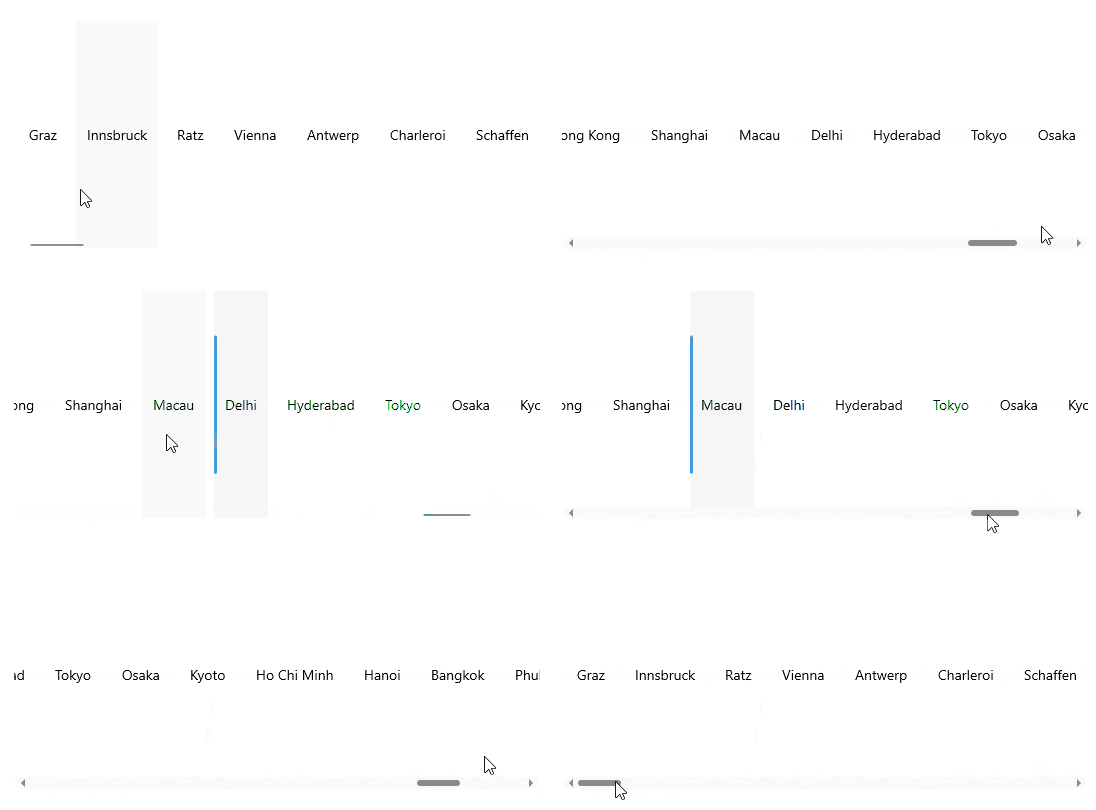
The following example demonstrates how to apply horizontal orientation to the `RadCollectionView`.
**1.** Define the following business object:
```C#
public class DataModel : NotifyPropertyChangedBase
{
private string continent;
private string country;
private string city;
private int id;
public string Continent
{
get => this.continent;
set => this.UpdateValue(ref this.continent, value);
}
public string Country
{
get => this.country;
set => this.UpdateValue(ref this.country, value);
}
public string City
{
get => this.city;
set => this.UpdateValue(ref this.city, value);
}
public int Id
{
get => this.id;
set => this.UpdateValue(ref this.id, value);
}
}
```
**2.** Create a `ViewModel` class as shown below:
```C#
public class ViewModel : NotifyPropertyChangedBase
{
public ViewModel()
{
this.Locations = new ObservableCollection
{
new DataModel { Continent = "Europe", Country = "Austria", City = "Graz", Id = 1 },
new DataModel { Continent = "Europe", Country = "Austria", City = "Innsbruck", Id = 2 },
new DataModel { Continent = "Europe", Country = "Austria", City = "Ratz", Id = 3 },
new DataModel { Continent = "Europe", Country = "Austria", City = "Vienna", Id = 4 },
new DataModel { Continent = "Europe", Country = "Belgium", City = "Antwerp", Id = 5 },
new DataModel { Continent = "Europe", Country = "Belgium", City = "Charleroi", Id = 6 },
new DataModel { Continent = "Europe", Country = "Belgium", City = "Schaffen", Id = 7 },
new DataModel { Continent = "Europe", Country = "Denmark", City = "Copenhagen", Id = 8 },
new DataModel { Continent = "Europe", Country = "Denmark", City = "Odense", Id = 9 },
new DataModel { Continent = "Europe", Country = "France", City = "Nice", Id = 10 },
new DataModel { Continent = "Europe", Country = "France", City = "Paris", Id = 11 },
new DataModel { Continent = "Europe", Country = "Germany", City = "Baden-Baden", Id = 12 },
new DataModel { Continent = "Europe", Country = "Germany", City = "Berlin", Id = 13 },
new DataModel { Continent = "Europe", Country = "Germany", City = "Hamburg", Id = 14 },
new DataModel { Continent = "Europe", Country = "Germany", City = "Munich", Id = 15 },
new DataModel { Continent = "Europe", Country = "Germany", City = "Nuremberg", Id = 16 },
new DataModel { Continent = "Europe", Country = "Italy", City = "Bari", Id = 17 },
new DataModel { Continent = "Europe", Country = "Italy", City = "Rome", Id = 18 },
new DataModel { Continent = "Europe", Country = "Netherlands", City = "Amsterdam", Id = 19 },
new DataModel { Continent = "Europe", Country = "Netherlands", City = "Eindhoven", Id = 20 },
new DataModel { Continent = "Europe", Country = "Netherlands", City = "Rotterdam", Id = 21 },
new DataModel { Continent = "Europe", Country = "Portugal", City = "Lisbon", Id = 22 },
new DataModel { Continent = "Europe", Country = "Portugal", City = "Porto", Id = 23 },
new DataModel { Continent = "Europe", Country = "Spain", City = "Barcelona", Id = 24 },
new DataModel { Continent = "Europe", Country = "Spain", City = "Madrid", Id = 25 },
new DataModel { Continent = "Europe", Country = "United Kingdom", City = "London", Id = 26 },
new DataModel { Continent = "Europe", Country = "United Kingdom", City = "Manchester", Id = 27 },
new DataModel { Continent = "North America", Country = "United States", City = "New York", Id = 28 },
new DataModel { Continent = "North America", Country = "United States", City = "Los Angeles", Id = 29 },
new DataModel { Continent = "North America", Country = "United States", City = "Chicago", Id = 30 },
new DataModel { Continent = "North America", Country = "United States", City = "Boston", Id = 31 },
new DataModel { Continent = "North America", Country = "United States", City = "San Francisco", Id = 32 },
new DataModel { Continent = "North America", Country = "Canada", City = "Toronto", Id = 33 },
new DataModel { Continent = "North America", Country = "Canada", City = "Vancouver", Id = 34 },
new DataModel { Continent = "North America", Country = "Canada", City = "Ottawa", Id = 35 },
new DataModel { Continent = "South America", Country = "Brazil", City = "Rio de Janeiro", Id = 36 },
new DataModel { Continent = "South America", Country = "Brazil", City = "Sao Paulo", Id = 37 },
new DataModel { Continent = "South America", Country = "Brazil", City = "Salvador", Id = 38 },
new DataModel { Continent = "South America", Country = "Argentina", City = "Buenos Aires", Id = 39 },
new DataModel { Continent = "South America", Country = "Peru", City = "Lima", Id = 40 },
new DataModel { Continent = "South America", Country = "Peru", City = "Cusco", Id = 41 },
new DataModel { Continent = "South America", Country = "Colombia", City = "Bogota", Id = 42 },
new DataModel { Continent = "South America", Country = "Bolivia", City = "La Paz", Id = 43 },
new DataModel { Continent = "South America", Country = "Venezuela", City = "Caracas", Id = 44 },
new DataModel { Continent = "South America", Country = "Chile", City = "Santiago", Id = 45 },
new DataModel { Continent = "Asia", Country = "China", City = "Hong Kong", Id = 46 },
new DataModel { Continent = "Asia", Country = "China", City = "Shanghai", Id = 47 },
new DataModel { Continent = "Asia", Country = "China", City = "Macau", Id = 48 },
new DataModel { Continent = "Asia", Country = "India", City = "Delhi", Id = 49 },
new DataModel { Continent = "Asia", Country = "India", City = "Hyderabad", Id = 50 },
new DataModel { Continent = "Asia", Country = "Japan", City = "Tokyo", Id = 51 },
new DataModel { Continent = "Asia", Country = "Japan", City = "Osaka", Id = 52 },
new DataModel { Continent = "Asia", Country = "Japan", City = "Kyoto", Id = 53 },
new DataModel { Continent = "Asia", Country = "Vietnam", City = "Ho Chi Minh", Id = 54 },
new DataModel { Continent = "Asia", Country = "Vietnam", City = "Hanoi", Id = 55 },
new DataModel { Continent = "Asia", Country = "Thailand", City = "Bangkok", Id = 56 },
new DataModel { Continent = "Asia", Country = "Thailand", City = "Phuket", Id = 57 },
new DataModel { Continent = "Africa", Country = "Nigeria", City = "Lagos", Id = 58 },
new DataModel { Continent = "Africa", Country = "Egypt", City = "Cairo", Id = 59 },
new DataModel { Continent = "Africa", Country = "Algeria", City = "Algiers", Id = 60 },
new DataModel { Continent = "Oceania", Country = "Australia", City = "Sydney", Id = 61 },
new DataModel { Continent = "Oceania", Country = "Australia", City = "Melbourne", Id = 62 },
new DataModel { Continent = "Oceania", Country = "Australia", City = "Canberra", Id = 63 },
new DataModel { Continent = "Oceania", Country = "New Zealand", City = "Auckland", Id = 64 },
new DataModel { Continent = "Oceania", Country = "New Zealand", City = "Wellington", Id = 65 },
};
}
public ObservableCollection Locations { get; set; }
}
```
**3.** Add the `RadCollectionView` definition with the linear layout:
```XAML
```
**4.** Include the `telerik` namespace:
```XAML
xmlns:telerik="http://schemas.telerik.com/2022/xaml/maui"
```
This is the result:
> For a runnable demo with the CollectionView `CollectionViewLinearLayout`, see the [SDKBrowser Demo Application](https://www.telerik.com/maui-ui/documentation/demos-and-sample-apps/sdkbrowser-app) and go to the **CollectionView > Layouts** category.
## See Also
* [Grouping](https://www.telerik.com/maui-ui/documentation/controls/collectionview/grouping/overview)
* [Sorting](https://www.telerik.com/maui-ui/documentation/controls/collectionview/sorting)
* [Selection](https://www.telerik.com/maui-ui/documentation/controls/collectionview/selection)
* [Commands](https://www.telerik.com/maui-ui/documentation/controls/collectionview/commands)