# .NET MAUI CollectionView Filtering
The CollectionView provides the functionality to programmatically filter its data at runtime.
You can achieve this by adding different filter descriptors in the `RadCollectionView.FilterDescriptors` collection.
The following descriptor types are supported:
* [Text Filter Descriptor](https://www.telerik.com/maui-ui/documentation/controls/collectionview/filtering#text-filter-descriptor)
* [Numerical Filter Descriptor](https://www.telerik.com/maui-ui/documentation/controls/collectionview/filtering#numerical-filter-descriptor)
* [DateTime Filter Descriptor](https://www.telerik.com/maui-ui/documentation/controls/collectionview/filtering#datetime-filter-descriptor)
* [TimeSpan Filter Descriptor](https://www.telerik.com/maui-ui/documentation/controls/collectionview/filtering#timespan-filter-descriptor)
* [Boolean Filter Descriptor](https://www.telerik.com/maui-ui/documentation/controls/collectionview/filtering#boolean-filter-descriptor)
* [Nested Property Text Filter Descriptor](https://www.telerik.com/maui-ui/documentation/controls/collectionview/filtering#nested-property-text-filter-descriptor)
* [Distinct Values Filter Descriptor](https://www.telerik.com/maui-ui/documentation/controls/collectionview/filtering#distinct-values-filter-descriptor)
* [Composite Filter Descriptor](https://www.telerik.com/maui-ui/documentation/controls/collectionview/filtering#composite-filter-descriptor)
* [Delegate Filter Descriptor](https://www.telerik.com/maui-ui/documentation/controls/collectionview/filtering#delegate-filter-descriptor)
All `FilterDescriptors` are located in the `Telerik.Maui.Controls.Data` namespace.
## Text Filter Descriptor
The `TextFilterDescriptor` represents a descriptor which filters by properties of the `string` data type.
The descriptor supports the following properties:
* `PropertyName`—Defines the name of the property that is used to retrieve the filter value.
* `Operator`—Defines the `TextOperator` value that defines how the `Value` member is compared with each value from the items source.
* `Value`—Defines the value used in the comparisons. This is the right operand of the comparison.
* `IsCaseSensitive`—Defines a value that determines whether the text comparisons will be case-sensitive. The default value is `true`.
### Example with Text Filter Descriptor
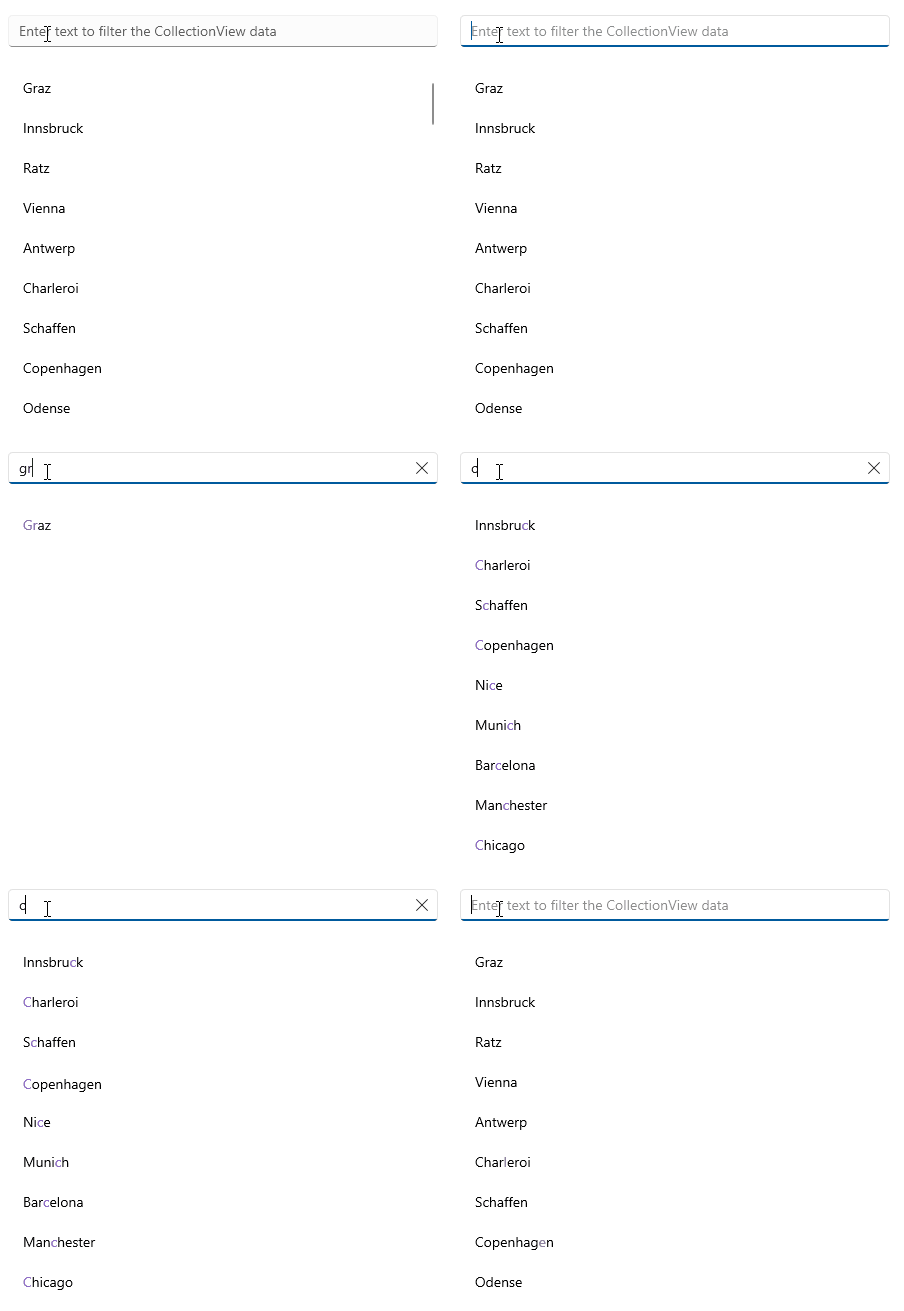
The following example implements a `TextFilterDescriptor` and uses a [`RadEntry`](https://www.telerik.com/maui-ui/documentation/controls/entry/overview) control that allows the user to enter a string of text to filter the CollectionView data.
**1.** Define the `RadCollectionView` and `RadEntry` in XAML:
```XAML
```
**2.** Add the `telerik` namespace:
```XAML
xmlns:telerik="http://schemas.telerik.com/2022/xaml/maui"
```
**3.** Create a sample `DataModel`:
```C#
public class DataModel : NotifyPropertyChangedBase
{
private string continent;
private string country;
private string city;
private int id;
public string Continent
{
get => this.continent;
set => this.UpdateValue(ref this.continent, value);
}
public string Country
{
get => this.country;
set => this.UpdateValue(ref this.country, value);
}
public string City
{
get => this.city;
set => this.UpdateValue(ref this.city, value);
}
public int Id
{
get => this.id;
set => this.UpdateValue(ref this.id, value);
}
}
```
**4.** Define the `ViewModel` class:
```C#
public class ViewModel : NotifyPropertyChangedBase
{
public ViewModel()
{
this.Locations = new ObservableCollection
{
new DataModel { Continent = "Europe", Country = "Austria", City = "Graz", Id = 1 },
new DataModel { Continent = "Europe", Country = "Austria", City = "Innsbruck", Id = 2 },
new DataModel { Continent = "Europe", Country = "Austria", City = "Ratz", Id = 3 },
new DataModel { Continent = "Europe", Country = "Austria", City = "Vienna", Id = 4 },
new DataModel { Continent = "Europe", Country = "Belgium", City = "Antwerp", Id = 5 },
new DataModel { Continent = "Europe", Country = "Belgium", City = "Charleroi", Id = 6 },
new DataModel { Continent = "Europe", Country = "Belgium", City = "Schaffen", Id = 7 },
new DataModel { Continent = "Europe", Country = "Denmark", City = "Copenhagen", Id = 8 },
new DataModel { Continent = "Europe", Country = "Denmark", City = "Odense", Id = 9 },
new DataModel { Continent = "Europe", Country = "France", City = "Nice", Id = 10 },
new DataModel { Continent = "Europe", Country = "France", City = "Paris", Id = 11 },
new DataModel { Continent = "Europe", Country = "Germany", City = "Baden-Baden", Id = 12 },
new DataModel { Continent = "Europe", Country = "Germany", City = "Berlin", Id = 13 },
new DataModel { Continent = "Europe", Country = "Germany", City = "Hamburg", Id = 14 },
new DataModel { Continent = "Europe", Country = "Germany", City = "Munich", Id = 15 },
new DataModel { Continent = "Europe", Country = "Germany", City = "Nuremberg", Id = 16 },
new DataModel { Continent = "Europe", Country = "Italy", City = "Bari", Id = 17 },
new DataModel { Continent = "Europe", Country = "Italy", City = "Rome", Id = 18 },
new DataModel { Continent = "Europe", Country = "Netherlands", City = "Amsterdam", Id = 19 },
new DataModel { Continent = "Europe", Country = "Netherlands", City = "Eindhoven", Id = 20 },
new DataModel { Continent = "Europe", Country = "Netherlands", City = "Rotterdam", Id = 21 },
new DataModel { Continent = "Europe", Country = "Portugal", City = "Lisbon", Id = 22 },
new DataModel { Continent = "Europe", Country = "Portugal", City = "Porto", Id = 23 },
new DataModel { Continent = "Europe", Country = "Spain", City = "Barcelona", Id = 24 },
new DataModel { Continent = "Europe", Country = "Spain", City = "Madrid", Id = 25 },
new DataModel { Continent = "Europe", Country = "United Kingdom", City = "London", Id = 26 },
new DataModel { Continent = "Europe", Country = "United Kingdom", City = "Manchester", Id = 27 },
new DataModel { Continent = "North America", Country = "United States", City = "New York", Id = 28 },
new DataModel { Continent = "North America", Country = "United States", City = "Los Angeles", Id = 29 },
new DataModel { Continent = "North America", Country = "United States", City = "Chicago", Id = 30 },
new DataModel { Continent = "North America", Country = "United States", City = "Boston", Id = 31 },
new DataModel { Continent = "North America", Country = "United States", City = "San Francisco", Id = 32 },
new DataModel { Continent = "North America", Country = "Canada", City = "Toronto", Id = 33 },
new DataModel { Continent = "North America", Country = "Canada", City = "Vancouver", Id = 34 },
new DataModel { Continent = "North America", Country = "Canada", City = "Ottawa", Id = 35 },
new DataModel { Continent = "South America", Country = "Brazil", City = "Rio de Janeiro", Id = 36 },
new DataModel { Continent = "South America", Country = "Brazil", City = "Sao Paulo", Id = 37 },
new DataModel { Continent = "South America", Country = "Brazil", City = "Salvador", Id = 38 },
new DataModel { Continent = "South America", Country = "Argentina", City = "Buenos Aires", Id = 39 },
new DataModel { Continent = "South America", Country = "Peru", City = "Lima", Id = 40 },
new DataModel { Continent = "South America", Country = "Peru", City = "Cusco", Id = 41 },
new DataModel { Continent = "South America", Country = "Colombia", City = "Bogota", Id = 42 },
new DataModel { Continent = "South America", Country = "Bolivia", City = "La Paz", Id = 43 },
new DataModel { Continent = "South America", Country = "Venezuela", City = "Caracas", Id = 44 },
new DataModel { Continent = "South America", Country = "Chile", City = "Santiago", Id = 45 },
new DataModel { Continent = "Asia", Country = "China", City = "Hong Kong", Id = 46 },
new DataModel { Continent = "Asia", Country = "China", City = "Shanghai", Id = 47 },
new DataModel { Continent = "Asia", Country = "China", City = "Macau", Id = 48 },
new DataModel { Continent = "Asia", Country = "India", City = "Delhi", Id = 49 },
new DataModel { Continent = "Asia", Country = "India", City = "Hyderabad", Id = 50 },
new DataModel { Continent = "Asia", Country = "Japan", City = "Tokyo", Id = 51 },
new DataModel { Continent = "Asia", Country = "Japan", City = "Osaka", Id = 52 },
new DataModel { Continent = "Asia", Country = "Japan", City = "Kyoto", Id = 53 },
new DataModel { Continent = "Asia", Country = "Vietnam", City = "Ho Chi Minh", Id = 54 },
new DataModel { Continent = "Asia", Country = "Vietnam", City = "Hanoi", Id = 55 },
new DataModel { Continent = "Asia", Country = "Thailand", City = "Bangkok", Id = 56 },
new DataModel { Continent = "Asia", Country = "Thailand", City = "Phuket", Id = 57 },
new DataModel { Continent = "Africa", Country = "Nigeria", City = "Lagos", Id = 58 },
new DataModel { Continent = "Africa", Country = "Egypt", City = "Cairo", Id = 59 },
new DataModel { Continent = "Africa", Country = "Algeria", City = "Algiers", Id = 60 },
new DataModel { Continent = "Oceania", Country = "Australia", City = "Sydney", Id = 61 },
new DataModel { Continent = "Oceania", Country = "Australia", City = "Melbourne", Id = 62 },
new DataModel { Continent = "Oceania", Country = "Australia", City = "Canberra", Id = 63 },
new DataModel { Continent = "Oceania", Country = "New Zealand", City = "Auckland", Id = 64 },
new DataModel { Continent = "Oceania", Country = "New Zealand", City = "Wellington", Id = 65 },
};
}
public ObservableCollection Locations { get; set; }
}
```
**5.** Add the `TextFilterDescriptor` to the `RadCollectionView` inside the `RadEntry` `TextChanged` event:
```C#
public partial class FilterDescriptor : ContentView
{
private TextFilterDescriptor descriptor;
public FilterDescriptor()
{
InitializeComponent();
}
private void OnFilterChanged(object sender, TextChangedEventArgs e)
{
var filterText = e.NewTextValue;
if (this.descriptor != null)
{
this.collectionView.FilterDescriptors.Remove(this.descriptor);
}
this.descriptor = new TextFilterDescriptor
{
PropertyName = nameof(DataModel.City),
IsCaseSensitive = false,
Operator = TextOperator.Contains,
Value = filterText,
};
this.collectionView.FilterDescriptors.Add(this.descriptor);
}
}
```
This is the result:
> For a runnable demo with the CollectionView Filtering example, see the [SDKBrowser Demo Application](https://www.telerik.com/maui-ui/documentation/demos-and-sample-apps/sdkbrowser-app) and go to the **CollectionView > Filtering** category.
## Numerical Filter Descriptor
The `NumericalFilterDescriptor` represents a descriptor which filters by properties of the `numerical` data type.
The descriptor exposes the following properties:
* `PropertyName`—Defines the name of the property that is used to retrieve the filter value.
* `Value`—Defines the value used in the comparisons. This is the right operand of the comparison.
* `Operator`—Defines the `NumericalOperator` value that defines the boolean logic behind the left and right operand comparison.
## DateTime Filter Descriptor
The `DateTimeFilterDescriptor` is a descriptor which filters by properties of the `System.DateTime` data type.
The descriptor exposes the following properties:
* `PropertyName`—Defines the name of the property that is used to retrieve the filter value.
* `Value`—Defines the value used in the comparisons. This is the right operand of the comparison.
* `Operator`—Defines the `NumericalOperator` value that defines the boolean logic behind the left and right operand comparison.
## TimeSpan Filter Descriptor
The `TimeSpanFilterDescriptor` is a descriptor which filters by properties of the `System.TimeSpan` data type.
The descriptor exposes the following properties:
* `PropertyName`—Defines the name of the property that is used to retrieve the filter value.
* `Value`—Defines the value used in the comparisons. This is the right operand of the comparison.
* `Operator`—Defines the `NumericalOperator` value that defines the boolean logic behind the left and right operand comparison.
## Boolean Filter Descriptor
The `BooleanFilterDescriptor` is a descriptor which filters by properties of the `System.Boolean` data type.
The descriptor exposes the following properties:
* `PropertyName`—Gets or sets the name of the property that is used to retrieve the filter value.
* `Value`—Gets or sets the value used in the comparisons. This is the right operand of the comparison.
## Nested Property Text Filter Descriptor
The `NestedPropertyTextFilterDescriptor` is a descriptor which filters the nested properties.
The descriptor exposes the following properties:
* `PropertyName`—Defines the name of the property that is used to retrieve the filter value.
* `Operator`—Defines the `TextOperator` value that defines how the `Value` member is compared with each value from the items source.
* `Value`—Defines the value used in the comparisons. This is the right operand of the comparison.
* `IsCaseSensitive`—Defines a value that determines whether the text comparisons will be case-sensitive. The default value is `true`.
## Distinct Values Filter Descriptor
The `DistinctValuesFilterDescriptor` is a descriptor which filters by distinct values.
The descriptor exposes the following properties:
* `PropertyName`—Defines the name of the property that is used to retrieve the filter value.
* `Value`—Defines the value used in the comparisons. This is the right operand of the comparison.
## Composite Filter Descriptor
The `CompositeFilterDescriptor` represents a special `FilterDescriptorBase` that stores an arbitrary number of other descriptors instances. The logical `AND` or `OR` operator is applied upon all composed filters to determine the result of the `PassesFilter` routine.
## Delegate Filter Descriptor
The `DelegateFilterDescriptor` exposes the `Filter` property, which gets or sets the `IFilter` implementation used to check whether a data item passes the filter or not.
To use a `DelegateFilterDescriptor`, you need to create a class that implements the `IFilter` interface which will return the `Key` by which you want to filter. Then, you need to add a `DelegateFilterDescriptor` to the `RadCollectionView.FilterDescriptors` collection and set its `Filter` property.
## See Also
* [Grouping](https://www.telerik.com/maui-ui/documentation/controls/collectionview/grouping/overview)
* [Sorting](https://www.telerik.com/maui-ui/documentation/controls/collectionview/sorting)
* [Selection](https://www.telerik.com/maui-ui/documentation/controls/collectionview/selection)
* [Commands](https://www.telerik.com/maui-ui/documentation/controls/collectionview/commands)