# Check States for .NET MAUI CheckBox
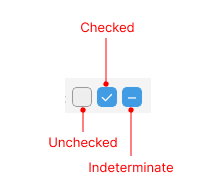
The CheckBox enables you to define its state as `Checked`, `Unchecked`, or `Indeterminate`.
The following image shows the states of the CheckBox control:
The state is controlled through the `IsChecked`(`bool?`) property. You can set all states either through the UI or programmatically. The `Indeterminate` state can be applied through the UI only for three-state checkboxes. `IsChecked` property binding mode is `TwoWay`.
* `Checked` state—When `IsChecked` is `true`.
* (Default) `Unchecked` state—When `IsChecked` is `false`.
* `Indeterminate` state—When `IsChecked` is `null`.
* `IsThreeState` (`bool`)—Defines whether you can apply the indeterminate state through the UI. When `IsThreeState` is `true`, it allows the end user to go to the indeterminate state along with the `Checked` and `Unchecked` states. By default, `IsThreeState` is `false`.
The following example demonstrates how to set the `IsChecked` property.
Define the checked state of the CheckBox.
```XAML
```
Set the ViewModel.
```C#
public class ViewModel : NotifyPropertyChangedBase
{
private bool? isChecked;
public bool? IsChecked
{
get { return this.isChecked; }
set
{
if (this.isChecked != value)
{
this.isChecked = value;
OnPropertyChanged();
}
}
}
}
```
## Events
* `IsCheckedChanging`—Raised when the `RadCheckBox.IsChecked` property is about to be changed. The `IsCheckedChanging` event handler receives two parameters:
* The `Sender` which is of type `Telerik.Maui.Controls.RadCheckBox`.
* The `IsCheckedChangingEventArgs`, which provides the following properties:
* `OldValue`(`bool?`)—Gets the current checked state value before the change.
* `NewValue`(`bool?`)—Gets the new checked state value that will be applied if the event is not canceled.
* `Cancel`(`bool`)—If `true`, the change of the `IsChecked` property is canceled.
* `IsCheckedChanged`—Occurs when the `RadCheckBox.IsChecked` property is changed. The `IsCheckedChanged` event handler receives two parameters:
* The `Sender` which is of type `Telerik.Maui.Controls.RadCheckBox`.
* and `IsCheckedChangedEventArgs`. The `IsCheckedChangedEventArgs` provides the following properties:
* `NewValue`(`bool?`)—Gets the new value from the CheckBox state.
* `OldValue`(`bool?`)—Gets the old value of the CheckBox state.
## Commands
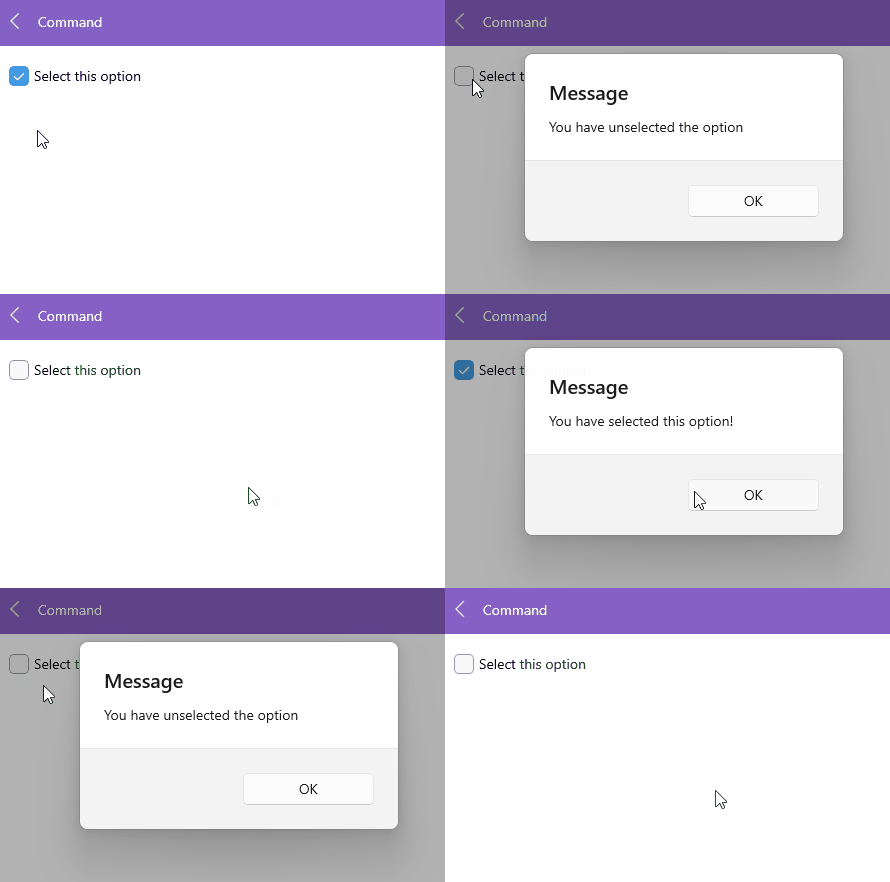
The Telerik .NET MAUI CheckBox allows you to attach a command that executes when the `IsChecked` property changes.
* `Command` (`ICommand`)—Defines the command, which executes when the `IsChecked` property of the checkbox changes. Use `CommandParameter` to pass a parameter to the command execute method.
Here is an example with the `CheckBox.Command`
**1.** Define the CheckBox in XAML:
```XAML
```
**2.** Define the ViewModel:
```C#
public class ViewModel
{
public ViewModel()
{
this.MyCheckBoxCommand = new Command(this.CommandExecute, this.CommandCanExecute);
}
public ICommand MyCheckBoxCommand { get; set; }
private bool CommandCanExecute(object p)
{
return true;
}
private void CommandExecute(object p)
{
var context = (bool)p;
if (context == true)
{
Application.Current.Windows[0].Page.DisplayAlert("Message", "You have selected this option!", "OK");
}
else
{
Application.Current.Windows[0].Page.DisplayAlert("Message", "You have unselected the option", "OK");
}
}
}
```
Here is the result:
## See Also
* [Styling Options of the Checkbox](https://www.telerik.com/maui-ui/documentation/controls/checkbox/styling)