# .NET MAUI Chat Commands
The Telerik UI for .NET MAUI Chat allows you to attach commands that will be executed when certain actions occur.
## Commands Related to the Chat Input Area:
* `SendMessageCommand` (`ICommand`)—Defines the command that is executed when the send button is clicked or the `Enter` key is pressed.
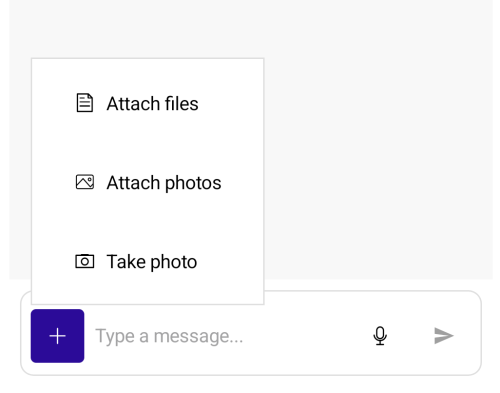
* `PickFileCommand` (`ICommand`)—Defines the command that opens the Microsoft.Maui.Storage.FilePicker for attaching files for upload.
* `PickPhotoCommand` (`ICommand`)—Defines the command that opens the Microsoft.Maui.Media.MediaPicker for attaching photos for upload.
* `TakePhotoCommand` (`ICommand`)—Defines the command that opens the camera for attaching a photo.
> tip When working with attachments, you need to grant permissions to access the device camera and device external storage. For more details, review the [Microsoft Media Picker](https://learn.microsoft.com/en-us/dotnet/maui/platform-integration/device-media/picker?view=net-maui-10.0\&tabs=android) article.
## Commands Related to Attachments
* `AttachFilesCommand` (`ICommand`)—Defines the command that is executed when the files the end-user picked need to be attached/uploaded. The command need to be implemented in order to attach files to the messages.
* `DownloadAttachmentsCommand` (`ICommand`)—Defines the command that is executed when the end user initiates download of attachments for a `Telerik.Maui.Controls.Chat.ChatAttachmentsMessage`. The command parameter of this command is of type `Telerik.Maui.Controls.Chat.ChatDownloadAttachmentsCommandContext.`
* `ShareAttachmentsCommand` (`ICommand`)—Defines the command that triggers the share attachments operation.
* `RemoveAttachedFileCommand` (`ICommand`)—Defines the command that should remove an attached file from the `Telerik.Maui.Controls.RadChat.AttachedFilesSource` collection in the view model.
## Example with SendMessageCommand
Here is an example on how to define a command in the ViewModel and bind the `SendMessageCommand` to it:
1. Add the command's `Execute` method.
```C#
private void NewMessageCommandExecute(object obj)
{
var newMessage = (string)obj;
//any additional logic you need to implement
this.MessagesLog.Add(new LogItem() { Message = "You just added a new message with text " + newMessage });
}
```
2. Define the `RadChat` component:
```XAML
```
3. Add the ViewModel:
```C#
public ViewModel()
{
this.Items = new ObservableCollection();
this.NewMessageCommand = new Command(NewMessageCommandExecute);
this.MessagesLog = new ObservableCollection();
}
public ObservableCollection MessagesLog { get; set; }
public ICommand NewMessageCommand { get; set; }
public IList Items { get; set; }
```
## Example with AttachFilesCommand
1. Define the `RadChat` component:
```XAML
```
2. Add the `ViewModel` with the `AttachFilesCommand` definition:
```C#
public class ChatWithAttachmentsViewModel : NotifyPropertyChangedBase
{
private int attachmentsCount;
private ObservableCollection attachedFiles;
private Command sendMessageCommand;
private object message;
public ChatWithAttachmentsViewModel()
{
this.Me = "human";
this.Bot = "bot";
this.Items = new ObservableCollection();
this.sendMessageCommand = new Command(this.ExecuteSendMessageCommand, this.CanExecuteSendMessageCommand);
this.AttachedFiles = new ObservableCollection();
this.AttachFilesCommand = new Command(this.AttachFiles);
this.LoadDataFromService();
}
public object Me { get; }
public object Bot { get; }
public object Message
{
get => this.message;
set => this.UpdateValue(ref this.message, value);
}
public IList Items { get; set; }
public ICommand AttachFilesCommand { get; }
public ICommand SendMessageCommand { get => this.sendMessageCommand; }
public ObservableCollection AttachedFiles
{
get => this.attachedFiles;
set => this.UpdateValue(ref this.attachedFiles, value, this.OnAttachedFilesChanged);
}
private async void LoadDataFromService()
{
await DataFileService.Init();
List files = DataFileService.predefinedFiles;
this.Items.Add(new AttachmentsItem { Author = this.Bot, Text = "Review this document and sign it, please", Attachments = this.GetAttachments(1) });
this.Items.Add(new AttachmentsItem { Author = this.Bot, Text = "Check out these files and apply the needed changes.", Attachments = this.GetAttachments(2) });
this.Items.Add(new AttachmentsItem { Author = this.Bot, Text = "I am sending the song audio and the video. Please let me know what you think", Attachments = this.GetAttachments(2) });
this.Items.Add(new AttachmentsItem { Author = this.Me, Text = "Document signed!", Attachments = this.GetAttachments(1) });
this.Items.Add(new AttachmentsItem { Author = this.Me, Text = "The files are added to the archive", Attachments = this.GetAttachments(1) });
this.Items.Add(new AttachmentsItem { Author = this.Me, Text = "The song is really good, and the video is awesome. Congrats!", Attachments = this.GetAttachments(0) });
}
private void OnAttachedFilesChanged(ObservableCollection oldValue)
{
if (oldValue != null)
{
oldValue.CollectionChanged -= this.AttachedFiles_CollectionChanged;
}
if (this.attachedFiles != null)
{
this.attachedFiles.CollectionChanged += this.AttachedFiles_CollectionChanged;
}
this.sendMessageCommand.ChangeCanExecute();
}
private async void AttachedFiles_CollectionChanged(object sender, NotifyCollectionChangedEventArgs args)
{
this.sendMessageCommand.ChangeCanExecute();
if (args.Action == NotifyCollectionChangedAction.Add)
{
// We want to start the upload process for the newly added file.
foreach (AttachedFileData attachedFileData in args.NewItems)
{
await this.TryUploadFile(attachedFileData);
}
}
else if (args.Action == NotifyCollectionChangedAction.Remove)
{
// User decided to not send the file, so delete it from the server.
foreach (AttachedFileData attachedFileData in args.OldItems)
{
this.TryDeleteFile(attachedFileData);
}
}
this.sendMessageCommand.ChangeCanExecute();
}
private async Task TryUploadFile(AttachedFileData attachedFileData)
{
if (!this.AttachedFiles.Contains(attachedFileData))
{
// The item was removed before we had a chance to upload it.
return;
}
using (Stream stream = await attachedFileData.GetStream())
{
Guid guid = await DataFileService.UploadFile(stream);
if (!this.AttachedFiles.Contains(attachedFileData))
{
// The item was removed while upload was running.
DataFileService.DeleteFile(guid);
return;
}
else if (guid != Guid.Empty)
{
attachedFileData.Guid = guid;
}
}
}
private void TryDeleteFile(AttachedFileData attachedFileData)
{
DataFileService.DeleteFile(attachedFileData.Guid);
}
private void AttachFiles(object commandParameter)
{
IList filesToAttach = (IList)commandParameter;
foreach (AttachedFileData attachedFileData in filesToAttach)
{
this.AttachedFiles.Add(attachedFileData);
}
// Instruct the RadChat to not attempt to auto add files.
filesToAttach.Clear();
}
private ObservableCollection GetAttachments(int count)
{
ObservableCollection list = new ObservableCollection();
for (int i = 0; i < count; i++)
{
PredefinedFile file = DataFileService.predefinedFiles[this.attachmentsCount % DataFileService.predefinedFiles.Count];
AttachmentData attachmentsData = new AttachmentData { Name = file.fileName, Size = file.fileSize, Guid = file.guid, };
list.Add(attachmentsData);
this.attachmentsCount++;
}
return list;
}
private static AttachmentData CreateAttachmentData(AttachedFileData attachedFile)
{
return new AttachmentData { Name = attachedFile.Name, Size = attachedFile.Size, Guid = attachedFile.Guid, };
}
private bool CanExecuteSendMessageCommand(object arg)
{
string myMessageString = this.message as string;
if (string.IsNullOrWhiteSpace(myMessageString))
{
return true;
}
if (this.AttachedFiles.Any(file => file.Guid == Guid.Empty))
{
return false;
}
return true;
}
private void ExecuteSendMessageCommand(object obj)
{
string myMessageString = this.message as string;
this.Message = string.Empty;
ObservableCollection attachedFiles = this.AttachedFiles;
if (attachedFiles.Count != 0)
{
// Create a new collection without deleting the uploaded files.
this.AttachedFiles = new ObservableCollection();
ObservableCollection attachments = new ObservableCollection(attachedFiles.Select(CreateAttachmentData));
AttachmentsItem attachmentsMessage = new AttachmentsItem { Author = this.Me, Text = myMessageString, Attachments = attachments };
this.Items.Add(attachmentsMessage);
}
else
{
MessageItem message = new MessageItem { Author = this.Me, Text = myMessageString, };
this.Items.Add(message);
}
}
}
```
3. Create a sample `MessageItem` model:
```C#
public class MessageItem : NotifyPropertyChangedBase
{
private object author;
private string text;
public object Author
{
get => this.author;
set => this.UpdateValue(ref this.author, value);
}
public string Text
{
get => this.text;
set => this.UpdateValue(ref this.text, value);
}
}
```
4. Create `AttachmentsItem` class and define the attachments collection property:
```C#
public class AttachmentsItem : MessageItem
{
private ObservableCollection attachments;
public ObservableCollection Attachments
{
get => this.attachments;
set => this.UpdateValue(ref this.attachments, value);
}
}
```
5. Define an `AttachmentData` class to hold the attachment information:
```C#
public class AttachmentData : NotifyPropertyChangedBase
{
private string name;
private long size;
private Guid guid;
public string Name
{
get => this.name;
set => this.UpdateValue(ref this.name, value);
}
public long Size
{
get => this.size;
set => this.UpdateValue(ref this.size, value);
}
public Guid Guid
{
get => this.guid;
set => this.UpdateValue(ref this.guid, value);
}
}
```
6. Define the custom class for the attachments file data:
```C#
public class AttachedFileData : NotifyPropertyChangedBase
{
private string name;
private long size;
private Func> getStream;
private Guid guid;
public string Name
{
get => this.name;
set => this.UpdateValue(ref this.name, value);
}
public long Size
{
get => this.size;
set => this.UpdateValue(ref this.size, value);
}
public Guid Guid
{
get => this.guid;
set => this.UpdateValue(ref this.guid, value);
}
public Func> GetStream
{
get => this.getStream;
set => this.UpdateValue(ref this.getStream, value);
}
}
```
7. Define a converter to convert a data item to a chat attachment. In general here you need to create and set up the corresponding `Telerik.Maui.Controls.Chat.ChatAttachedFile` for the given business object:
```C#
public class AttachedFileConverter : IChatAttachedFileConverter
{
private static AttachedFileConverter instance;
public static AttachedFileConverter Instance => instance ??= new AttachedFileConverter();
public ChatAttachedFile ConvertToChatAttachedFile(object dataItem, ChatAttachedFileConverterContext context)
{
AttachedFileData data = (AttachedFileData)dataItem;
ChatAttachedFile chatAttachedFile = new ChatAttachedFile { Data = data, FileName = data.Name, FileSize = data.Size };
return chatAttachedFile;
}
public object ConvertToDataItem(IFileInfo fileToAttach, ChatAttachedFileConverterContext context)
{
return CreateAttachedFileData(fileToAttach);
}
internal static AttachedFileData CreateAttachedFileData(IFileInfo file)
{
return new AttachedFileData { Name = file.FileName, Size = file.FileSize, GetStream = file.OpenReadAsync, };
}
}
```
8. Define a custom converter that converts from chat specific objects to business objects, so that the `ViewModel` does not have to handle chat specific classes:
```C#
///
/// A custom converter that converts from chat specific objects to business objects,
/// so that the ViewModel does not have to handle chat specific classes.
///
public class AttachFilesCommandConverter : IValueConverter
{
private static AttachFilesCommandConverter instance;
public static AttachFilesCommandConverter Instance => instance ??= new AttachFilesCommandConverter();
public object Convert(object value, Type targetType, object parameter, CultureInfo culture)
{
if (value is ICommand command)
{
return new AttachFilesCommand(command);
}
else
{
return value;
}
}
public object ConvertBack(object value, Type targetType, object parameter, CultureInfo culture) => throw new NotImplementedException();
class AttachFilesCommand : ICommand
{
private ICommand command;
public AttachFilesCommand(ICommand command)
{
this.command = command;
this.command.CanExecuteChanged += (s, e) => this.CanExecuteChanged?.Invoke(this, e);
}
public event EventHandler CanExecuteChanged;
public bool CanExecute(object parameter)
{
if (parameter is IList filesToAttach)
{
List attachedFileDatas = ToAttachedFileDatas(filesToAttach);
return this.command.CanExecute(attachedFileDatas);
}
else
{
return false;
}
}
public void Execute(object parameter)
{
if (parameter is IList filesToAttach)
{
List attachedFileDatas = ToAttachedFileDatas(filesToAttach);
this.command.Execute(attachedFileDatas);
if (attachedFileDatas.Count == 0)
{
// Instruct the RadChat to not attempt to auto add files.
filesToAttach.Clear();
}
}
else
{
throw new InvalidOperationException($"The command parameter must be of type {nameof(IList)}.");
}
}
private static List ToAttachedFileDatas(IList filesToAttach)
{
return new List(filesToAttach.Select(AttachedFileConverter.CreateAttachedFileData));
}
}
}
```
9. The `ItemConverter` is need in MVVM scenario as custom items are used:
```C#
public class ItemConverter : IChatItemConverter
{
private static ItemConverter instance;
public static ItemConverter Instance => instance ??= new ItemConverter();
private Dictionary authorDict;
public ItemConverter()
{
this.authorDict = new Dictionary();
}
public ChatItem ConvertToChatItem(object dataItem, ChatItemConverterContext context)
{
MessageItem message = (MessageItem)dataItem;
ChatMessage chatMessage;
if (message is AttachmentsItem attachmentsItem)
{
List chatAttachments = attachmentsItem.Attachments.Select(CreateChatAttachment).ToList();
chatMessage = new ChatAttachmentsMessage { Attachments = chatAttachments };
chatMessage.SetBinding(ChatAttachmentsMessage.TextProperty, new Binding(nameof(MessageItem.Text)) { Source = message });
}
else
{
chatMessage = new TextMessage();
chatMessage.SetBinding(TextMessage.TextProperty, new Binding(nameof(MessageItem.Text)) { Source = message });
}
chatMessage.Data = message;
chatMessage.Author = GetOrCreateAuthor(message.Author, context);
return chatMessage;
}
public object ConvertToDataItem(object message, ChatItemConverterContext context)
{
// We add a new message into the messages in the view model when the SendMessageCommand is executed, so no need to create a new data item here.
return null;
}
private static ChatAttachment CreateChatAttachment(AttachmentData attachment)
{
ChatAttachment chatAttachment = new ChatAttachment { Data = attachment, FileName = attachment.Name, FileSize = attachment.Size };
chatAttachment.GetFileStream = () => GetFileStreamTask(attachment);
return chatAttachment;
}
private static async Task GetFileStreamTask(AttachmentData attachment)
{
if (attachment.Guid != Guid.Empty)
{
Stream stream = await DataFileService.OpenFileStream(attachment.Guid);
return stream;
}
else
{
return null;
}
}
private Author GetOrCreateAuthor(object authorData, ChatItemConverterContext context)
{
Author author;
if (!this.authorDict.TryGetValue(authorData, out author))
{
ChatWithAttachmentsViewModel vm = (ChatWithAttachmentsViewModel)context.Chat.BindingContext;
if (object.Equals(vm.Me, authorData))
{
author = context.Chat.Author;
}
else
{
author = new Author();
author.Data = authorData;
author.Name = "" + authorData;
author.Avatar = string.Format("{0}.png", authorData);
}
this.authorDict[authorData] = author;
}
return author;
}
}
```
10. The demo uses a custom data file server for uploading, downloading and deleting attachments:
```C#
public static class DataFileService
{
internal static List predefinedFiles;
private static readonly Dictionary files = new Dictionary();
internal static async Task Init()
{
if (predefinedFiles != null)
{
return;
}
List list = new List();
List fileNames = new List
{
"PdfDocument.pdf",
"Presentation.pptx",
"Accounting.xlsx",
"Audio.mp3",
"Video.mp4",
"PdfDocument-Signed.pdf",
"Archive.zip",
"TextFile.txt",
};
foreach (string fileName in fileNames)
{
using (MemoryStream stream = new MemoryStream(Encoding.UTF8.GetBytes($"this is fake content for file {fileName}")))
{
Guid guid = await UploadFile(stream);
list.Add(new PredefinedFile { fileName = fileName, fileSize = stream.Length, guid = guid, });
}
}
predefinedFiles = list;
}
public static async Task UploadFile(Stream stream)
{
await Task.Yield();
MemoryStream streamCopy = new MemoryStream();
stream.CopyTo(streamCopy);
ServerFile file = new ServerFile { stream = streamCopy };
lock (files)
{
Guid guid = Guid.NewGuid();
files[guid] = file;
return guid;
}
}
public static void DeleteFile(Guid guid)
{
ServerFile file;
lock (files)
{
if (!files.ContainsKey(guid))
{
return;
}
file = files[guid];
files.Remove(guid);
}
_ = Task.Run(() =>
{
lock (file)
{
file.stream.Dispose();
file.isDisposed = true;
}
});
}
public static async Task OpenFileStream(Guid guid)
{
await Task.Yield();
ServerFile file;
lock (files)
{
file = files[guid];
}
MemoryStream streamCopy = new MemoryStream();
lock (file)
{
if (file.isDisposed)
{
throw new ObjectDisposedException("The file has been deleted from the server.");
}
file.stream.Position = 0;
file.stream.CopyTo(streamCopy);
streamCopy.Position = 0;
}
return streamCopy;
}
class ServerFile
{
internal MemoryStream stream;
internal bool isDisposed;
}
internal class PredefinedFile
{
internal string fileName;
internal long fileSize;
internal Guid guid;
}
}
```
## See Also
* [MVVM Support](https://www.telerik.com/maui-ui/documentation/controls/chat/mvvm-support)
* [Chat Items](https://www.telerik.com/maui-ui/documentation/controls/chat/items/overview)