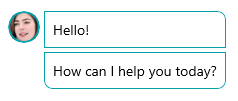
# .NET MAUI Border Corner Radius

Telerik UI for .NET MAUI Border enables you to set a different corner radius to its angles through the `CornerRadius` property.

The `CornerRadius` property represents the degree to which the corners of the Border are rounded. `CornerRadius` is of the `Microsoft.Maui.Thickness` type.

```XAML
<telerik:RadBorder BorderColor="#04A2AA"
                   CornerRadius="0, 8, 0, 0"
                   BorderThickness="1">
    <Label Text="Hello!" Margin="8" />
</telerik:RadBorder>
<telerik:RadBorder BorderColor="#04A2AA"
                   CornerRadius="0, 0, 8, 8"
                   BorderThickness="1">
    <Label Text="How can I help you today?" Margin="8" />
</telerik:RadBorder>
```

The following image shows the result from that implementation.
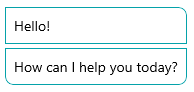
![Telerik UI for .NET MAUI Border with rounded top-right and bottom-left and right corners around message content](https://www.telerik.com/maui-ui/documentation/assets/920c971a8be367f707ef871552202b43/border_corner_radius.png)

Additionally, the wrapped content will be clipped according to the specified corner radius of each side.

The example below demonstrates how to render a circle image by wrapping an Image control in a Border.

Let's use the following Image:

![Portrait photo used as the image content inside a Telerik UI for .NET MAUI Border](https://www.telerik.com/maui-ui/documentation/assets/00c69139b4c52bb11b5e95d0d97c9494/person_01.png)

```XAML
<telerik:RadBorder BorderColor="#04A2AA"
                   CornerRadius="16"
                   WidthRequest="32"
                   HeightRequest="32"
                   BorderThickness="2"
                   VerticalOptions="Start">
    <Image Source="person_01.png"
           WidthRequest="32"
           HeightRequest="32" />
</telerik:RadBorder>
```

Here is the result:

![Telerik UI for .NET MAUI Border clipping a portrait image into a circular shape](https://www.telerik.com/maui-ui/documentation/assets/a4b2e9d52032421c77056cb133db7795/border_corner_radius_clipped.png)

## See Also

* [Setting the Color of the Border](https://www.telerik.com/maui-ui/documentation/controls/border/styling)
* [Setting the Border Thickness](https://www.telerik.com/maui-ui/documentation/controls/border/styling)