# TabView Styling

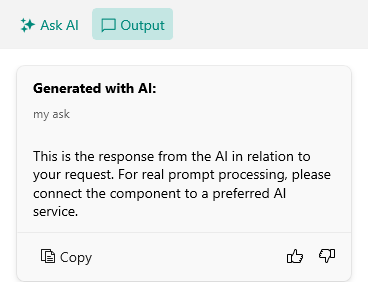
The AIPrompt control displays the available views (Input, Output, Commands) in a TabView. You can modify the visual appearance of the TabView and each TabView header through the `TabViewStyle` property of the control.

The following example demonstrates how to modify the visual states of the TabView headers through the `TabViewStyle` property:

**1.** Add a `Style` property with `TargetType` set to `RadTabView` to the page's resources:

```XAML
<Style x:Key="MyHeaderItemStyle" TargetType="telerik:TabViewHeaderItem">
    <Setter Property="TextColor" Value="#00897B" />
    <Setter Property="VisualStateManager.VisualStateGroups">
        <VisualStateGroupList>
            <VisualStateGroup Name="CommonStates">
                <VisualState Name="Normal" />
                <VisualState Name="PointerOver">
                    <VisualState.Setters>
                        <Setter Property="telerik:TabViewHeaderItem.BackgroundColor" Value="#D6EEEC" />
                    </VisualState.Setters>
                </VisualState>
                <VisualState Name="Selected">
                    <VisualState.Setters>
                        <Setter Property="telerik:TabViewHeaderItem.BackgroundColor" Value="#C4E6E3" />
                    </VisualState.Setters>
                </VisualState>
                <VisualState Name="Disabled">
                    <VisualState.Setters>
                        <Setter Property="telerik:TabViewHeaderItem.TextColor" Value="#6100897B" />
                    </VisualState.Setters>
                </VisualState>
            </VisualStateGroup>
        </VisualStateGroupList>
    </Setter>
</Style>
<Style x:Key="MyTabViewStyle" TargetType="telerik:RadTabView">
    <Setter Property="HeaderItemStyle" Value="{StaticResource MyHeaderItemStyle}" />
</Style>
```

**2.** Add the `RadAIPrompt` control with `TabViewStyle` applied:

```XAML
<telerik:RadAIPrompt x:Name="aiPrompt"
                     InputText="{Binding InputText}"
                     PromptRequestCommand="{Binding PromptRequestCommand}"
                     OutputItems="{Binding OutputItems}"
                     TabViewStyle="{StaticResource MyTabViewStyle}" />
```

Here is the result after applying the `TabViewStyle`:
![Telerik UI for .NET MAUI AIPrompt TabView with styled Input and Output header items, and selected output item](https://www.telerik.com/maui-ui/documentation/assets/2eab3bb69193aa04c722bfc9970ccc47/aiprompt-tabview-styling.png)

## See Also

* [Views](https://www.telerik.com/maui-ui/documentation/controls/aiprompt/views/overview)
