# Suggestions Styling
The Input View of the AIPrompt control allows you to define suggestions for the user prior to initiating a request through the `Suggestions` property. You can modify the visual appearance of each suggestion with the `SuggestionStyle` property:
* `SuggestionStyle` (`Style`)—Defines the style that is to be applied to the suggestions inside the Input View.
* `SuggestionsExpanderStyle` (`Style` with target type `RadExpander`)—Defines the style that is to be applied to the expander wrapping the suggestions.
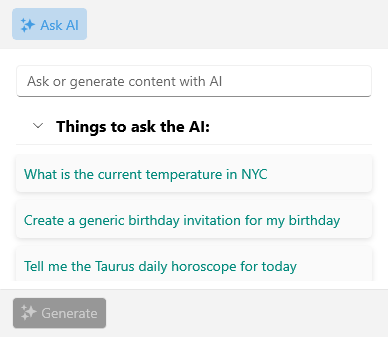
The following example demonstrates how to modify the suggestions' appearance:
**1.** Add a `Style` property with `TargetType` set to `AIPromptInputSuggestionView` to the page's resources:
```XAML
```
**2.** Add the `RadAIPrompt` control with `SuggestionStyle` applied:
```XAML
```
Here is the result after applying the `SuggestionStyle`:
## See Also
* [Suggestions](https://www.telerik.com/maui-ui/documentation/controls/aiprompt/suggestions)
* [Views](https://www.telerik.com/maui-ui/documentation/controls/aiprompt/views/overview)
* [Input View](https://www.telerik.com/maui-ui/documentation/controls/aiprompt/views/input-view)