# TypeScript
Kendo UI provides a [TypeScript](http://www.typescriptlang.org/) definitions file which enables strongly-typed access to the Kendo UI components and their configuration.
## Getting Started
You can install TypeScript either by using the redistributable package or NPM.
### Using the Redistributable Package
Each Kendo UI distribution includes a `typescript` directory which contains a `.d.ts` file, i.e. `kendo.all.d.ts`. Copy this file to your project and in your TypeScript file add a reference to it as demonstrated below:
```
///
```
You can optionally include the latest jQuery TypeScript definition file as well.
```
///
///
```
### Using NPM
When you install Kendo UI for jQuery through NPM, the package already includes all TypeScript definition files. No additional installation is required. After running:
```
npm install --save @progress/kendo-ui
```
the TypeScript definitions (including all.d.ts) are available directly inside the installed NPM package.
## Features
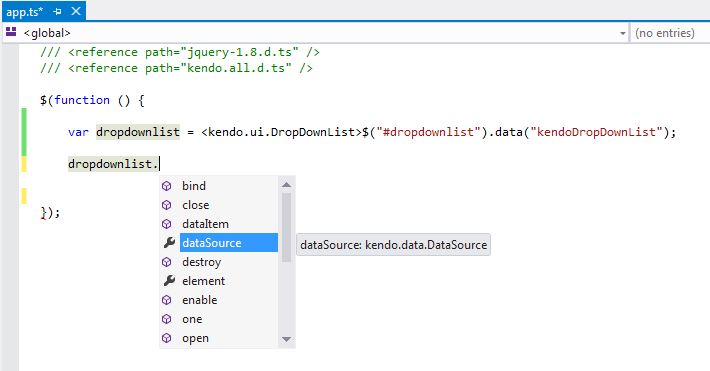
* Getting instances of existing components
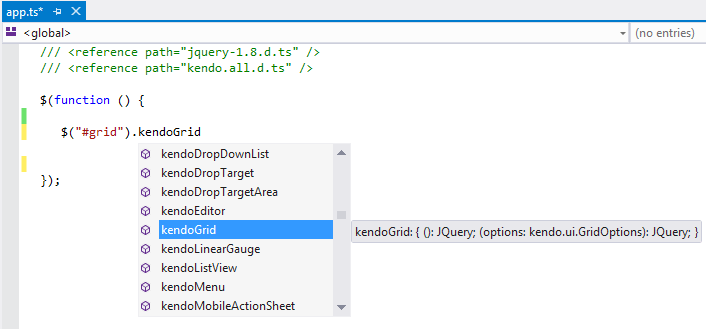
* Initializing and configuring components
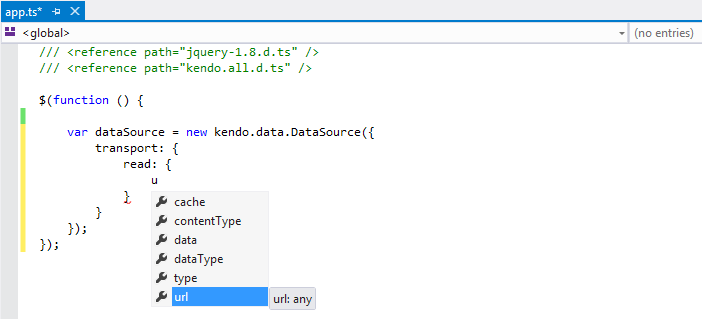
* Initializing the Kendo UI DataSource
* Creating components through TypeScript inheritance—The following example demonstrates how to inherit from an existing Kendo UI component.
```
///
///
module KendoWidgets {
// (Optional) Extend the default component options.
export interface MyDatePickerOptions extends kendo.ui.DatePickerOptions {
}
// Create a class which inherits from the Kendo UI component.
export class MyDatePicker extends kendo.ui.DatePicker {
constructor(element: Element, options?: MyDatePickerOptions) {
super(element, options);
}
// (Optional) Override a component method.
open() {
// Log to the console (optional).
console.log("open");
// Invoke a base component method.
super.open();
}
}
// Create an alias of the prototype (required by kendo.ui.plugin).
MyDatePicker.fn = MyDatePicker.prototype;
// Deep clone the component default options.
MyDatePicker.fn.options = $.extend(true, {}, kendo.ui.DatePicker.fn.options);
// Specify the name of your Kendo UI component. Used to create the corresponding jQuery plugin.
MyDatePicker.fn.options.name = "MyDatePicker";
// Create a jQuery plugin.
kendo.ui.plugin(MyDatePicker);
}
// Expose the newly created jQuery plugin to TypeScript.
interface JQuery {
kendoMyDatePicker(options?: kendo.ui.DatePickerOptions): JQuery;
}
$(function () {
// Initialize your custom component.
$("#datepicker").kendoMyDatePicker();
// Get a reference to the component instance.
var myDatePicker = $("#datepicker").data("kendoMyDatePicker");
// Call a component method.
myDatePicker.open();
});
```
* Using Kendo UI MVVM in TypeScript—When inheriting from `kendo.data.ObservableObject` in TypeScript you should call the `super.init` method to properly set up dependency tracking. The following example shows how to use Kendo UI MVVM in TypeScript.
```
///
///
class Person extends kendo.data.ObservableObject {
name = "John Doe";
constructor() {
super();
super.init(this);
}
}
class ViewModel extends kendo.data.ObservableObject {
person = new Person();
constructor() {
super();
super.init(this);
}
}
$(function () {
var viewModel = new ViewModel();
kendo.bind(document.body, viewModel);
viewModel.set("person.name", "Jane Doe");
});
```
## See Also
* [MVVM Pattern Overview](https://www.telerik.com/kendo-jquery-ui/documentation/framework/mvvm/overview)
* [Installing with NPM](https://www.telerik.com/kendo-jquery-ui/documentation/intro/installation/npm)