# Filtering
The PivotGridV2 supports filtering both in the OLAP and flat data-binding scenarios.
The PivotGridV2 uses [`kendo.data.PivotDataSourceV2`](https://www.telerik.com/kendo-jquery-ui/documentation/api/data/pivotdatasourcev2) to perform `label` filtration. However, it filters only by the caption value of the members.
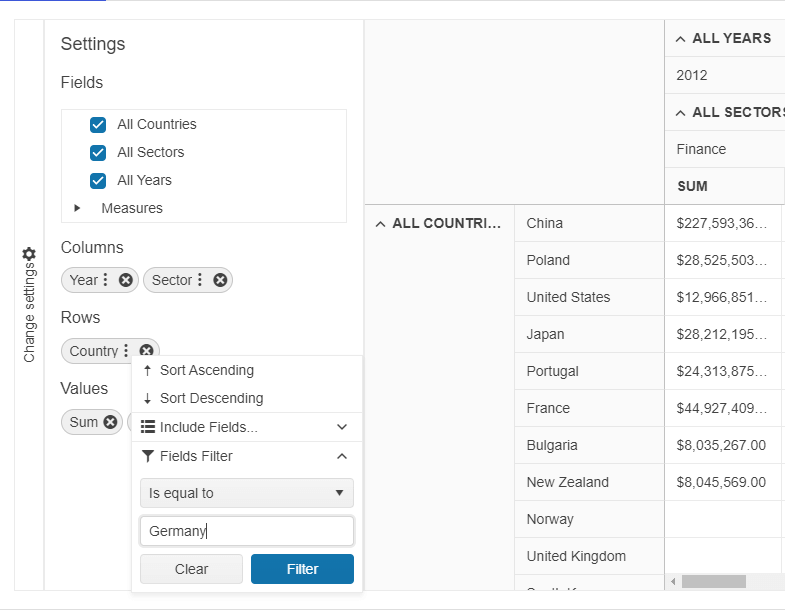
The following image from the [Local Binding](https://demos.telerik.com/kendo-ui/pivotgridv2/local-flat-data-binding) demo demonstrates how end-users can apply a filter.
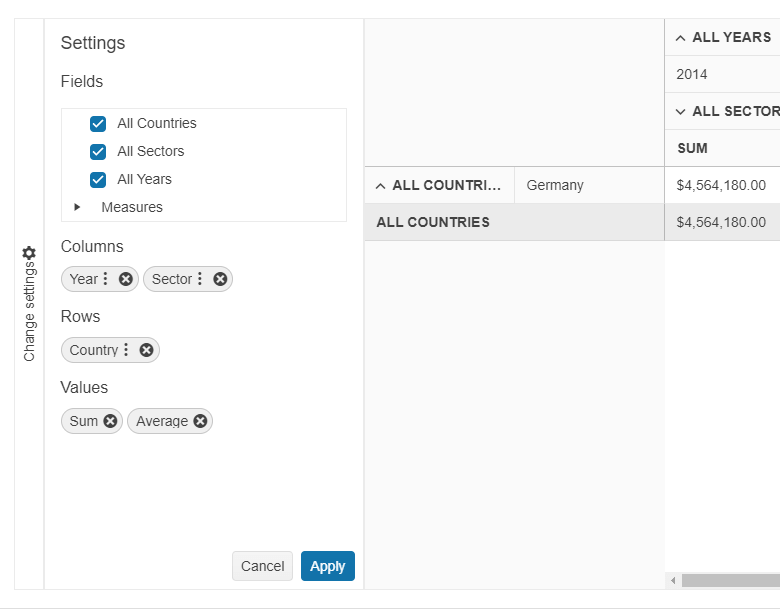
The next image demonstrates the result when the end-user applies a filter to the **Country** row.
## Enabling Filtering
To enable the filtering functionality, set the [`filterable`](https://www.telerik.com/kendo-jquery-ui/documentation/api/ui/pivotconfiguratorv2/configuration/filterable) configuration of the PivotConfiguratorV2 to `true`.
```javascript
$("#configurator").kendoPivotConfiguratorV2({
filterable: true,
// ... other configurations
});
```
## Filter Object Structure
The filter descriptor is similar to [the filter option of the `kendo.data.DataSource`](https://www.telerik.com/kendo-jquery-ui/documentation/api/data/datasource/configuration/filter) and contains the following options:
* `field`—The full path to the tuple member. For example, `[Date].[Calendar].[Calendar Year].&[2005]`.
* `operator`—All operators that work with strings. Note that the component treats field values as strings.
* `value`—The filter value.
### Filtering when using Xmla DataSource
To set a predefined filter when using Xmla data use the above-described approach and set the filter configuration of the dataSource, following the [guidelines for MDX queries](https://learn.microsoft.com/en-us/analysis-services/multidimensional-models/mdx/mdx-query-fundamentals-analysis-services?view=asallproducts-allversions) and [Members, Tuples, and Sets](https://learn.microsoft.com/en-us/analysis-services/multidimensional-models/mdx/working-with-members-tuples-and-sets-mdx?view=asallproducts-allversions).
The example below demonstrates how to filter data only for cities starting with "M" for the years 2010 and 2013:
```dojo
```
### Filtering when using Flat Data
Build the filter descriptor similar to [the filter option of the `kendo.data.DataSource`](https://www.telerik.com/kendo-jquery-ui/documentation/api/data/datasource/configuration/filter).
For example, to filter a [PivotGridV2 bound to local data](https://demos.telerik.com/kendo-ui/pivotgridv2/local-flat-data-binding) for countries starting with "S" for the year 2022 you can provide a filter configuration as demonstrated below:
```
dataSource: {
data: revenue,
sort: { field: "Year", dir: "asc" },
schema: {
model: {
fields: {
Country: { type: "string" },
Revenue: { type: "number" },
Year: { type: "number" },
Sector: { type: "string" }
}
},
cube: {
dimensions: {
Country: { caption: "All Countries" },
Sector: { caption: "All Sectors" },
Year: { caption: "All Years" }
},
measures: {
"Sum": { field: "Revenue", format: "{0:c}", aggregate: "sum" },
"Average": { field: "Revenue", format: "{0:c}", aggregate: "average" }
}
}
},
columns: [{ name: "Year", expand: true }, { name: "Sector" } ],
rows: [{ name: "Country", expand: true }],
measures: ["Sum", "Average"],
filter:[{ field: "Country", operator: "startswith", value: "S" },
{ field: "Year", operator: "eq", value: 2022 }]
}
```
## See Also
* [Basic Usage of the PivotGridV2 (Demo)](https://demos.telerik.com/kendo-ui/pivotgridv2/index)
* [Binding the PivotGridV2 for flat local data (Demo)](https://demos.telerik.com/kendo-ui/pivotgridv2/local-flat-data-binding)
* [PivotGridV2 JavaScript API Reference](https://www.telerik.com/kendo-jquery-ui/documentation/api/ui/pivotgridv2)