# Group Templates
When grouping is applied, the group rows of the Grid organize data rows into a tree structure.
For runnable examples, refer to:
* [Demo on using the row template of the Grid](https://demos.telerik.com/kendo-ui/grid/rowtemplate)
* [Demo on using the detail-row template of the Grid](https://demos.telerik.com/kendo-ui/grid/detailtemplate)
* [Demo on using the toolbar template of the Grid](https://demos.telerik.com/kendo-ui/grid/toolbar-template)
Group rows display group summary values and contain expanding and collapsing group icons which enable users to expand (show the child rows) and collapse (hide the child rows) a group row. The Grid provides the following templates which you can use to customize the appearance of the group rows:
* [`GroupHeaderTemplate`](https://docs.telerik.com/kendo-ui/api/ui/grid/configuration/columns#columnsgroupheadertemplate)—Renders a template for the entire group row. Usually, the main aim is to display information about the entire group. By default, if you do not define a template, the name of the field and the current group value is displayed.
* (Available as of the R3 2018 release) [`GroupHeaderColumnTemplate`](https://docs.telerik.com/kendo-ui/api/ui/grid/configuration/columns#columnsgroupheadercolumntemplate)—Renders a template in the group row aligned to the column itself. Usually, it displays an aggregate value for a specific column in the context of the current group. The template content is visually displayed as aligned to the column itself.
* [`GroupFooterTemplate`](https://docs.telerik.com/kendo-ui/api/ui/grid/configuration/columns#columnsgroupfootertemplate)—Renders a template in the group footer row that is aligned to the column. Works in a similar way to the `groupHeaderColumnTemplate` for the group footer row.
If you do not define a template, the name of the field and the current group are displayed in the following way.
**Figure 1: A Grid with no group templates**
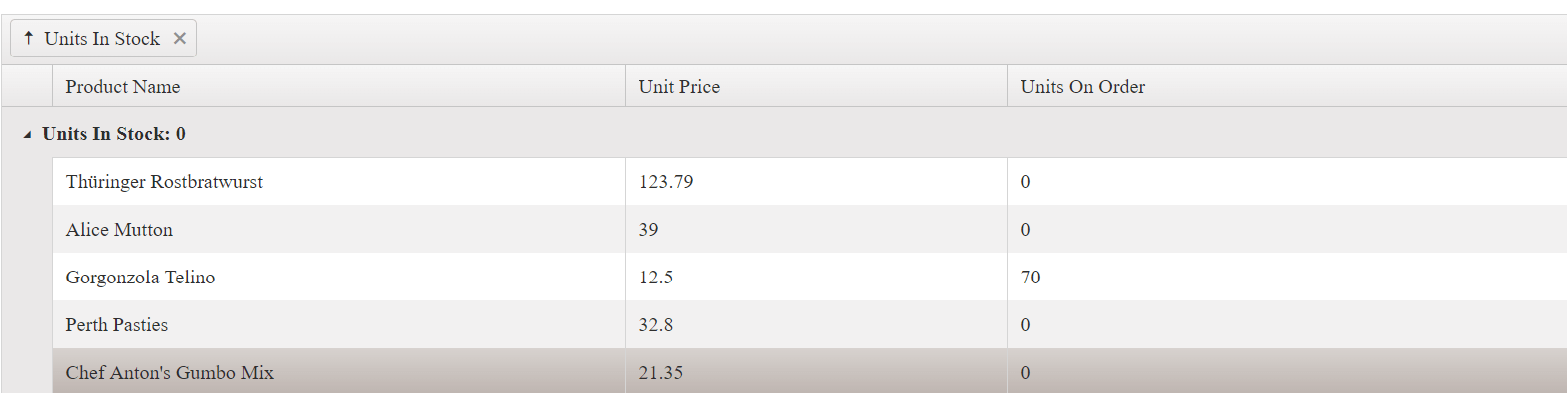
The only difference in the use of `GroupHeaderTemplate` is that the template content is compiled and displayed instead of the field and current group value. Both `GroupHeaderColumnTemplate` and `GroupFooterTemplate` work in a similar way. `GroupHeaderColumnTemplate` displays the content as aligned to the column in the group row. `GroupFooterTemplate` displays the content as aligned to the column in the group footer row. Their content is displayed as aligned to the column as shown in the following way.
**Figure 2: A Grid with defined group header and group footer templates**
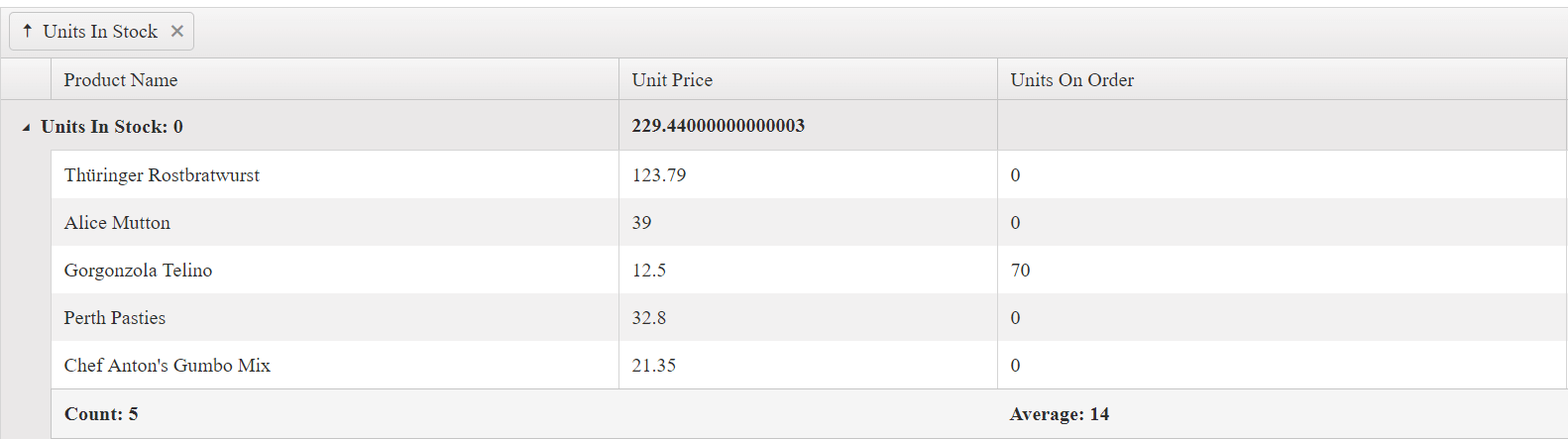
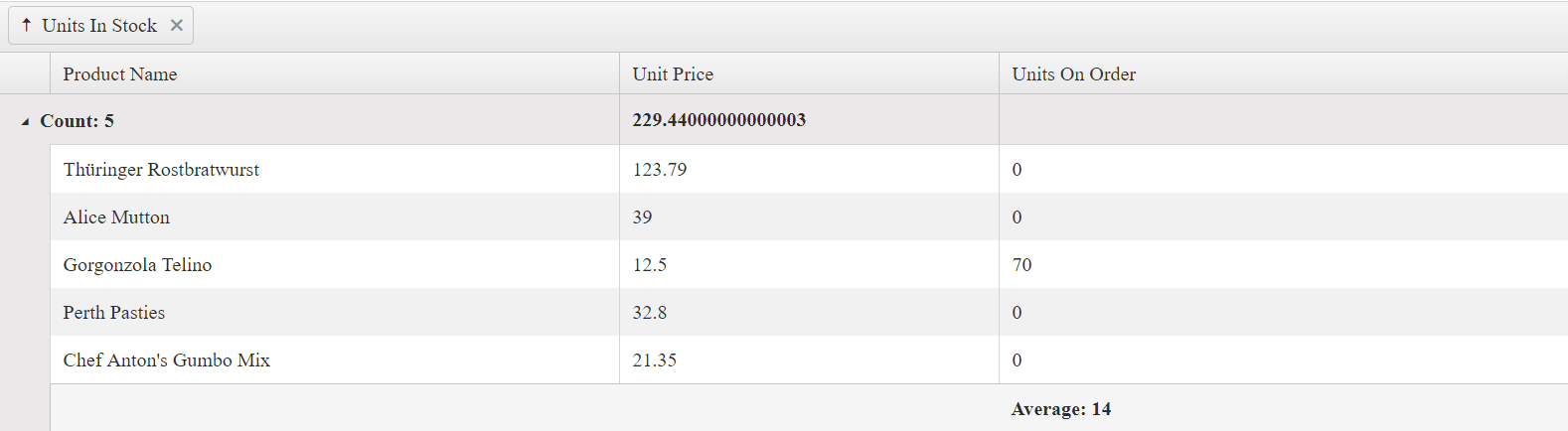
Because `GroupHeaderTemplate` is displayed next to the expanding icon of the group row, it takes precedence over the `GroupHeaderColumnTemplate` of the first visible column. To show the `GroupHeaderColumnTemplate` content for the first column of the Grid, do not set the `GroupHeaderTemplate` for the group column. The following Grid configuration demonstrates that commenting the `GroupHeaderTemplate` for the **Units In Stock** column shows the `GroupHeaderColumnTemplate` for the **Product Name** column.
```dojo
```
**Figure 3: A Grid with a group header template applied to the first column and no group header template defined**
## KB Articles on Templates
* [Editing Records in Child Grids](https://www.telerik.com/kendo-jquery-ui/documentation/knowledge-base/edit-master-row-data-in-detail-template)
* [Refreshing the Grid in the Detail Template](https://www.telerik.com/kendo-jquery-ui/documentation/knowledge-base/refresh-grid-in-detail-template)
* [Creating a Custom Editor in the Detail Template](https://www.telerik.com/kendo-jquery-ui/documentation/knowledge-base/detail-template-editor)
* [Find Out More in the Knowledge Base](https://www.telerik.com/kendo-jquery-ui/documentation/knowledge-base)
## See Also
* [Using Row Templates in the Grid (Demo)](https://demos.telerik.com/kendo-ui/grid/rowtemplate)
* [Using Detail-Row Templates in the Grid (Demo)](https://demos.telerik.com/kendo-ui/grid/detailtemplate)
* [Using Toolbar Templates in the Grid (Demo)](https://demos.telerik.com/kendo-ui/grid/toolbar-template)
* [JavaScript API Reference of the Grid](https://www.telerik.com/kendo-jquery-ui/documentation/api/ui/grid)