# Selection
The Calendar enables the user to make single, multiple, range-date, and week selections.
For a runnable example, refer to [the demo on multiple selection in the Calendar](https://demos.telerik.com/kendo-ui/calendar/selection).
## Single Date Selection
By default, the Calendar enables the user to select a single date by using the mouse or the keyboard.
## Multiple Date Selection
As of the 2017 R3 release, the Calendar allows you to implement the multiple date selection by using the [`selectable`](https://www.telerik.com/kendo-jquery-ui/documentation/api/ui/calendar/configuration/selectable) configuration property.
To perform the multiple date selection, the user can also use the keyboard:
* `Ctrl` + mouse-clicking a specific date—Marks the date as selected. Other previously selected dates remain selected.
* The selection of a date from a specific view without utilizing the `Ctrl` key selects the date of the clicked cell and deselects all previously selected dates including the previously selected dates from other views or months.
* The selection of a date that is already selected while holding the `Ctrl` key removes the date from the selection.
```dojo
```
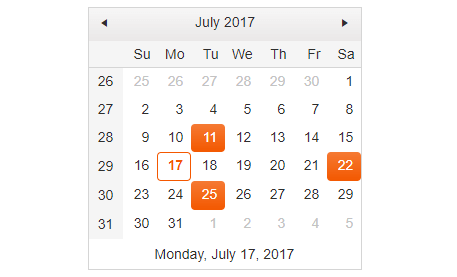
The following image demonstrates a Calendar with selected multiple dates.
## Range Date Selection
The Calendar provides range date selection with the keyboard. Starting with Kendo UI suite R2 2024, the component supports `range` selection through the [`selectable`](https://www.telerik.com/kendo-jquery-ui/documentation/api/ui/calendar/configuration/selectable) option.
The usage of the `Shift` key allows the user to select a range of dates in the same month or across different months when the [`selectable`](https://www.telerik.com/kendo-jquery-ui/documentation/api/ui/calendar/configuration/selectable) configuration is set to `multiple`:
* `Shift` + mouse-clicking specific dates—Selects all dates between the most recently selected one (with `Space` or mouse click) and the clicked cell.
* `Shift` + mouse clicking specific dates—If no previous selection was made, selects all dates from the beginning to the clicked cell.
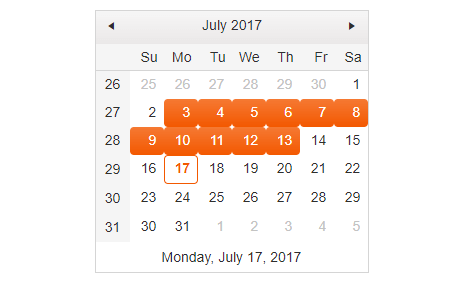
The following image demonstrates a Calendar with enabled date-range selection.
## Week Selection
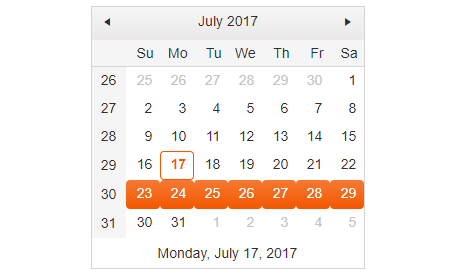
When the user clicks a specific week number, the Calendar selects the entire week. The week selection functionality is a special case of range selection which starts from the first day of the week and selects all dates to the end of the week.
The following image demonstrates a Calendar with enabled week selection.
## See Also
* [Multiple Selection by the Calendar (Demo)](https://demos.telerik.com/kendo-ui/calendar/selection)
* [JavaScript API Reference of the Calendar](https://www.telerik.com/kendo-jquery-ui/documentation/api/ui/calendar)