# Consuming Data from Google Cloud Big Query
This tutorial demonstrates how to create a table in [Google Cloud Big Query](https://cloud.google.com/bigquery/) and configure the Kendo UI Grid to retrieve, create, update, and destroy items in that table.
## Prerequisites
* [Google Cloud account](https://cloud.google.com/)
* Basic knowledge on using the [Cloud Console](https://cloud.google.com/cloud-console/)
## Client-Side Authorization and Access through OAuth 2.0
The Google APIs Client library for JavaScript handles the client-side authorization flow for storing and using OAuth 2.0 access and refresh tokens. When you authorize access to a Google API, you receive an access token for making calls to the API.
The Google API OAuth 2.0 access tokens last one hour. You can request and store a refresh token which will allow you to request a new access token when the previous access token expires. For more information on how to set up the authorization, refer to the article on [authorizing API requests](https://cloud.google.com/bigquery/docs/authorization).
To create OAuth 2.0 credentials and add authorized JavaScript origin:
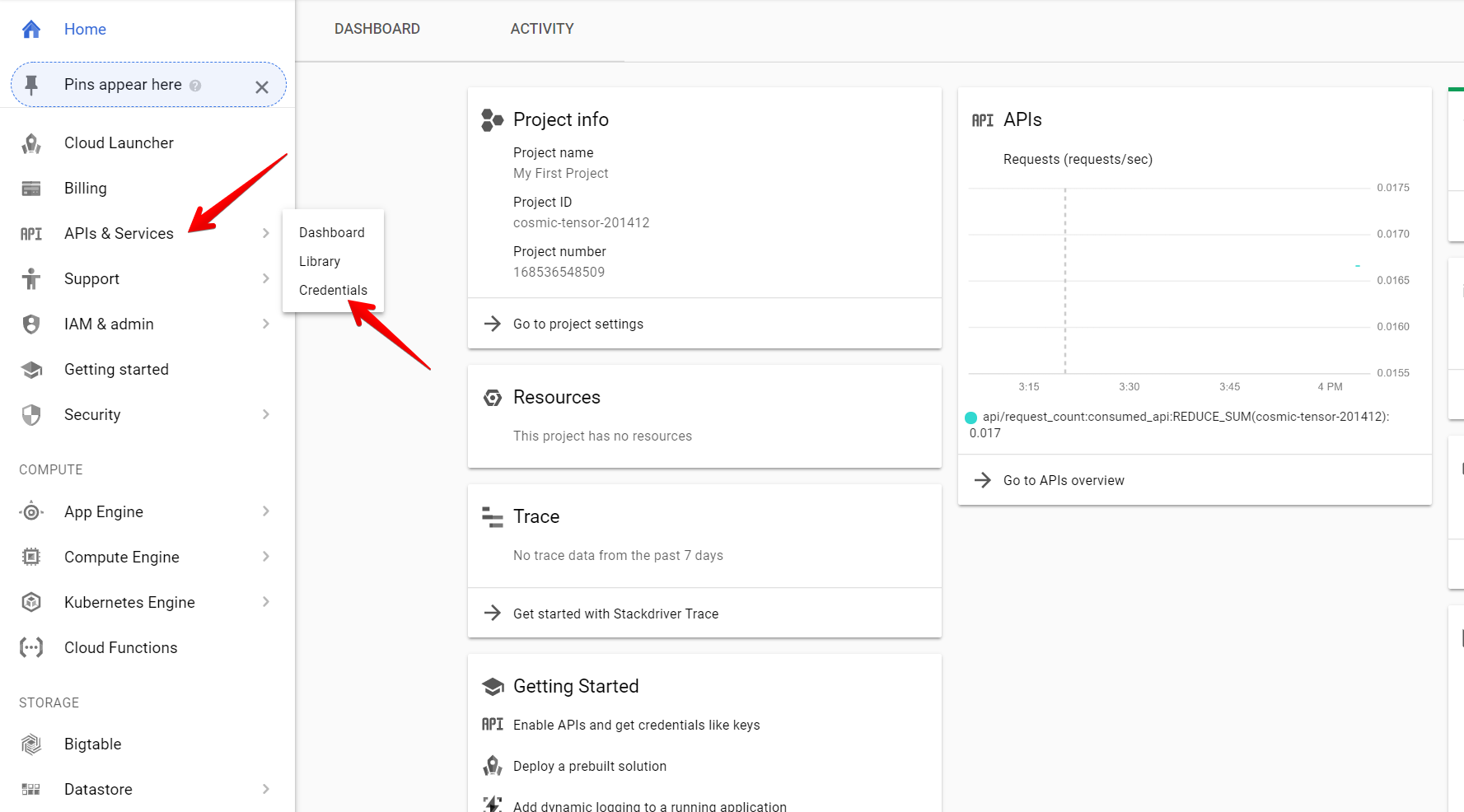
1. On the left-hand side pane in the console, hover over the **APIs and Services** item and select **Credentials**.
**Image 1: Navigating to the Credentials section**
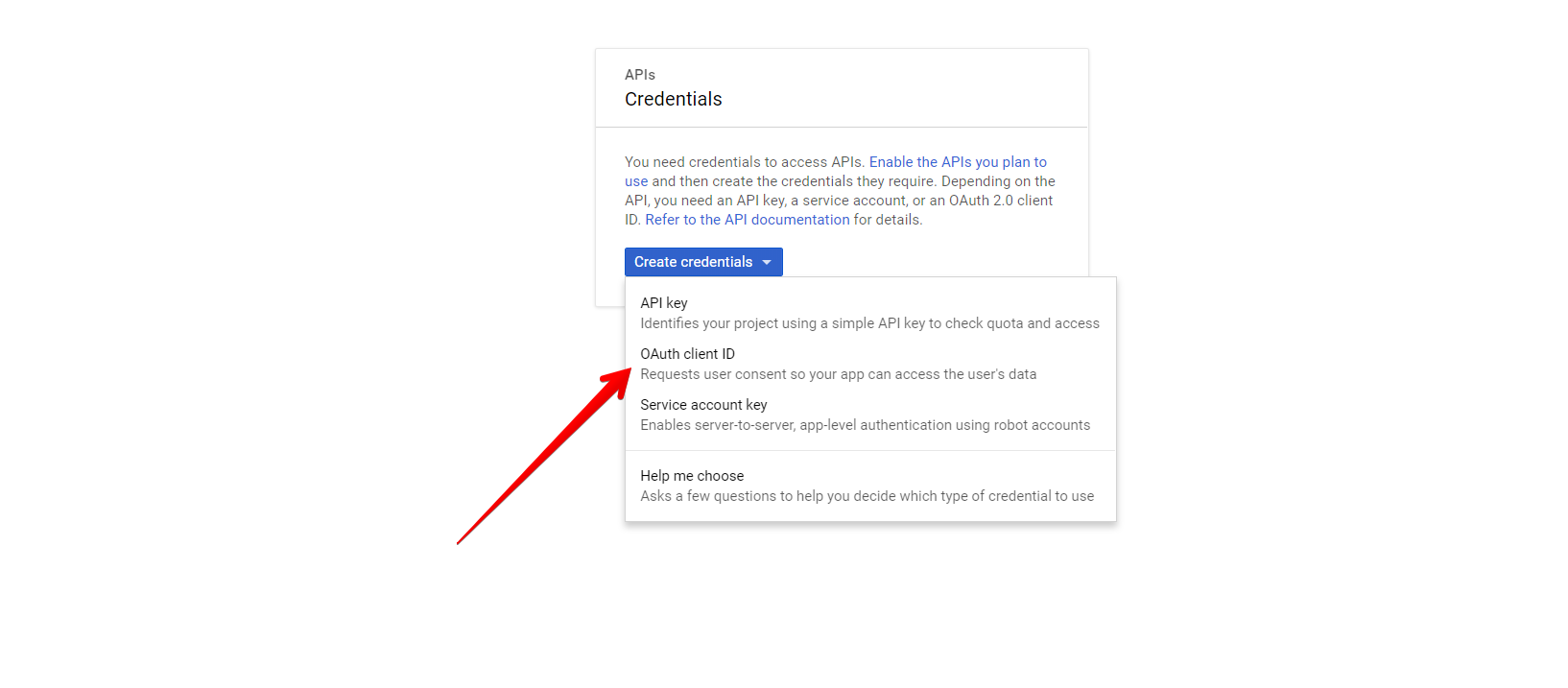
2. Click the **Create Credentials** button and select **OAuth client ID**.
**Image 2: Creating OAuth client ID**
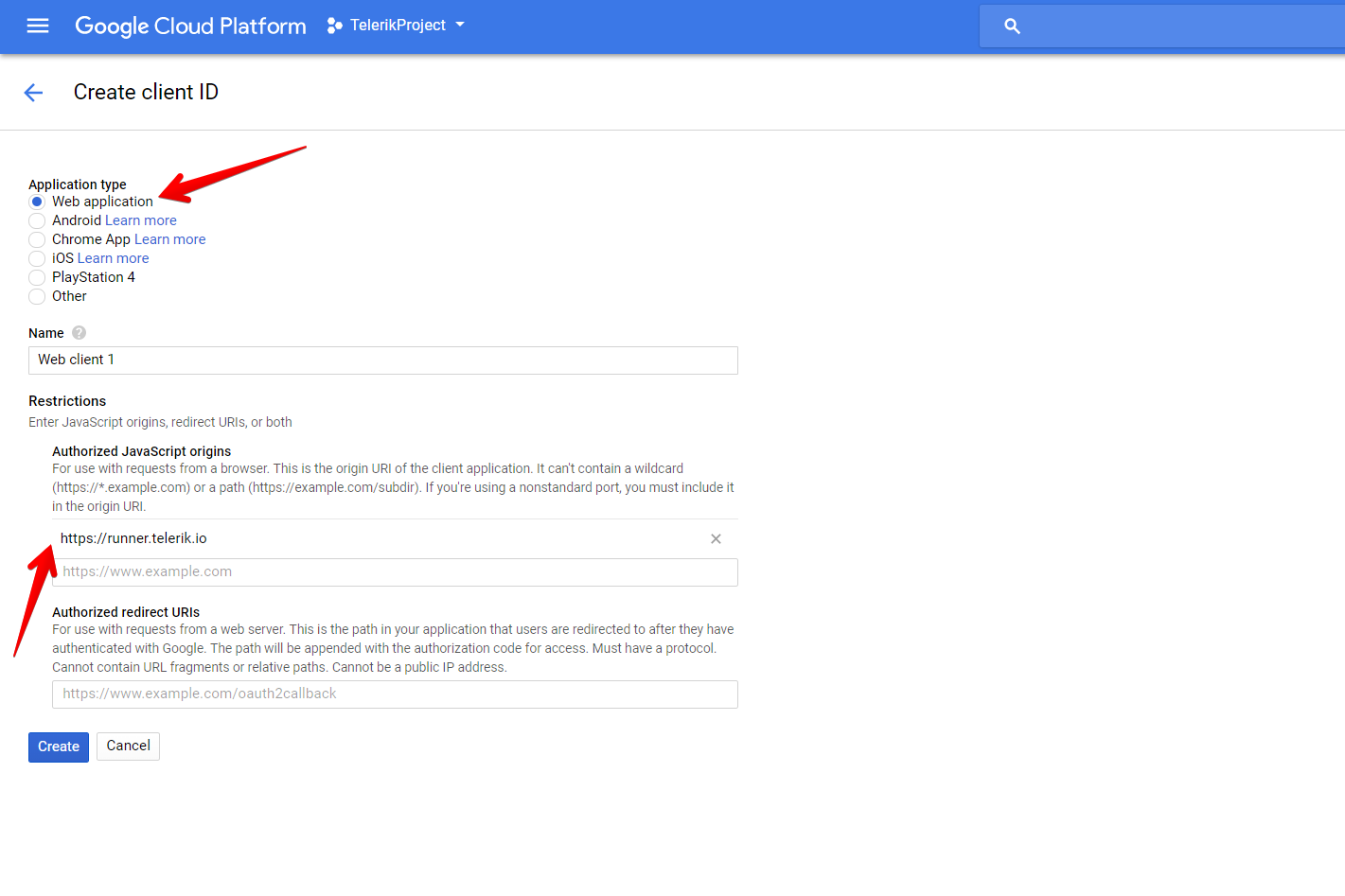
3. Select **Web Application** and add **Authorized JavaScript origins**.
**Image 3: Adding the authorized origin for your application**
## Creating New DataSet and Table in BigQuery
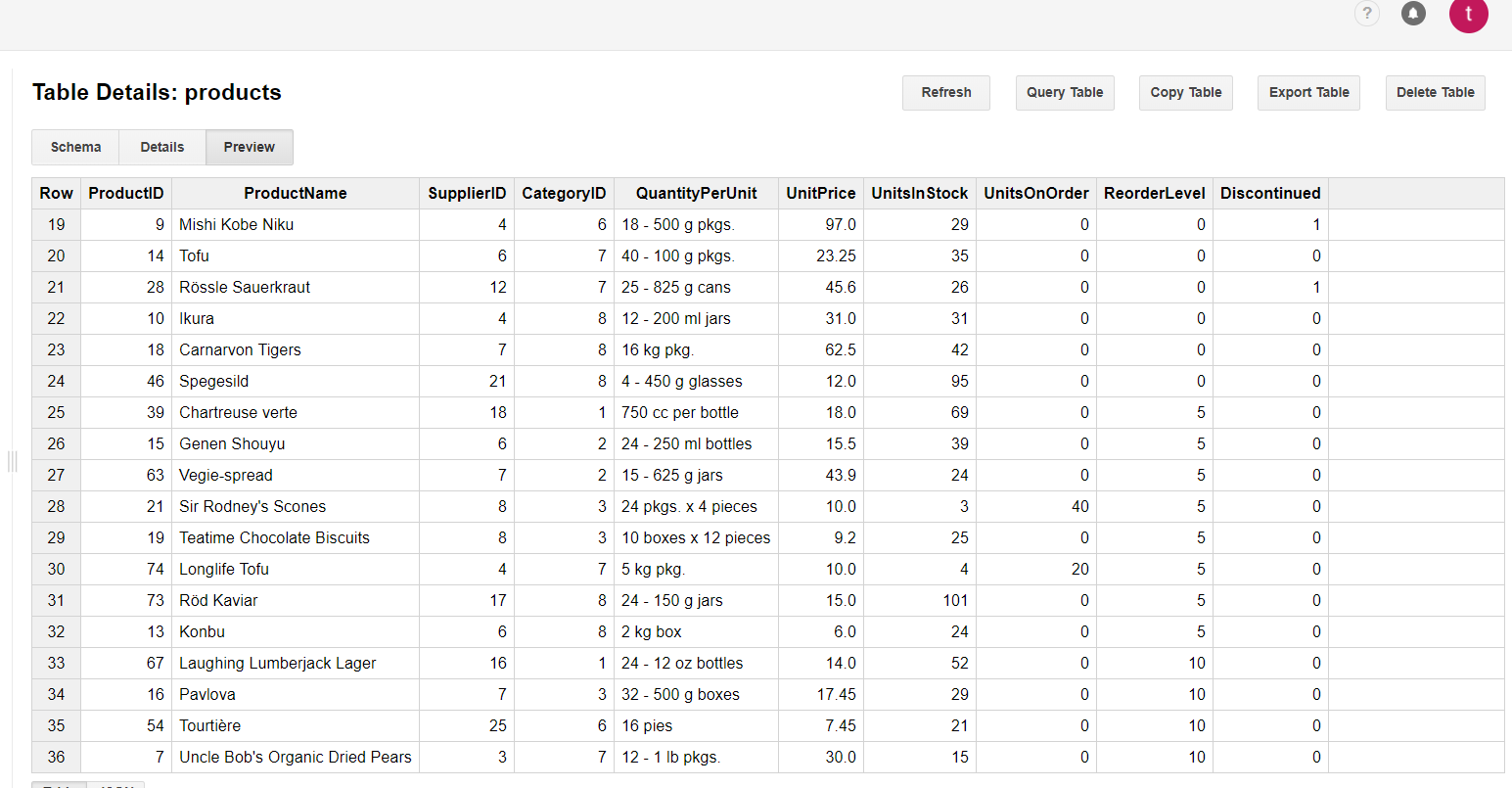
For more information on how to create new DataSets and tables, refer to the articles about [creating and using DataSets](https://cloud.google.com/bigquery/docs/tables) and [creating and using tables](https://cloud.google.com/bigquery/docs/tables) from the official BigQuery documentation. For the purposes of this sample project, create a **Products** table with the following schema and data.
**Image 4: Schema of the Products Table in the KendoDS DataSet**
**Image 5: Data of the Products Table in the KendoDS DataSet**
## Configuring the Grid to Consume and Manipulate Available BigQuery Data
1. Install the [`ng-gapi`](https://www.npmjs.com/package/ng-gapi) library that will provide an API for consuming the Google Cloud tables.
2. Import and configure the Gapi client.
```ts
// app.module.ts
import { BrowserModule } from '@angular/platform-browser';
import { NgModule } from '@angular/core';
import { AppComponent } from './app.component';
import { GridModule } from '@progress/kendo-angular-grid';
import { BrowserAnimationsModule } from '@angular/platform-browser/animations';
import { DataService } from './data.service';
import { HttpClientModule } from '@angular/common/http';
import {
GoogleApiModule,
GoogleApiService,
GoogleAuthService,
NgGapiClientConfig,
NG_GAPI_CONFIG,
GoogleApiConfig
} from 'ng-gapi';
const gapiClientConfig: NgGapiClientConfig = {
client_id: 'XXXX.apps.googleusercontent.com', // your client ID
discoveryDocs: ['https://content.googleapis.com/discovery/v1/apis/bigquery/v2/rest'],
scope: [
'https://www.googleapis.com/auth/bigquery',
'https://www.googleapis.com/auth/cloud-platform',
'https://www.googleapis.com/auth/cloud-platform.read-only'
].join(' ')
};
@NgModule({
declarations: [
AppComponent
],
imports: [
BrowserModule,
GridModule,
BrowserAnimationsModule,
HttpClientModule,
GoogleApiModule.forRoot({
provide: NG_GAPI_CONFIG,
useValue: gapiClientConfig
}),
],
providers: [DataService],
bootstrap: [AppComponent]
})
export class AppModule { }
```
3. Create and configure the data service that will handle the remote HTTP requests.
```ts
// data.service.ts
import { Injectable, EventEmitter } from '@angular/core';
import { HttpClient, HttpHeaders } from '@angular/common/http';
import { tap } from 'rxjs/operators/tap';
import { map } from 'rxjs/operators/map';
import { Observable } from 'rxjs/Observable';
import { GoogleApiService, GoogleAuthService } from 'ng-gapi';
import { switchMap } from 'rxjs/internal/operators/switchMap';
@Injectable()
export class DataService {
private clientId = 'XXXX.apps.googleusercontent.com';
private projectId = 'XXXX';
private total;
public token;
private endpoint = 'https://content.googleapis.com/bigquery/v2/projects/your-project-name/queries?alt=json';
private headers = new HttpHeaders();
public logged;
public loading = true;
constructor(
private gapiService: GoogleApiService,
private authService: GoogleAuthService,
private httpClient: HttpClient
) {
this.gapiService.onLoad().subscribe();
this.logged = this.authService.getAuth().pipe(
tap(auth => {
this.token = auth.currentUser.get().getAuthResponse().access_token;
console.log('Is SignedIn = ' + auth.isSignedIn.get());
this.headers = this.headers.set('Authorization', `Bearer ${this.token}`);
}),
switchMap(_ => this.read())
);
}
public read() {
// Optionally, spin a loading indicator when a request is performed.
this.loading = true;
// Send the actual query as part of the request body and add the authorization headers.
return this.httpClient.post(this.endpoint, { query: 'SELECT * FROM KendoDS.products_copy' }, { headers: this.headers })
.pipe(
tap(res => {
// Optionally, toggle off the loading indicator and store the current total number of rows.
this.total = +res['totalRows'];
this.loading = false;
return res;
}),
map(res => {
// Manipulate the response in accordance with your preference and return the data items expected by the Grid.
return res['rows'].map(item => {
const productid = +item.f[0].v;
const productname = item.f[1].v;
const unitsinstock = +item.f[6].v;
const unitprice = +item.f[5].v;
return {
productid,
productname,
unitsinstock,
unitprice
};
});
})
);
}
public update(item) {
const productname = `"${item.productname}"`;
// Optionally, spin a loading indicator when a request is performed.
this.loading = true;
// Send the actual query as part of the request body and add the authorization headers.
return this.httpClient
.post(this.endpoint, {
query: `UPDATE KendoDS.products_copy SET ProductName = ${productname} , UnitsInStock = ${item.unitsinstock}, UnitPrice = ${item.unitprice} WHERE ProductID = ${item.productid.toString()};`,
useLegacySql: false
}, { headers: this.headers })
.pipe(
// Read the latest data and return it to the caller.
switchMap(_ => this.read())
);
}
public create(item) {
// Optionally, spin a loading indicator when a request is performed.
this.loading = true;
const productid = ++this.total + 20;
const productname = `"${item.productname}"`;
// Send the actual query as part of the request body and add the authorization headers.
return this.httpClient
.post(this.endpoint, {
query: `INSERT KendoDS.products_copy (ProductID, ProductName, UnitsInStock, UnitPrice) VALUES(${productid.toString()}, ${productname}, ${item.unitsinstock}, ${item.unitprice});`,
useLegacySql: false
}, { headers: this.headers })
.pipe(
// Read the latest data and return it to the caller.
switchMap(_ => this.read())
);
}
public remove(item) {
// Optionally, spin a loading indicator when a request is performed.
this.loading = true;
// Send the actual query as part of the request body and add the authorization headers.
return this.httpClient
.post(this.endpoint, {
query: `DELETE KendoDS.products_copy WHERE ProductID = ${item.productid};`,
useLegacySql: false
}, { headers: this.headers })
.pipe(
// Read the latest data and return it to the caller.
switchMap(_ => this.read())
);
}
}
```
4. Use the data service methods to populate the Grid and handle editing-related events.
```ts
import { NgModule, AfterViewInit, NgZone } from '@angular/core';
import { Component } from '@angular/core';
import { DataService } from './data.service';
import { FormGroup, FormControl, Validators } from '@angular/forms';
import { orderBy } from '@progress/kendo-data-query';
@Component({
selector: 'app-root',
template: `
`
})
export class AppComponent implements AfterViewInit {
public products;
public formGroup: FormGroup;
private editedRowIndex: number;
constructor(private service: DataService, private ngZone: NgZone) {}
public ngAfterViewInit() {
this.service.logged.subscribe(r => {
// The ng-gapi runs outside Angular, so you need to initially explicitly assign the
// incoming response to the collection the Grid is bound to in the NgZone.
this.ngZone.run(() => {
this.products = orderBy(r, [{field: 'productid', dir: 'asc'}]);
});
});
}
public addHandler({sender}) {
this.closeEditor(sender);
this.formGroup = new FormGroup({
'productname': new FormControl('', Validators.required),
'unitprice': new FormControl(0),
'unitsinstock': new FormControl(0)
});
sender.addRow(this.formGroup);
}
public editHandler({sender, rowIndex, dataItem}): void {
this.closeEditor(sender);
this.formGroup = new FormGroup({
'productname': new FormControl(dataItem.productname, Validators.required),
'unitprice': new FormControl(dataItem.unitprice),
'unitsinstock': new FormControl(dataItem.unitsinstock)
});
this.editedRowIndex = rowIndex;
sender.editRow(rowIndex, this.formGroup);
}
public cancelHandler({sender, rowIndex}) {
this.closeEditor(sender, rowIndex);
}
public saveHandler({sender, rowIndex, formGroup, dataItem, isNew}) {
if (isNew) {
this.service.create(formGroup.value).subscribe(r => {
this.products = orderBy(r, [{field: 'productid', dir: 'asc'}]);
});
} else {
const updatedItem = Object.assign(dataItem, formGroup.value);
this.service.update(updatedItem).subscribe(r => {
this.products = orderBy(r, [{field: 'productid', dir: 'asc'}]);
});
}
sender.closeRow(rowIndex);
}
public removeHandler({dataItem}) {
this.service.remove(dataItem).subscribe(r => {
this.products = orderBy(r, [{field: 'productid', dir: 'asc'}]);
});
}
private closeEditor(grid, rowIndex = this.editedRowIndex): void {
grid.closeRow(rowIndex);
this.editedRowIndex = undefined;
this.formGroup = undefined;
}
}
```
## Suggested Links
* [Consuming Data from Azure Cosmos DB](https://www.telerik.com/kendo-angular-ui/components/cloud/cosmos-db)
* [Uploading Images to Azure Face API](https://www.telerik.com/kendo-angular-ui/components/cloud/face-api)
* [Consuming Data from Amazon Dynamo DB](https://www.telerik.com/kendo-angular-ui/components/cloud/amazon-dynamo-db)
* [Binding the Grid to Azure Functions](https://www.telerik.com/kendo-angular-ui/components/cloud/azure-functions)
 2. Click the **Create Credentials** button and select **OAuth client ID**.
**Image 2: Creating OAuth client ID**
 3. Select **Web Application** and add **Authorized JavaScript origins**.
**Image 3: Adding the authorized origin for your application**
 ## Creating New DataSet and Table in BigQuery
For more information on how to create new DataSets and tables, refer to the articles about [creating and using DataSets](https://cloud.google.com/bigquery/docs/tables) and [creating and using tables](https://cloud.google.com/bigquery/docs/tables) from the official BigQuery documentation. For the purposes of this sample project, create a **Products** table with the following schema and data.
**Image 4: Schema of the Products Table in the KendoDS DataSet**
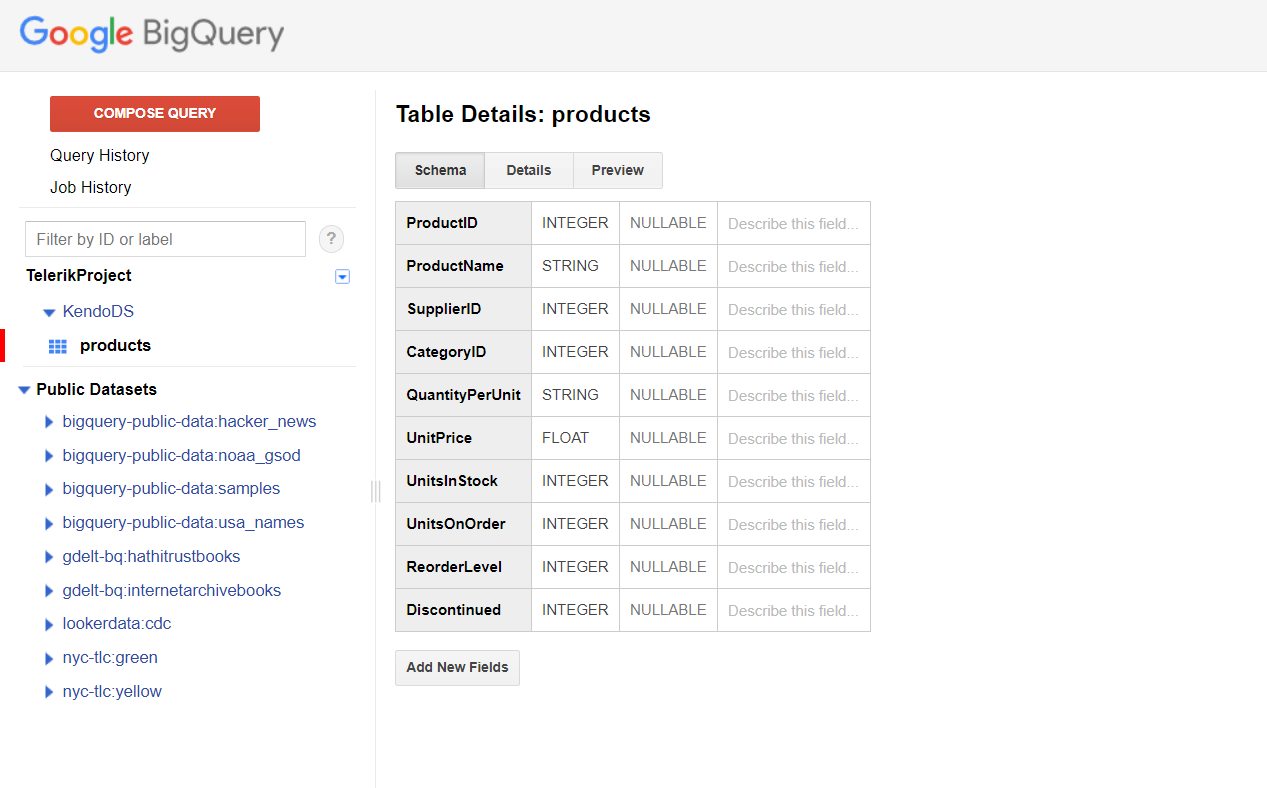 **Image 5: Data of the Products Table in the KendoDS DataSet**
 ## Configuring the Grid to Consume and Manipulate Available BigQuery Data
1. Install the [`ng-gapi`](https://www.npmjs.com/package/ng-gapi) library that will provide an API for consuming the Google Cloud tables.
2. Import and configure the Gapi client.
```ts
// app.module.ts
import { BrowserModule } from '@angular/platform-browser';
import { NgModule } from '@angular/core';
import { AppComponent } from './app.component';
import { GridModule } from '@progress/kendo-angular-grid';
import { BrowserAnimationsModule } from '@angular/platform-browser/animations';
import { DataService } from './data.service';
import { HttpClientModule } from '@angular/common/http';
import {
GoogleApiModule,
GoogleApiService,
GoogleAuthService,
NgGapiClientConfig,
NG_GAPI_CONFIG,
GoogleApiConfig
} from 'ng-gapi';
const gapiClientConfig: NgGapiClientConfig = {
client_id: 'XXXX.apps.googleusercontent.com', // your client ID
discoveryDocs: ['https://content.googleapis.com/discovery/v1/apis/bigquery/v2/rest'],
scope: [
'https://www.googleapis.com/auth/bigquery',
'https://www.googleapis.com/auth/cloud-platform',
'https://www.googleapis.com/auth/cloud-platform.read-only'
].join(' ')
};
@NgModule({
declarations: [
AppComponent
],
imports: [
BrowserModule,
GridModule,
BrowserAnimationsModule,
HttpClientModule,
GoogleApiModule.forRoot({
provide: NG_GAPI_CONFIG,
useValue: gapiClientConfig
}),
],
providers: [DataService],
bootstrap: [AppComponent]
})
export class AppModule { }
```
3. Create and configure the data service that will handle the remote HTTP requests.
```ts
// data.service.ts
import { Injectable, EventEmitter } from '@angular/core';
import { HttpClient, HttpHeaders } from '@angular/common/http';
import { tap } from 'rxjs/operators/tap';
import { map } from 'rxjs/operators/map';
import { Observable } from 'rxjs/Observable';
import { GoogleApiService, GoogleAuthService } from 'ng-gapi';
import { switchMap } from 'rxjs/internal/operators/switchMap';
@Injectable()
export class DataService {
private clientId = 'XXXX.apps.googleusercontent.com';
private projectId = 'XXXX';
private total;
public token;
private endpoint = 'https://content.googleapis.com/bigquery/v2/projects/your-project-name/queries?alt=json';
private headers = new HttpHeaders();
public logged;
public loading = true;
constructor(
private gapiService: GoogleApiService,
private authService: GoogleAuthService,
private httpClient: HttpClient
) {
this.gapiService.onLoad().subscribe();
this.logged = this.authService.getAuth().pipe(
tap(auth => {
this.token = auth.currentUser.get().getAuthResponse().access_token;
console.log('Is SignedIn = ' + auth.isSignedIn.get());
this.headers = this.headers.set('Authorization', `Bearer ${this.token}`);
}),
switchMap(_ => this.read())
);
}
public read() {
// Optionally, spin a loading indicator when a request is performed.
this.loading = true;
// Send the actual query as part of the request body and add the authorization headers.
return this.httpClient.post(this.endpoint, { query: 'SELECT * FROM KendoDS.products_copy' }, { headers: this.headers })
.pipe(
tap(res => {
// Optionally, toggle off the loading indicator and store the current total number of rows.
this.total = +res['totalRows'];
this.loading = false;
return res;
}),
map(res => {
// Manipulate the response in accordance with your preference and return the data items expected by the Grid.
return res['rows'].map(item => {
const productid = +item.f[0].v;
const productname = item.f[1].v;
const unitsinstock = +item.f[6].v;
const unitprice = +item.f[5].v;
return {
productid,
productname,
unitsinstock,
unitprice
};
});
})
);
}
public update(item) {
const productname = `"${item.productname}"`;
// Optionally, spin a loading indicator when a request is performed.
this.loading = true;
// Send the actual query as part of the request body and add the authorization headers.
return this.httpClient
.post(this.endpoint, {
query: `UPDATE KendoDS.products_copy SET ProductName = ${productname} , UnitsInStock = ${item.unitsinstock}, UnitPrice = ${item.unitprice} WHERE ProductID = ${item.productid.toString()};`,
useLegacySql: false
}, { headers: this.headers })
.pipe(
// Read the latest data and return it to the caller.
switchMap(_ => this.read())
);
}
public create(item) {
// Optionally, spin a loading indicator when a request is performed.
this.loading = true;
const productid = ++this.total + 20;
const productname = `"${item.productname}"`;
// Send the actual query as part of the request body and add the authorization headers.
return this.httpClient
.post(this.endpoint, {
query: `INSERT KendoDS.products_copy (ProductID, ProductName, UnitsInStock, UnitPrice) VALUES(${productid.toString()}, ${productname}, ${item.unitsinstock}, ${item.unitprice});`,
useLegacySql: false
}, { headers: this.headers })
.pipe(
// Read the latest data and return it to the caller.
switchMap(_ => this.read())
);
}
public remove(item) {
// Optionally, spin a loading indicator when a request is performed.
this.loading = true;
// Send the actual query as part of the request body and add the authorization headers.
return this.httpClient
.post(this.endpoint, {
query: `DELETE KendoDS.products_copy WHERE ProductID = ${item.productid};`,
useLegacySql: false
}, { headers: this.headers })
.pipe(
// Read the latest data and return it to the caller.
switchMap(_ => this.read())
);
}
}
```
4. Use the data service methods to populate the Grid and handle editing-related events.
```ts
import { NgModule, AfterViewInit, NgZone } from '@angular/core';
import { Component } from '@angular/core';
import { DataService } from './data.service';
import { FormGroup, FormControl, Validators } from '@angular/forms';
import { orderBy } from '@progress/kendo-data-query';
@Component({
selector: 'app-root',
template: `