# Map Local Files

Remote mapping of a request location means testing changes or fixes locally and avoiding deploying on an actual remote host. However, testing against a localhost environment is often the more straightforward, quicker, and cheaper solution. Mapping HTTP requests can be done to remote locations and local sources like files, the Fiddler predefined responses, or manual responses (through the Fiddler user interface).

With Fiddler Everywhere, you can easily create a rule that **maps HTTP requests to a local DAT file** (which contains the modified HTTP response).

## Creating a "Map Local (File)" Rule

Create a "Map Local (File)" rule by setting the following actions through the [Rules Builder](https://www.telerik.com/fiddler/fiddler-everywhere/documentation/modify-and-filter-traffic/modify-traffic-with-rules).

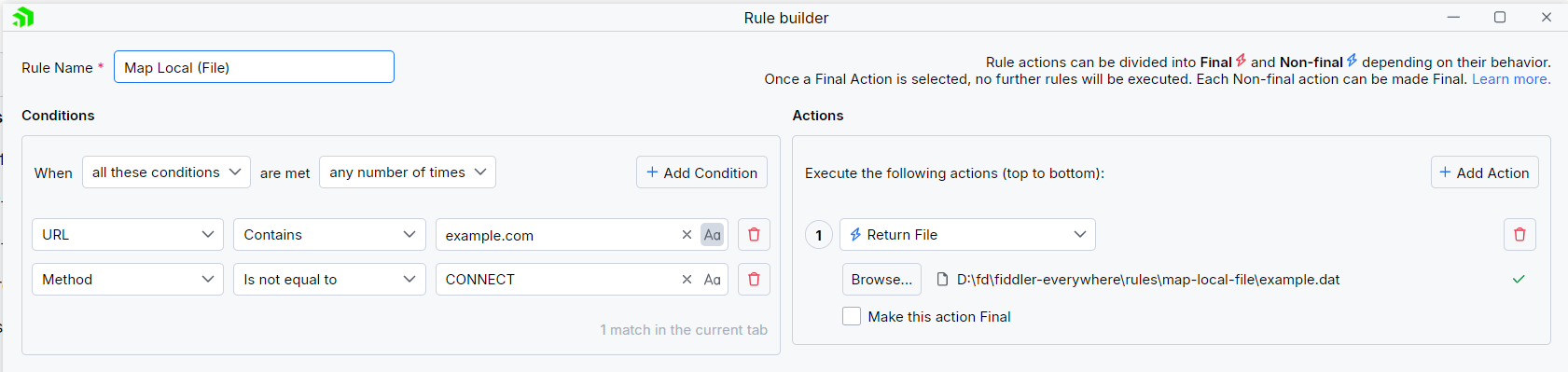
1. Create a matching condition that uses the "When **all these conditions** are met **any number of times**" pattern.
2. Match by a **URL** that uses a string value to match the desired URL. For example: `example.com`.
3. (Optional) If you need to test a URL that your DNS server cannot resolve, create a **Return CONNECT Tunnel** action.
4. Create a **Return File** action and set the path to the DAT file that contains the modified HTTP response. The DAT file must contain a well-formed HTTP response. For example:
   ```html
   HTTP/2 200
   accept-ranges: bytes
   age: 339925
   cache-control: max-age=604800
   content-type: text/html; charset=UTF-8
   date: Fri, 05 Apr 2024 08:26:52 GMT
   etag: "3147526947"
   expires: Fri, 12 Apr 2024 08:26:52 GMT
   last-modified: Thu, 17 Oct 2019 07:18:26 GMT
   server: ECS (sed/58EA)
   vary: Accept-Encoding
   x-cache: HIT
   content-length: 1382

   <!doctype html>
   <html>
   <head>
       <title>Fiddler Everywhere - Example Domain</title>

       <meta charset="utf-8" />
       <meta http-equiv="Content-type" content="text/html; charset=utf-8" />
       <meta name="viewport" content="width=device-width, initial-scale=1" />
       <style type="text/css">
       body {
           background-color: #f0f0f2;
           margin: 0;
           padding: 0;
           font-family: -apple-system, system-ui, BlinkMacSystemFont, "Segoe UI", "Open Sans", "Helvetica Neue", Helvetica, Arial, sans-serif;
           
       }
       h1 {
           color: white
       }
       div {
           width: 600px;
           margin: 5em auto;
           padding: 2em;
           background-color: darkslategray;
           border-radius: 0.5em;
           box-shadow: 2px 3px 7px 2px rgba(0,0,0,0.02);
       }
       a:link, a:visited {
           color: #38488f;
           text-decoration: none;
       }
       @media (max-width: 700px) {
           div {
               margin: 0 auto;
               width: auto;
           }
       }
       </style>    
   </head>

   <body>
   <div>
       <h1>Modified by Fiddler Everywhere</h1>
       <p>This domain is for use in illustrative examples in documents. You may use this
       domain in literature without prior coordination or asking for permission.</p>
   </div>
   </body>
   </html>
   ```

This sample Fiddler rule maps an HTTP request to return a manually-crafted response.
![Creating "Map Local (File)" rule](https://www.telerik.com/fiddler/fiddler-everywhere/documentation/assets/eb54d7f6f8fc7add143f2fe0e511f4c1/adv-map-local-file.png)

> tip Instead of manually creating a DAT file that contains a proper response, you can use one of the Fiddler predefined DAT files available through [the **Return Predefined Response** action](https://www.telerik.com/fiddler/fiddler-everywhere/documentation/knowledge-base/using-ar-predefined-actions).

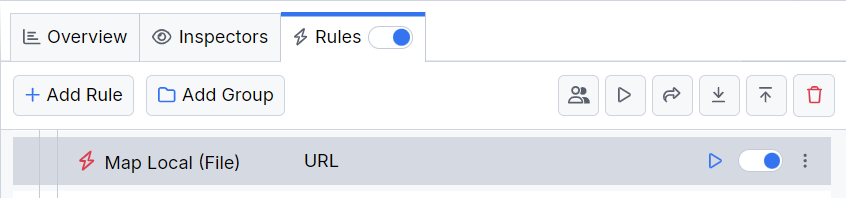
Once the rule is created, enable the **Rules** tab, toggle the rule switch, and start capturing traffic.
![Activating the "Map Local (File)" rule](https://www.telerik.com/fiddler/fiddler-everywhere/documentation/assets/c5349d2be0c2b611bc38aedc1bafd7a2/adv-map-local-file-active.png)

Download a ready-to-use <a href="https://github.com/telerik/fiddler-everywhere/tree/master/rules/map-local-file" target="_blank">"Map Local (File)"</a> rule as a FARX file, which you can import through the Rules toolbar.

## See Also

* [Learn more about the Rules functionality in Fiddler Everywhere here...](https://www.telerik.com/fiddler/fiddler-everywhere/documentation/modify-and-filter-traffic/modify-traffic-with-rules)
* [Learn more about all rules presets in Fiddler Everywhere here...](https://www.telerik.com/fiddler/fiddler-everywhere/documentation/rules-presets)
* [Learn more on how to organize your rules here...](https://www.telerik.com/fiddler/fiddler-everywhere/documentation/modify-and-filter-traffic/organizing-rules)
* [Learn more about the matching conditions here...](https://www.telerik.com/fiddler/fiddler-everywhere/documentation/modify-and-filter-traffic/conditions-and-actions#conditions)
* [Learn more about the supported actions here...](https://www.telerik.com/fiddler/fiddler-everywhere/documentation/modify-and-filter-traffic/conditions-and-actions#actions)
* [Learn more about final and non-final rules here...](https://www.telerik.com/fiddler/fiddler-everywhere/documentation/modify-and-filter-traffic/conditions-and-actions#final-and-non-final-actions)
* [Learn more about using breakpoints here...](https://www.telerik.com/fiddler/fiddler-everywhere/documentation/modify-and-filter-traffic/breakpoints)
