# Blocking Traffic from Specific Processes
With Fiddler Everywhere, you can create a rule that automatically blocks traffic from any matched processes by forcibly closing the ongoing HTTP connection.
## Creating a "Block Traffic from Specific Processes" Rule
Create a "Block Traffic from Specific Processes" rule by setting the following actions through the [Rules Builder](https://www.telerik.com/fiddler/fiddler-everywhere/documentation/modify-and-filter-traffic/modify-traffic-with-rules).
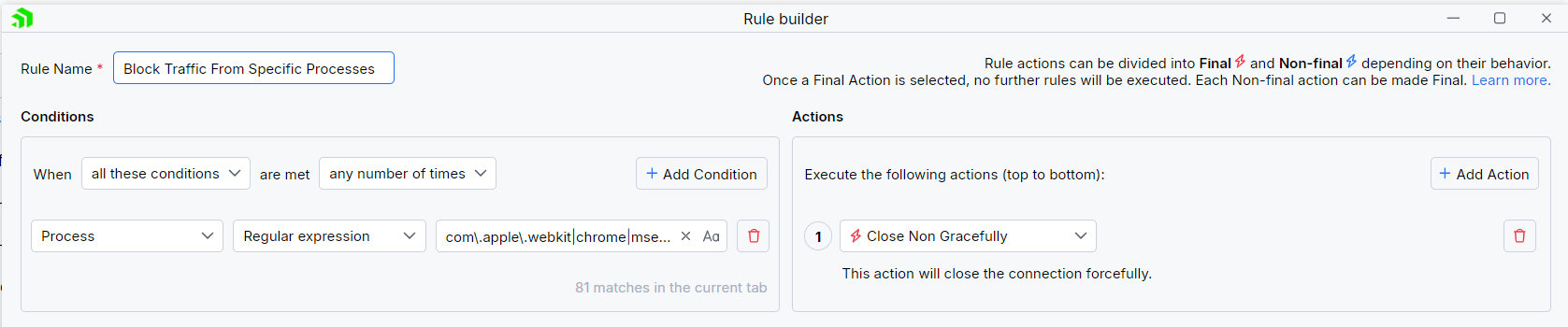
1. Create a matching condition that uses the "When **all these conditions** are met **any number of times**" pattern.
2. Match by a **Process**where the string value defines the targeted process by its name. The process name varies depending on the used operating system and version of the client application.\
\*\*The example below matches different browsers on macOS while using the following regular expression:**com.apple.webkit|chrome|msedge**.
3. Create a **Close Non Gracefully** action.
This sample Fiddler rule matches all sessions where the process contains one of the string literals set through the regular expression and closes the connection forcibly.
> tip The blocking actions are not final and can be combined with other actions. [Learn more about final and non-final actions here.](https://www.telerik.com/fiddler/fiddler-everywhere/documentation/modify-and-filter-traffic/conditions-and-actions)
Once the rule is created, enable the **Rules** tab, toggle the rule switch, and start capturing traffic.

Download a ready-to-use "Block Traffic to Specific Processes" rule as a FARX file, which you can import through the Rules toolbar.
## See Also
* [Learn more about the Rules functionality in Fiddler Everywhere here...](https://www.telerik.com/fiddler/fiddler-everywhere/documentation/modify-and-filter-traffic/modify-traffic-with-rules)
* [Learn more about all rules presets in Fiddler Everywhere here...](https://www.telerik.com/fiddler/fiddler-everywhere/documentation/rules-presets)
* [Learn more on how to organize your rules here...](https://www.telerik.com/fiddler/fiddler-everywhere/documentation/modify-and-filter-traffic/organizing-rules)
* [Learn more about the matching conditions here...](https://www.telerik.com/fiddler/fiddler-everywhere/documentation/modify-and-filter-traffic/conditions-and-actions#conditions)
* [Learn more about the supported actions here...](https://www.telerik.com/fiddler/fiddler-everywhere/documentation/modify-and-filter-traffic/conditions-and-actions#actions)
* [Learn more about final and non-final rules here...](https://www.telerik.com/fiddler/fiddler-everywhere/documentation/modify-and-filter-traffic/conditions-and-actions#final-and-non-final-actions)
* [Learn more about using breakpoints here...](https://www.telerik.com/fiddler/fiddler-everywhere/documentation/modify-and-filter-traffic/breakpoints)