# Failed to execute compile on WebAssembly - expected magic word 00 61 73 6d
## Environment
Product
UI for Blazor
Application type
WebAssembly
Hosting
cloudflare.com integration with smarterasp.net, may affect others
## Description
Publishing a client-side (WASM) Blazor app may fail with messages similar to the error below.
A particular environment is an ASP.NET Core hosted Blazor project hosted on smarterAsp.net with the automatic config which enabled caching and compacting with cloudflare.com.
## Error Message
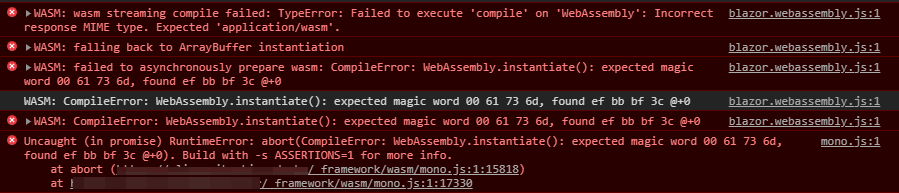
* WASM: wasm streaming compile failed: Failed to execute 'compile' on 'WebAssembly': Incorrect response MIME type. Expected 'application/wasm'
* WASM: failed to asynchronously prepare wasm: CompileError: WebAssembly.instantiate(): expected magic word 00 61 73 6d, found ef bb bf 3c @+0
* CompileError: WebAssembly.instantiate(): expected magic word 00 61 73 6d, found ef bb bf 3c @+0
## Possible Cause
The errors indicate the following issues:
* The MIME type for the `wasm` files is wrong - it must be `application/wasm` but the hosting environment used the wrong one
* The wasm file is broken (for example, archived, compressed twice or otherwise truncated/modified).
## Solution
The general solution is to make sure that the application files are not tampered with and that you have the correct server settings as per Microsoft's documentation:
In the particular smarterasp.net hosting case, disabling the cloudflare integration resolved the issue.