# Small numbers are shown in scientific format
## Environment
Product
NumericTextBox for Blazor
## Description
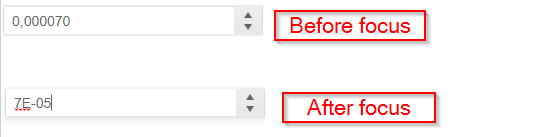
When I try to update a value, the numeric textbox automatically transforms the value into the equivalent scientific notation, but I need to keep the decimal notation of the value.
## Steps to Reproduce
Use a sufficiently small number and bind it to the Numeric Textobox, then focus it.
```RAZOR
@* the key thing is the small value below, and the type - double *@
@code{
double Performance { get; set; } = 0.000070;
string format = "#0.000000";
protected override void OnInitialized()
{
//this will show the scientific notation in the console too
Console.WriteLine(Performance);
base.OnInitialized();
}
}
```
## Possible Cause
Sufficiently small (or large) numbers may be rendered as strings by the framework in scientific notation (see the example above).
The Telerik Numeric Textbox renders the `Format` parameter when it is not focused through a simple `.ToString(Format)` call, but when focused, it needs to take into account the `Decimals` and so it has to round the value before calling `.ToString()` to it to render it in the input.
This rounding makes types with lower precision (such as `double`) show up in scientific notation (such as `7E-05`) instead of the expected decimal notation (such as `0.000070`) while the `Format` may be set to something that does not manifest this behavior and thus mask the problem.
You can find a sample approximation of the rounding code at the time of writing here:
```RAZOR
non-focused:
@Performance.ToString(format)
focused:
@RoundDouble(Performance, decimals)
@code{
double Performance { get; set; } = 0.000070;
string format = "#0.000000";
int decimals = 6;
public double RoundDouble(double value, int decimals)
{
return (double)(object)Math.Round((double)(object)value, decimals);
}
}
```
## Solution
Use a type with sufficient precision that will still be rendered by the framework in decimal notation at the desired precision levels, such as `decimal`.
```RAZOR
non-focused:
@Performance.ToString(format)
focused:
@RoundDecimal(Performance, decimals)
@code{
decimal Performance { get; set; } = 0.000070m;
string format = "#0.000000";
int decimals = 6;
public decimal RoundDecimal(decimal value, int decimals)
{
return (decimal)(object)Math.Round((decimal)(object)value, decimals);
}
}
```