# Showing a Validation Summary in a Grid Popup
## Environment
Product
Telerik UI for ASP.NET MVC Grid
Created with Product Version
2024.2.514
## Description
How can I display the validation summary instead of tooltips in the Grid's Popup edit template?
## Solution
The Telerik UI for ASP.NET MVC Grid configured for Popup editing uses a Validator that shows the error messages as tooltips:
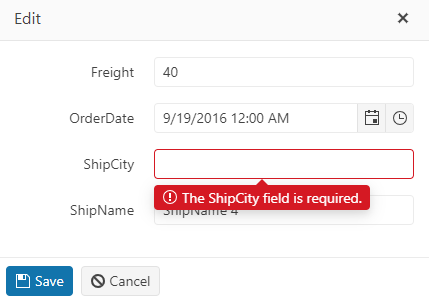
You can show a validation summary with a few lines of JavaScript.
1. Handle the [`Edit`](https://docs.telerik.com/aspnet-mvc/api/kendo.mvc.ui.fluent/grideventbuilder#editsystemstring) event of the Grid.
2. Get a reference to the [Kendo UI Validator](https://docs.telerik.com/kendo-ui/controls/validator/overview) and update its options by using the [`setOptions()`](https://docs.telerik.com/kendo-ui/api/ui/validator/methods/setoptions) method.
```Razor HtmlHelper
@(Html.Kendo().Grid ()
.Name("grid")
.Events(e => e.Edit("addValidationSummary"))
...
)
```
```JS scripts
```
As a result, the error messages will be displayed as a list above the editors:
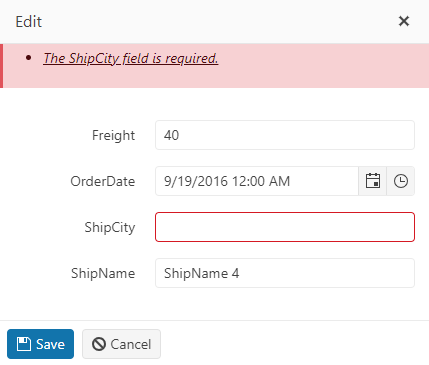
To keep the tooltips, as well, do not reset the "errorTemplate" option:
```JS scripts
```
For more information on validation, refer to the following articles:
* [Show Server Validation Errors in a Grid Edit Popup](https://www.telerik.com/aspnet-mvc/documentation/knowledge-base/grid-popup-editing-show-server-validation-errors)
* [Validation in Telerik UI for ASP.NET MVC](https://docs.telerik.com/aspnet-mvc/getting-started/helper-basics/validation)
## More ASP.NET MVC Grid Resources
* [ASP.NET MVC Grid Documentation](https://www.telerik.com/aspnet-mvc/documentation/html-helpers/data-management/grid/overview)
* [ASP.NET MVC Grid Demos](https://demos.telerik.com/aspnet-mvc/grid/index)
* [ASP.NET MVC Grid Product Page](https://www.telerik.com/aspnet-mvc/grid)
* [Telerik UI for ASP.NET MVC Video Onboarding Course (Free for trial users and license holders)](https://www.telerik.com/aspnet-mvc/documentation/getting-started/video-onboarding)
* [Telerik UI for ASP.NET MVC Forums](https://www.telerik.com/forums/aspnet-mvc)
## See Also
* [Client-Side API Reference of the Grid for ASP.NET MVC](https://docs.telerik.com/kendo-ui/api/ui/grid)
* [Server-Side API Reference of the Grid for ASP.NET MVC](https://docs.telerik.com/aspnet-mvc/api/grid)
* [Telerik UI for ASP.NET MVC Breaking Changes](https://www.telerik.com/aspnet-mvc/documentation/backwards-compatibility/2023-backwards-compatibility)
* [Telerik UI for ASP.NET MVC Knowledge Base](https://docs.telerik.com/aspnet-mvc/knowledge-base)