# Resolve Hot Reload BrowserLink error with enabled CSP
## Environment
Product
Telerik® UI for ASP.NET Core
## Description
New versions of Microsoft Visual Studio provide the [Hot Reload](https://learn.microsoft.com/en-us/aspnet/core/test/hot-reload?view=aspnetcore-9.0) and [Browser Link Refresh](https://learn.microsoft.com/en-us/aspnet/core/client-side/using-browserlink?view=aspnetcore-9.0) features in order to facilitiate working with ASP.NET Core projects.
This creates a communication channel between the development environment and one or more web browsers. And since this communication is done with a javascript file connection, when you implement the Content Security Policy meta tag for your application you can see these errors:
```js
browserLink:4 Refused to connect to 'http://localhost:.../8d05de7…/browserLinkSignalR/…owserLink.initializationData.browserId&browserId=...' because it violates the following Content Security Policy directive: "default-src 'self'". Note that 'connect-src' was not explicitly set, so 'default-src' is used as a fallback.
send @ browserLink:4
aspnetcore-browser-refresh.js:329 Refused to connect to 'wss://localhost:.../TelerikProjectName/' because it violates the following Content Security Policy directive: "default-src 'self'". Note that 'connect-src' was not explicitly set, so 'default-src' is used as a fallback.
(anonymous) @ aspnetcore-browser-refresh.js:329
```
## Solution
To resolve this issue you have two different options:
1. You can disable the functionality from VS:
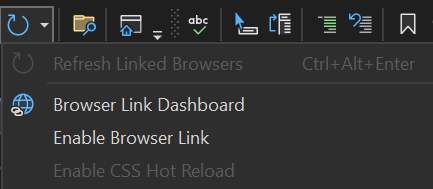
2. You can add `connect-src ws: http: 'self';` to your CSP meta tag in the `_Layout.cshtml` file:
```html
```
## See Also
* [Content Security Policy Documentation](https://docs.telerik.com/aspnet-core/html-helpers/helper-basics/content-security-policy)
* [Telerik UI for Core CSP Example](https://github.com/telerik/ui-for-aspnet-core-examples/tree/master/Telerik.Examples.ContentSecurityPolicy)