# Getting Started with the Notification
This tutorial explains how to set up a basic Telerik UI for ASP.NET MVC Notification component and highlights the major steps in the configuration of the component.
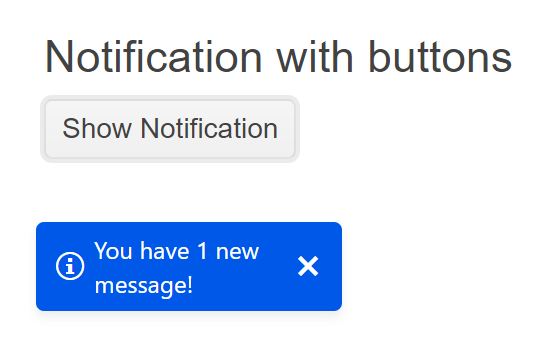
You will initialize a Notification component with basic content and an action button. Then, you will use the events of the UI component.
## Prerequisites
To successfully complete the tutorial, you need a project that is already configured to use the Telerik UI for ASP.NET MVC components:
* To create a new pre-configured project for the Telerik UI for ASP.NET MVC components, you can [use a project template](https://www.telerik.com/aspnet-mvc/documentation/getting-started-mvc/first-steps).
* To manually configure an existing project by using NuGet, see the [Adding Telerik UI through NuGet](https://www.telerik.com/aspnet-mvc/documentation/getting-started/setup-with-nuget).
## 1. Prepare the CSHTML File
The first step is to add the required directives at the top of the `.cshtml` document:
* To use the Telerik UI for ASP.NET MVC HtmlHelpers:
```cshtml
@using Kendo.Mvc.UI
```
Optionally, you can structure the document by adding the desired HTML elements like headings, divs, paragraphs, and others.
```Razor HtmlHelper
@using Kendo.Mvc.UI
Notification with a Hide Button
```
## 2. Initialize the Notification
Use the Notification HtmlHelper to add the component to a page:
* The `Name()` configuration method is mandatory as its value is used for the `id` and the `name` attributes of the Notification element.
* The `Position()` setting allows you to declare offsets that change the position of the component.
This tutorial uses a separate `Kendo().Button()` component with an event handler to display the Notification. In your scenarios, you could have another user action or event handler that displays the Notification component.
```Razor HtmlHelper
@using Kendo.Mvc.UI
Notification with a Hide Button
@(Html.Kendo().Notification()
.Name("notification")
.Position(p=>p.Top(120).Left(20))
)
@(Html.Kendo().Button()
.Name("button")
.Content("Show Notification")
.Events(e=>e.Click("buttonClick"))
)
```
## 3. Hide with a Button
The next step is to make the Notification hide only on manual button click action initiated by the user.
By default, the Notification disappears automatically after a couple of seconds or when the user clicks it. Alternatively, you can use the built-in close button that is controlled by the following properties:
* The `Button()` property determines whether the notifications will include a hide button. This setting works only with the built-in templates.
* The `HideOnClick()` setting determines whether notifications can be hidden by clicking anywhere on their content.
```Razor HtmlHelper
@using Kendo.Mvc.UI
Notification with a Hide Button
@(Html.Kendo().Notification()
.Name("notification")
.Position(p=>p.Top(120).Left(20))
.Button(true)
.HideOnClick(false)
)
@(Html.Kendo().Button()
.Name("button")
.Content("Show Notification")
.Events(e=>e.Click("buttonClick"))
)
```
## 4. Handle a Notification Event
The Notification component provides convenient events for implementing your desired logic. In this tutorial, you will use the exposed `Show()` event to log a new entry in the browser's console.
```Razor HtmlHelper
@using Kendo.Mvc.UI
Notification with a Hide Button
@(Html.Kendo().Notification()
.Name("notification")
.Position(p=>p.Top(120).Left(20))
.Button(true)
.HideOnClick(false)
// Configure the client-side events.
.Events(e => e.Show("show")
)
)
@(Html.Kendo().Button()
.Name("button")
.Content("Show Notification")
.Events(e=>e.Click("buttonClick"))
)
```
## 5. (Optional) Reference Existing Notification Instances
You can reference the Notification instances that you have created and build on top of their existing configuration:
1. Use the `id` attribute of the component instance to establish a reference.
```JS script
```
2. Use the [Notification client-side API](https://docs.telerik.com/kendo-ui/api/ui/notification#methods) to control the behavior of the widget. In this example, you will use the `hide` method to close the Notification.
```JS script
```
## Next Steps
* [Customize the Positioning of the Notification](https://www.telerik.com/aspnet-mvc/documentation/html-helpers/layout/notification/positioning-stacking)
* [Use Templates to Control the Notification Appearance](https://www.telerik.com/aspnet-mvc/documentation/html-helpers/layout/notification/templates)
## See Also
* [Using the API of the Notification for ASP.NET MVC (Demo)](https://demos.telerik.com/aspnet-mvc/notification/api)
* [Client-Side API of the Notification](https://docs.telerik.com/kendo-ui/api/ui/notification)
* [Server-Side API of the Notification](https://www.telerik.com/aspnet-mvc/documentation/api/notification)
* [Knowledge Base Section](https://www.telerik.com/aspnet-mvc/documentation/knowledge-base)