# Getting Started with the RadioGroup
This tutorial explains how to set up a basic Telerik UI for ASP.NET MVC RadioGroup component and highlights the major steps in the configuration of the component.
You will initialize a RadioGroup component with a set of items. Then, you will use the events of the UI component.
## Prerequisites
To successfully complete the tutorial, you need a project that is already configured to use the Telerik UI for ASP.NET MVC components:
* To create a new pre-configured project for the Telerik UI for ASP.NET MVC components, you can [use a project template](https://www.telerik.com/aspnet-mvc/documentation/getting-started-mvc/first-steps).
* To manually configure an existing project by using NuGet, see the [Adding Telerik UI through NuGet](https://www.telerik.com/aspnet-mvc/documentation/getting-started/setup-with-nuget).
## 1. Prepare the CSHTML File
The first step is to add the required directives at the top of the `.cshtml` document:
* To use the Telerik UI for ASP.NET MVC HtmlHelpers:
```cshtml
@using Kendo.Mvc.UI
```
Optionally, you can structure the document by adding the desired HTML elements like headings, divs, paragraphs, and others.
```Razor HtmlHelper
@using Kendo.Mvc.UI
RadioGroup with Predefined Items
```
## 2. Initialize the RadioGroup
Use the RadioGroup HtmlHelper to add the component to a page:
* The `Name()` configuration method is mandatory as its value is used for the `id` and the `name` attributes of the RadioGroup element.
* The `Items()` collection contains the list of Items representing the available options.
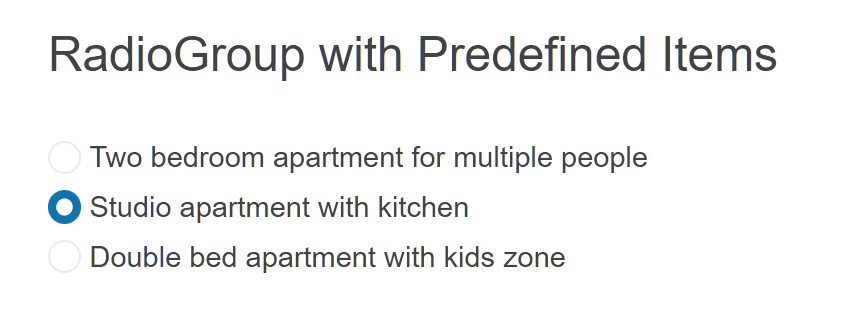
* The `Value()` configuration applies the initial selection to a given item.
```Razor HtmlHelper
@using Kendo.Mvc.UI
RadioGroup with Predefined Items
@(Html.Kendo().RadioGroup()
.Name("radiogroup")
.Items(i =>
{
i.Add().Label("Two bedroom apartment for multiple people").Value("1");
i.Add().Label("Studio apartment with kitchen").Value("2");
i.Add().Label("Double bed apartment with kids zone").Value("3");
})
.Value("2")
)
```
## 3. Handle a RadioGroup Event
The RadioGroup component provides convenient events for implementing your desired logic. In this tutorial, you will use the exposed `Change()` event to log a new entry in the browser's console.
```Razor HtmlHelper
@using Kendo.Mvc.UI
RadioGroup with Predefined Items
@(Html.Kendo().RadioGroup()
.Name("radiogroup")
.Items(i =>
{
i.Add().Label("Two bedroom apartment for multiple people").Value("1");
i.Add().Label("Studio apartment with kitchen").Value("2");
i.Add().Label("Double bed apartment with kids zone").Value("3");
})
.Value("2")
.Events(e => e.Change("onChange"))
)
```
## 4. (Optional) Reference Existing RadioGroup Instances
You can reference the RadioGroup instances that you have created and build on top of their existing configuration:
1. Use the `id` attribute of the component instance to establish a reference.
```JS script
```
2. Use the [RadioGroup client-side API](https://docs.telerik.com/kendo-ui/api/ui/radiogroup#methods) to control the behavior of the widget. In this example, you will use the `enable` method to disable the RadioGroup.
```JS script
```
## Next Steps
* [Customize the Labels of the RadioGroup](https://www.telerik.com/aspnet-mvc/documentation/html-helpers/editors/radiogroup/label)
* [Configure the Layout](https://www.telerik.com/aspnet-mvc/documentation/html-helpers/editors/radiogroup/layout)
## See Also
* [Using the API of the RadioGroup for ASP.NET MVC (Demo)](https://demos.telerik.com/aspnet-mvc/radiogroup/api)
* [Client-Side API of the RadioGroup](https://docs.telerik.com/kendo-ui/api/ui/radiogroup)
* [Server-Side API of the RadioGroup](https://www.telerik.com/aspnet-mvc/documentation/api/radiogroup)
* [Knowledge Base Section](https://www.telerik.com/aspnet-mvc/documentation/knowledge-base)