# Getting Started with the PDFViewer

This tutorial explains how to set up a basic Telerik UI for ASP.NET Core PDFViewer and highlights the major steps in the configuration of the component.

You will initialize a PDFViewer component and visualize a PDF document in it. Finally, you can run the sample code in [Telerik REPL](https://netcorerepl.telerik.com/) and continue exploring the components.
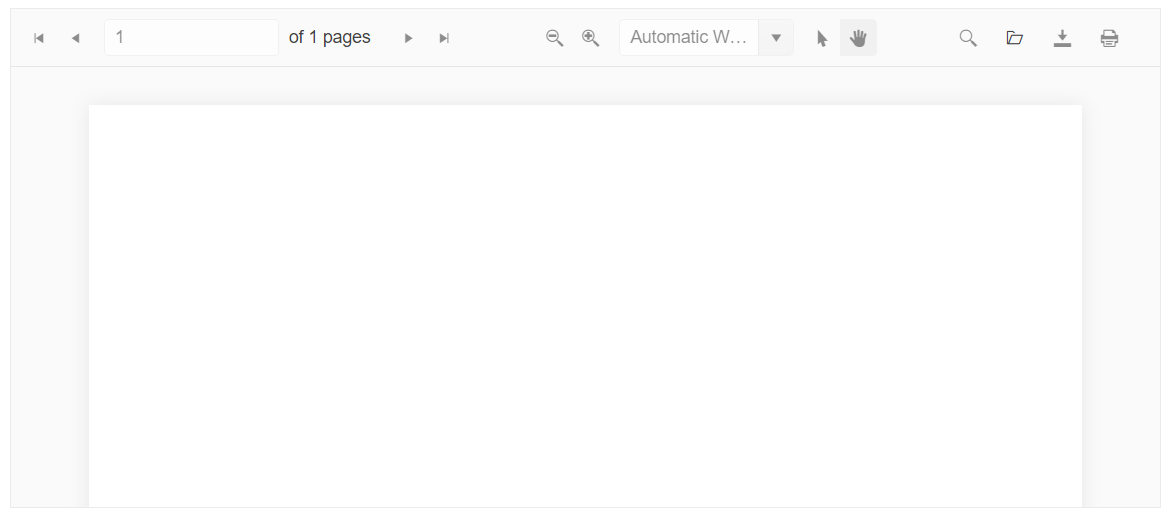
![Sample Telerik UI for ASP.NET Core PDFViewer](https://www.telerik.com/aspnet-core-ui/documentation/assets/743204886d28f6d9ac53ed064e8a3823/pdfviewer-getting-started.png)

## Prerequisites

To successfully complete the tutorial, you need a project that is already configured to use the Telerik UI for ASP.NET Core components:

* You can use the [Telerik REPL](https://netcorerepl.telerik.com/) playground and skip installing the components on your system and configuring a project.

* You can prepare a Visual Studio project by following the following guide:

  * Creating a new pre-configured project for the Telerik UI for ASP.NET Core components from [a project template](https://www.telerik.com/aspnet-core-ui/documentation/vs-integration/new-project-wizard).

## 1. Prepare the CSHTML File

The first step is to add the required directives at the top of the `.cshtml` document:

* To use the Telerik UI for ASP.NET Core HtmlHelpers:

  ```cshtml
  @using Kendo.Mvc.UI
  ```

* To use the Telerik UI for ASP.NET Core TagHelpers:

  ```cshtml
  @addTagHelper *, Kendo.Mvc
  ```

Optionally, you can structure the document by adding the desired HTML elements like headings, divs, paragraphs, and others.

```Razor HtmlHelper
    @using Kendo.Mvc.UI

    <h4>PDFViewer</h4>
    <div>

    </div>
```

```Razor TagHelper
    @addTagHelper *, Kendo.Mvc

    <h4>PDFViewer</h4>
    <div>

    </div>
```

## 2. Enable the RenderAsModule option

Enable the `RenderAsModule` option, which will add `type="module"` to the initialization scripts of all Telerik UI components in the application:

```C# Program.cs
    builder.Services.AddKendo(x => x.RenderAsModule = true);
```

## 3. Initialize the PDFViewer

Load the `pdf.js` library and use the PDFViewer HtmlHelper or TagHelper to add the component to the view. :

* The `Name()` configuration method is mandatory as its value is used for the `id` and the `name` attributes of the PDFViewer element.
* The `Height()` configuration allows you to control the height of the component.

```Razor HtmlHelper
@using Kendo.Mvc.UI

<h4>PDFViewer</h4>
<div>
    <script src="https://cdnjs.cloudflare.com/ajax/libs/pdf.js/4.3.136/pdf.mjs" type="module"></script>
    <script src="https://cdnjs.cloudflare.com/ajax/libs/pdf.js/4.3.136/pdf.worker.mjs" type="module"></script>
    <script src="https://code.jquery.com/jquery-3.7.1.min.js" type="module"></script>
    <script src="https://cdn.jsdelivr.net/npm/@progress/kendo-ui@2024.4.1112/umd/kendo.all.min.js" type="module"></script>
    <script src="https://cdn.jsdelivr.net/npm/@progress/kendo-ui@2024.4.1112/umd/kendo.aspnetmvc.min.js" type="module"></script>

    <div>
        @(Html.Kendo().PDFViewer()
            .Name("pdfviewer")
            .Height(400)
        )
    </div>

    <style>
        html body #pdfviewer {
            width: 100% !important;
        }
    </style>
</div>

```

```Razor TagHelper
    @addTagHelper *, Kendo.Mvc

    <script src="https://cdnjs.cloudflare.com/ajax/libs/pdf.js/4.3.136/pdf.mjs" type="module"></script>
    <script src="https://cdnjs.cloudflare.com/ajax/libs/pdf.js/4.3.136/pdf.worker.mjs" type="module"></script>
    <script src="https://code.jquery.com/jquery-3.7.1.min.js" type="module"></script>
    <script src="https://cdn.jsdelivr.net/npm/@progress/kendo-ui@2024.4.1112/umd/kendo.all.min.js" type="module"></script>
    <script src="https://cdn.jsdelivr.net/npm/@progress/kendo-ui@2024.4.1112/umd/kendo.aspnetmvc.min.js" type="module"></script>

    <div id="example">
        <kendo-pdfviewer name="pdfviewer"
            height="400">
        </kendo-pdfviewer>
    </div>

    <style>
        html body #pdfviewer {
            width: 100% !important;
        }
    </style>

```

## 4. Load an Initial PDF Document

To load and visualize an initial PDF document, set the `PdfjsProcessing` configuration and specify the path to the PDF file.

```Razor HtmlHelper
@using Kendo.Mvc.UI

<h4>PDFViewer</h4>
<div>
    <script src="https://cdnjs.cloudflare.com/ajax/libs/pdf.js/4.3.136/pdf.mjs" type="module"></script>
    <script src="https://cdnjs.cloudflare.com/ajax/libs/pdf.js/4.3.136/pdf.worker.mjs" type="module"></script>
    <script src="https://code.jquery.com/jquery-3.7.1.min.js" type="module"></script>
    <script src="https://cdn.jsdelivr.net/npm/@progress/kendo-ui@2024.4.1112/umd/kendo.all.min.js" type="module"></script>
    <script src="https://cdn.jsdelivr.net/npm/@progress/kendo-ui@2024.4.1112/umd/kendo.aspnetmvc.min.js" type="module"></script>

    <div>
        @(Html.Kendo().PDFViewer()
            .Name("pdfviewer")
            .PdfjsProcessing(pdf => pdf.File(Url.Content("~/shared/web/pdfViewer/sample.pdf")))
            .Height(400)
        )
    </div>

    <style>
        html body #pdfviewer {
            width: 100% !important;
        }
    </style>
</div>

```

```Razor TagHelper
    @addTagHelper *, Kendo.Mvc

    <script src="https://cdnjs.cloudflare.com/ajax/libs/pdf.js/4.3.136/pdf.mjs" type="module"></script>
    <script src="https://cdnjs.cloudflare.com/ajax/libs/pdf.js/4.3.136/pdf.worker.mjs" type="module"></script>
    <script src="https://code.jquery.com/jquery-3.7.1.min.js" type="module"></script>
    <script src="https://cdn.jsdelivr.net/npm/@progress/kendo-ui@2024.4.1112/umd/kendo.all.min.js" type="module"></script>
    <script src="https://cdn.jsdelivr.net/npm/@progress/kendo-ui@2024.4.1112/umd/kendo.aspnetmvc.min.js" type="module"></script>

    <div id="example">
        <kendo-pdfviewer name="pdfviewer"
            height="400">
            <pdfjs-processing file="@Url.Content("~/shared/web/pdfViewer/sample.pdf")" />
        </kendo-pdfviewer>
    </div>

    <style>
        html body #pdfviewer {
            width: 100% !important;
        }
    </style>
```

## 5. Handle a PDFViewer Event

The PDFViewer exposes various [events](https://www.telerik.com/aspnet-core-ui/documentation/api/kendo.mvc.ui.fluent/pdfviewerbuilder) that you can handle and further customize the functionality of the component. In this example, you will use the `Open` event, which fires when a PDF is opened in the PDFViewer. As a result, the browser console will log a message when you open a PDF file.

```Razor HtmlHelper
@using Kendo.Mvc.UI

<h4>PDFViewer</h4>
<div>
    <script src="https://cdnjs.cloudflare.com/ajax/libs/pdf.js/4.3.136/pdf.mjs" type="module"></script>
    <script src="https://cdnjs.cloudflare.com/ajax/libs/pdf.js/4.3.136/pdf.worker.mjs" type="module"></script>
    <script src="https://code.jquery.com/jquery-3.7.1.min.js" type="module"></script>
    <script src="https://cdn.jsdelivr.net/npm/@progress/kendo-ui@2024.4.1112/umd/kendo.all.min.js" type="module"></script>
    <script src="https://cdn.jsdelivr.net/npm/@progress/kendo-ui@2024.4.1112/umd/kendo.aspnetmvc.min.js" type="module"></script>

    <div>
        @(Html.Kendo().PDFViewer()
            .Name("pdfviewer")
            .PdfjsProcessing(pdf => pdf.File(Url.Content("~/shared/web/pdfViewer/sample.pdf")))
            .Height(400)
            .Events(events => events
                .Open("onOpen")
            )
        )
    </div>

    <script>
        function onOpen(e) {
            console.log("file open: " + e.file.name);
        }
    </script>

    <style>
        html body #pdfviewer {
            width: 100% !important;
        }
    </style>
</div>

```

```Razor TagHelper
    @addTagHelper *, Kendo.Mvc

    <script src="https://cdnjs.cloudflare.com/ajax/libs/pdf.js/4.3.136/pdf.mjs" type="module"></script>
    <script src="https://cdnjs.cloudflare.com/ajax/libs/pdf.js/4.3.136/pdf.worker.mjs" type="module"></script>
    <script src="https://code.jquery.com/jquery-3.7.1.min.js" type="module"></script>
    <script src="https://cdn.jsdelivr.net/npm/@progress/kendo-ui@2024.4.1112/umd/kendo.all.min.js" type="module"></script>
    <script src="https://cdn.jsdelivr.net/npm/@progress/kendo-ui@2024.4.1112/umd/kendo.aspnetmvc.min.js" type="module"></script>

    <div id="example">
        <kendo-pdfviewer name="pdfviewer"
            <pdfjs-processing file="@Url.Content("~/shared/web/pdfViewer/sample.pdf")" />
            height="400"
            on-open="onOpen">
        </kendo-pdfviewer>
    </div>

    <script>
        function onOpen(e) {
            console.log("file open: " + e.file.name);
        }
    </script>

    <style>
        html body #pdfviewer {
            width: 100% !important;
        }
    </style>

```

## 6. (Optional) Reference Existing PDFViewer Instances

You can reference the PDFViewer instances that you have created and build on top of their existing configuration:

1. Use the `id` attribute of the component instance to establish a reference.

   ```JS script
   <script>
       var pdfviewerReference = $("#pdfviewer").data("kendoPDFViewer"); // pdfviewerReference is a reference to the existing PDFViewer instance of the helper.
   </script>
   ```

2. Use the [PDFViewer client-side API](https://docs.telerik.com/kendo-ui/api/ui/pdfviewer#methods) to control the behavior of the widget. In this example, you will use the `activatePage` method to activate a page.

   ```JS script
   <input id="btn1" type="button" value="Load page 3" onclick="changePdfViewerPage()" />

   <script>
       function changePdfViewerPage() {
           //get a reference to the PDFViewer instance
           var pdfViewer = $("#pdfviewer").data("kendoPDFViewer");
           // activate page 3
           pdfViewer.activatePage(3);
       }
   </script>
   ```

## Next Steps

* [Using PDF.js Processing with the PDFViewer](https://www.telerik.com/aspnet-core-ui/documentation/html-helpers/pdf/pdfviewer/pdfjs-processing)
* [Using DPL Processing with the PDFViewer](https://www.telerik.com/aspnet-core-ui/documentation/html-helpers/pdf/pdfviewer/dpl-processing)

## See Also

* [Using the API of the PDFViewer for ASP.NET Core (Demo)](https://demos.telerik.com/aspnet-core/pdfviewer/api)
* [Client-Side API of the PDFViewer ](https://docs.telerik.com/kendo-ui/api/ui/pdfviewer)
* [Server-Side API of the PDFViewer](https://www.telerik.com/aspnet-core-ui/documentation/api/pdfviewer)
* [Knowledge Base Section](https://www.telerik.com/aspnet-core-ui/documentation/knowledge-base)
