# Getting Started with the RadioButton
This tutorial explains how to set up a basic Telerik UI for ASP.NET Core RadioButton and highlights the major steps in the configuration of the component.
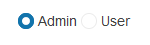
You will initialize two RadioButton components and set one of them as checked by default. Finally, you can run the sample code in [Telerik REPL](https://netcorerepl.telerik.com/) and continue exploring the components.
## Prerequisites
To successfully complete the tutorial, you need a project that is already configured to use the Telerik UI for ASP.NET Core components:
* You can use the [Telerik REPL](https://netcorerepl.telerik.com/) playground and skip installing the components on your system and configuring a project.
* You can prepare a Visual Studio project by following the following guide:
* Creating a new pre-configured project for the Telerik UI for ASP.NET Core components from [a project template](https://www.telerik.com/aspnet-core-ui/documentation/vs-integration/new-project-wizard).
## 1. Prepare the CSHTML File
The first step is to add the required directives at the top of the `.cshtml` document:
* To use the Telerik UI for ASP.NET Core HtmlHelpers:
```cshtml
@using Kendo.Mvc.UI
```
* To use the Telerik UI for ASP.NET Core TagHelpers:
```cshtml
@addTagHelper *, Kendo.Mvc
```
Optionally, you can structure the document by adding the desired HTML elements like headings, divs, paragraphs, and others.
```Razor HtmlHelper
@using Kendo.Mvc.UI
RadioButton
```
```Razor TagHelper
@addTagHelper *, Kendo.Mvc
RadioButton
```
## 2. Initialize the RadioButton
Use the RadioButton HtmlHelper or TagHelper to add the component to the view:
* The `Name()` configuration method is mandatory as its value is used for the `id` and the `name` attributes of the RadioButton element.
* The `HtmlAttributes()` configuration can be used to set the values of various RadioButton Html attributes. In this tutorial, we use the `HtmlAttributes()` option to set an identical `name` attribute value to the two RadioButton components.
* The `Checked()` configuration is used to set the checked/unchecked state of the RadioButton.
```Razor HtmlHelper
@using Kendo.Mvc.UI
RadioButton
@(Html.Kendo().RadioButton()
.Name("role1")
.Checked(true)
.HtmlAttributes(new { @name = "role" })
.Label("Admin")
)
@(Html.Kendo().RadioButton()
.Name("role2")
.Checked(false)
.HtmlAttributes(new { @name = "role" })
.Label("User")
)
```
```Razor TagHelper
@addTagHelper *, Kendo.Mvc
RadioButton
```
## 3. Handle a RadioButton Event
The RadioButton exposes a `Change` event. In this tutorial, you will handle the `Change` event to detect any changes in the state of the component.
```Razor HtmlHelper
@using Kendo.Mvc.UI
RadioButton
@(Html.Kendo().RadioButton()
.Name("role1")
.Checked(true)
.HtmlAttributes(new { @name = "role" })
.Label("Admin")
.Events(ev => ev.Change("onChange"))
)
@(Html.Kendo().RadioButton()
.Name("role2")
.Checked(false)
.HtmlAttributes(new { @name = "role" })
.Events(ev => ev.Change("onChange"))
.Label("User")
)
```
```Razor TagHelper
@addTagHelper *, Kendo.Mvc
RadioButton
```
## 4. (Optional) Reference Existing RadioButton Instances
You can reference the RadioButton instances that you have created and build on top of their existing configuration:
1. Use the `id` attribute of the component instance to establish a reference.
```JS script
```
2. Use the [RadioButton client-side API](https://docs.telerik.com/kendo-ui/api/ui/radiobutton#methods) to control the behavior of the widget. In this example, you will use the `check` method to check the RadioButton.
```JS script
```
## Explore this Tutorial in REPL
You can continue experimenting with the code sample above by running it in the Telerik REPL server playground:
* [Sample code with the RadioButton HtmlHelper](https://netcorerepl.telerik.com/wRkUuzYj31oSE74d56)
* [Sample code with the RadioButton TagHelper](https://netcorerepl.telerik.com/cRkAuTkj388hsXaE27)
## Next Steps
* [Configuring the Checked State of the RadioButton](https://www.telerik.com/aspnet-core-ui/documentation/html-helpers/navigation/radiobutton/checked-state)
* [Configuring the Disabled State of the RadioButton](https://www.telerik.com/aspnet-core-ui/documentation/html-helpers/navigation/radiobutton/disabled-state)
## See Also
* [Basic Usage of the RadioButton for ASP.NET Core (Demo)](https://demos.telerik.com/aspnet-core/radiobutton)
* [Changing the Appearance of the RadioButton for ASP.NET Core (Demo)](https://demos.telerik.com/aspnet-core/radiobutton/appearance)
* [Client-Side API of the RadioButton](https://docs.telerik.com/kendo-ui/api/ui/radiobutton)
* [Server-Side API of the RadioButton](https://www.telerik.com/aspnet-core-ui/documentation/api/radiobutton)
* [Knowledge Base Section](https://www.telerik.com/aspnet-core-ui/documentation/knowledge-base)