# Table Editing
The Editor exposes the capability of editing a data table as any other (X)HTML. The options that the table editing provides are:
* [Inserting a Table](https://www.telerik.com/aspnet-core-ui/documentation/html-helpers/editors/editor/table-editing#inserting-a-table)
* [Editing a table](https://www.telerik.com/aspnet-core-ui/documentation/html-helpers/editors/editor/table-editing#editing-a-table)
* [Available **Table**, **Cell**, and **Accessibility** tab options](https://www.telerik.com/aspnet-core-ui/documentation/html-helpers/editors/editor/table-editing#available-options)
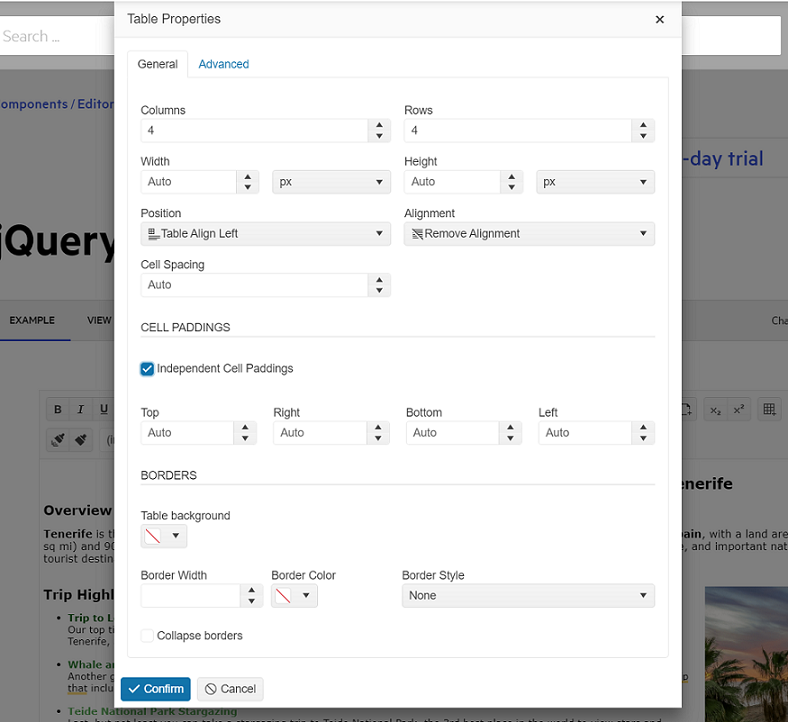
> As of the R3 2023 Release, the `Table Wizard` transmutes into two separate `Table` and `Cell` properties popup elements.
To enable the table editing, add the `TableEditing` tool to the configuration of the component:
```Razor HtmlHelper
@(Html.Kendo().Editor()
.Name("editor")
.HtmlAttributes(new { style = "height:440px", aria_label = "editor" })
.Tools(tools => tools.TableEditing())
)
```
```Razor TagHelper
```
## Inserting a Table
To insert a new table by using the Table Wizard dialog:
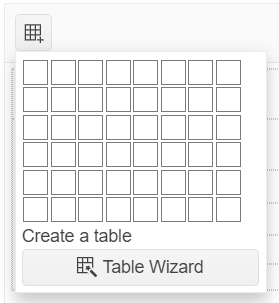
1. Click the **Create Table** tool.
2. To open the dialog, click the **Table Wizard** button.
3. Configure the table you want to insert.
4. Click the **Confirm** button.
To quickly create a plain table, click the **Create Table** tool and choose the row and column dimensions.
## Editing a Table
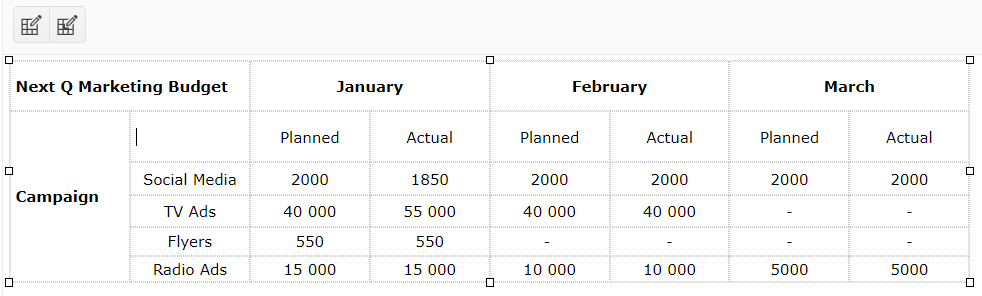
To modify an existing table or a table cell:
1. Select the table or the table cell to edit.
2. Click the **Table Properties** or **Cell Properties** tool in the toolbar.
> You can resize the table rows and columns by dragging the cell border with the mouse and without using the Table Wizard dialog.
The table and cell options that are available in the **Table Wizard** are displayed in the following three tabs:
* [**Table**](https://www.telerik.com/aspnet-core-ui/documentation/html-helpers/editors/editor/table-editing#table-tab)—The available options for the table element.
* [**Cell**](https://www.telerik.com/aspnet-core-ui/documentation/html-helpers/editors/editor/table-editing#cell-tab)—The available options for the selected cell or all cells in the table.
* [**Accessibility**](https://www.telerik.com/aspnet-core-ui/documentation/html-helpers/editors/editor/table-editing#accessibility-tab)—The available options related to accessibility.
## Available Options
The Editor provides a set of editing options through its **Table**, **Cell**, and **Accessibility** tabs.
### Table Tab
The **Table** tab provides the following options:
* **Width**—Changes the width of the table (in pixels, em, or percent).
* **Height**—Changes the height of the table (in pixels, em, or percent).
* **Columns**—Defines the columns of the table.
* **Rows**—Defines the rows of the table.
* **Cell Spacing**—Specifies the space between the cells ([`cellspacing` attribute](http://www.w3schools.com/tags/att_table_cellspacing.asp)).
* **Cell Padding**—Specifies the padding in the cells ([`cellpadding` attribute](http://www.w3schools.com/tags/att_table_cellpadding.asp)).
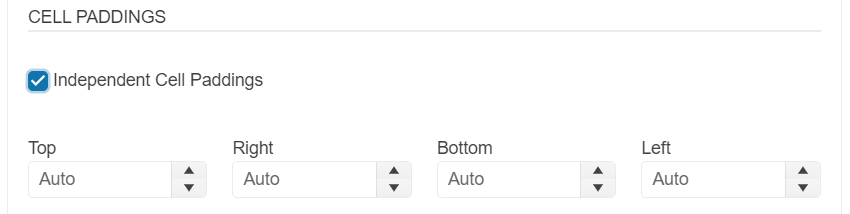
* **Independent Cell Paddings** (available as of the `2024 Q2` release)—Specifies individual padding in the cells for `top`, `right`, `bottom` and `left`.
* **Alignment**—Specifies the text alignment in the cells.
* **Background**—Specifies the background color of the table.
* **CSS Class**—Defines the class names for the table element (white space-separated).
* **ID**—Defines the id of the table element.
* **Border**—Defines the border size (in pixels only) and color.
* **Border Style**—Defines the border style (`none`, `hidden`, `dotted`, `dashed`, `solid`, `double`, `groove`, `ridge`, `inset`, `outset`, `initial`, and `inherit`).
* **Collapse borders**—Adds an inline style to that table element with the `border-collapse: collapse` rule ([`border-collapse` property](http://www.w3schools.com/cssref/pr_border-collapse.asp)).
### Cell Tab
The **Cell** tab provides the following options:
* **Apply to all cells**—Applies the changes to all cells in the table.
* **Width**—Changes the width of the cell or cells (in pixels, em, or percent).
* **Height**—Changes the height of the cell or cells (in pixels, em, or percent).
* **Cell Margin**—Defines the margin of the cell or cells.
* **Cell Padding**—Defines the padding of the cell or cells.
* **Independent Cell Paddings** (available as of the `2024 Q2` release)—Specifies individual padding in the cells for `top`, `right`, `bottom` and `left`.

* **Alignment**—Specifies the text alignment of the cell or cells.
* **Background**—Specifies the background color of the cell or cells.
* **CSS Class**—Defines class names for the cells (white space-separated).
* **ID**—Defines the id of the cells.
* **Border**—Defines the border size (in pixels only) and color of the cells.
* **Border Style**—Defines the border style (`none`, `hidden`, `dotted`, `dashed`, `solid`, `double`, `groove`, `ridge`, `inset`, `outset`, `initial`, and `inherit`).
* **Wrap text**—When unchecked, applies a `white-space: nowrap` style to the cells ([`white-space` property](http://www.w3schools.com/cssref/pr_text_white-space.asp)).
### Accessibility Tab
> As of the R3 2023 Release, the accessibility tab becomes a section in the `Advanced` tab in the new `Table Properties` popup.
The **Accessibility** tab provides the following options:
* **Header Rows**—Allows the user to specify the number of rows in the table that should belong to header and should render `| ` cell elements instead of ` | `. When creating a new Table, those rows will be placed within a `` element.
* **Header Cols**—Allows the user to specify the number of columns in the table that would be headers for their respective rows. The cells will be rendered as `| ` elements instead of ` | `.
* **Caption**—Adds a [`caption` element](https://developer.mozilla.org/en-US/docs/Web/HTML/Element/caption) for the table with the respective text.
* **Alignment**—Defines the text alignment of the caption.
* **Summary**—Adds a [`summary` attribute](http://www.w3schools.com/tags/att_table_summary.asp) to the table using value defined. The `summary` attribute has been deprecated in HTML5 and its use should be avoided when possible.
* **Associate headers**—Allows the user to specify the mode in which content cells should be associated with their header cells. it provides the following three options:
* **None** - Will not explicitly associate cells. That is the default option and it is appropriate for tables with simple structure (no merged cells).
* **Associate using 'scope' attribute** - The wizard will add the appropriate [`scope` attribute](https://developer.mozilla.org/en-US/docs/Web/HTML/Element/th) to all header cells.
* **Associate using Ids** - The wizard will assign IDs to all header cells and will inject [`headers` attribute](https://developer.mozilla.org/en-US/docs/Web/HTML/Element/td) with the appropriate value to all data (and header, if needed) cells.
## See Also
* [Table Editing of the Editor HtmlHelper for ASP.NET Core (Demo)](https://demos.telerik.com/aspnet-core/editor/table-editing)
* [Server-Side API](https://www.telerik.com/aspnet-core-ui/documentation/api/editor)
| |