# Getting Started with the DropDownTree
This tutorial explains how to set up a basic Telerik UI for ASP.NET Core DropDownTree and highlights the major steps in the configuration of the component.
You will initialize a DropDownTree control and bind it to data. Next, you will handle some of the DropDownTree events. Finally, you can run the sample code in [Telerik REPL](https://netcorerepl.telerik.com/) and continue exploring the components.
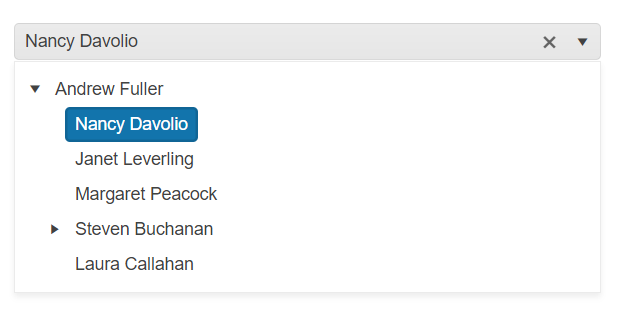
After completing this guide, you will achieve the following result:
## Prerequisites
To successfully complete the tutorial, you need a project that is already configured to use the Telerik UI for ASP.NET Core components:
* You can use the [Telerik REPL](https://netcorerepl.telerik.com/) playground and skip installing the components on your system and configuring a project.
* You can prepare a Visual Studio project by following the following guide:
* Creating a new pre-configured project for the Telerik UI for ASP.NET Core components from [a project template](https://www.telerik.com/aspnet-core-ui/documentation/vs-integration/new-project-wizard).
## 1. Prepare the CSHTML File
The first step is to add the required directives at the top of the `.cshtml` document:
* To use the Telerik UI for ASP.NET Core HtmlHelpers:
```cshtml
@using Kendo.Mvc.UI
```
* To use the Telerik UI for ASP.NET Core TagHelpers:
```cshtml
@addTagHelper *, Kendo.Mvc
```
Optionally, you can structure the document by adding the desired HTML elements like headings, divs, paragraphs, and others.
## 2. Declare the View Model
Declare the `EmployeeViewModel` view model.
> The model must have a property field that represents the hierarchical relationship of the entries. In this tutorial, this is the `ReportsTo` field.
> The `hasChildren` property of the model is required to render items as parent nodes on the client-side.
```C#
public class EmployeeViewModel
{
public int EmployeeID { get; set; }
public string Name { get; set; }
public int? ReportsTo { get; set; }
public string Title { get; set; }
public bool hasChildren { get; set; }
}
```
## 3. Initialize the DropDownTree
Use the DropDownTree HtmlHelper or TagHelper to add the component to a page and set some of its options.
* The `Name()` configuration assigns a name to the instance of the helper—this is mandatory as its value is used for the `id` and the `name` attributes of the DropDownTree element.
* Configure the `DataTextField` of the DropDownTree to bind the items of the popup to a field of the `EmployeeViewModel`.
* Add the `DataSource()` configuration option and set the `Read` end point.
```Razor HtmlHelper
@using Kendo.Mvc.UI
@(Html.Kendo().DropDownTree()
.Name("dropdowntree")
.DataTextField("Name")
.DataSource(dataSource => dataSource
.Read(read => read
.Action("Get_Employees", "DropDownTree")
)
)
)
```
```Razor TagHelper
@addTagHelper *, Kendo.Mvc
```
## 4. Declare the Read Action
In the `Home` controller, declare the `Get_Employees` action that you set to the DataSource `Read` configuration in the previous step.
```C# Controller
public List GetFlatData()
{
List employees = new List(){
new EmployeeViewModel {
EmployeeID = 1,
Name = "Nancy Davolio",
Title = "Sales Representative",
ReportsTo = 2,
hasChildren = false
},
new EmployeeViewModel {
EmployeeID = 2,
Name = "Andrew Fuller",
Title = "Vice President, Sales",
ReportsTo = null,
hasChildren = true
},
new EmployeeViewModel {
EmployeeID = 3,
Name = "Janet Leverling",
Title = "Sales Representative",
ReportsTo = 2,
hasChildren = false
},
new EmployeeViewModel {
EmployeeID = 4,
Name = "Margaret Peacock",
Title = "Sales Representative",
ReportsTo = 2,
hasChildren = false
},
new EmployeeViewModel {
EmployeeID = 5,
Name = "Steven Buchanan",
Title = "Sales Manager",
ReportsTo = 2,
hasChildren = true
},
new EmployeeViewModel {
EmployeeID = 6,
Name = "Michael Suyama",
Title = "Sales Representative",
ReportsTo = 5,
hasChildren = false
},
new EmployeeViewModel {
EmployeeID = 7,
Name = "Robert King",
Title = "Sales Representative",
ReportsTo = 5,
hasChildren = false
},
new EmployeeViewModel {
EmployeeID = 8,
Name = "Laura Callahan",
Title = "Inside Sales Coordinator",
ReportsTo = 2,
hasChildren = false
},
new EmployeeViewModel {
EmployeeID = 9,
Name = "Anne Dodsworth",
Title = "Sales Representative",
ReportsTo = 5,
hasChildren = false
}
}
return employees;
}
public JsonResult Get_Employees([DataSourceRequest] DataSourceRequest request, int? id)
{
var data = GetFlatData();
var result = from e in data.Employees
where (id.HasValue ? e.ReportsTo == id : e.ReportsTo == null)
select new
{
id = e.EmployeeID,
Name = e.FirstName + " " + e.LastName,
hasChildren = (from q in data.Employees
where (q.ReportsTo == e.EmployeeID)
select q
).Count() > 0
};
return Json(result.ToTreeDataSourceResult(request));
}
```
## 5. Handle the DropDownTree Events
The DropDownTree [exposes various events](https://www.telerik.com/aspnet-core-ui/documentation/api/kendo.mvc.ui.fluent/dropdowntreeeventbuilder) that you can handle and further customize the functionality of the component. In this tutorial, you will use the `DataBound` event of the DropDownTree.
```Razor HtmlHelper
@using Kendo.Mvc.UI
@(Html.Kendo().DropDownTree()
.Name("dropdowntree")
.DataTextField("Name")
.DataSource(dataSource => dataSource
.Read(read => read
.Action("Get_Employees", "DropDownTree")
)
)
.Events(e=>e.DataBound("onDataBound"))
)
```
```Razor TagHelper
@addTagHelper *, Kendo.Mvc
```
```JavaScript
```
For more examples, refer to the [demo on using the events of the DropDownTree](https://demos.telerik.com/aspnet-core/dropdowntree/events).
## 6. (Optional) Reference Existing DropDownTree Instances
To use the client-side API of the DropDownTree and build on top of its initial configuration, you need a reference to the DropDownTree instance. Once you get a valid reference, you can call the respective API methods:
1. Use the `.Name()` (`id` attribute) of the component instance to get a reference.
```JS script
```
2. Use the [DropDownTree client-side API](https://docs.telerik.com/kendo-ui/api/ui/dropdowntree#methods) to control the behavior of the widget. In this example, you will use the `open` method to open the popup of the DropDownTree programmatically.
```JS script
```
For more information on referencing specific helper instances, see the [Methods and Events](https://www.telerik.com/aspnet-core-ui/documentation/html-helpers/helper-basics/events-and-methods) article.
## Explore this Tutorial in REPL
You can continue experimenting with the code sample above by running it in the Telerik REPL server playground:
* [Sample code with the DropDownTree HtmlHelper](https://netcorerepl.telerik.com/QRuSaAlT09u9OUQG31)
* [Sample code with the DropDownTree TagHelper](https://netcorerepl.telerik.com/wnOyYKPT09ersZUo47)
## Next Steps
* [Adding Custom Content through DropDownTree Templates](https://www.telerik.com/aspnet-core-ui/documentation/html-helpers/editors/dropdowntree/templates)
* [Using Filtering in the DropDownTree](https://www.telerik.com/aspnet-core-ui/documentation/html-helpers/editors/dropdowntree/filtering)
## See Also
* [Using the API of the DropDownTree for ASP.NET Core (Demo)](https://demos.telerik.com/aspnet-core/dropdowntree/api)
* [Client-Side API of the DropDownTree](https://docs.telerik.com/kendo-ui/api/ui/dropdowntree)
* [Server-Side API of the DropDownTree](https://www.telerik.com/aspnet-core-ui/documentation/api/dropdowntree)
* [Knowledge Base Section](https://www.telerik.com/aspnet-core-ui/documentation/knowledge-base)