# ASP.NET Core PivotGridV2 Overview
The Telerik UI PivotGridV2 HtmlHelper and TagHelper for ASP.NET Core are server-side wrappers for the Kendo UI PivotGridV2 widget. To add the component to your ASP.NET Core application, you can use either.
The PivotGridV2 represents multidimensional data in a cross-tabular format. Compared to the legacy [PivotGrid](https://www.telerik.com/aspnet-core-ui/documentation/html-helpers/data-management/pivotgrid/overview), PivotGridV2 offers a brand new design, and its future-proof architecture allows the implementation of many upcoming features. We recommended using the PivotGridV2 in your new projects, because, at some point in the future, the PivotGridV2 will replace the legacy PivotGrid. For more details about the differences between the PivotGrid and PivotGridV2, refer to the [Comparison](https://www.telerik.com/aspnet-core-ui/documentation/html-helpers/data-management/pivotgridv2/comparison) article.
* [Demo page for the PivotGridV2 HtmlHelper](https://demos.telerik.com/aspnet-core/pivotgridv2)
* [Demo page for the PivotGridV2 TagHelper](https://demos.telerik.com/aspnet-core/pivotgridv2/tag-helper)
## Basic Configuration
To configure the PivotGridV2 for Ajax binding to an [Adventure Works](https://learn.microsoft.com/en-us/analysis-services/multidimensional-tutorial/multidimensional-modeling-adventure-works-tutorial?view=asallproducts-allversions) cube that is hosted on `https://demos.telerik.com/service/v2/olap/msmdpump.dll`, follow the next steps:
1. Create a new ASP.NET Core application. If you have the [Telerik UI for ASP.NET Core Visual Studio Extensions](https://www.telerik.com/aspnet-core-ui/documentation/vs-integration/introduction) installed, create a Telerik UI for ASP.NET Core application. Name the application `KendoPivotGridV2`. If you decide not to use the Visual Studio Extensions, follow the steps from the [introductory article](https://www.telerik.com/aspnet-core-ui/documentation/getting-started-core/first-steps) to install Telerik UI for ASP.NET Core in the application.
2. Add a PivotGridV2 to the `Index` View.
```Razor HtmlHelper
@(Html.Kendo().PivotConfiguratorV2()
.Name("configurator")
.Filterable(true)
.Sortable()
.Height(570)
)
@(Html.Kendo().PivotGridV2()
.Name("pivotgridv2")
.ColumnWidth(200)
.Height(570)
.Configurator("#configurator")
.DataSource(dataSource => dataSource.
Xmla()
.Columns(columns => {
columns.Add("[Date].[Calendar]").Expand(true);
columns.Add("[Product].[Category]");
})
.Rows(rows => rows.Add("[Geography].[City]"))
.Measures(measures => measures.Values(new string[]{"[Measures].[Reseller Freight Cost]"}))
.Transport(transport => transport
.Connection(connection => connection
.Catalog("Adventure Works DW 2008R2")
.Cube("Adventure Works"))
.Read(read => read
.Url("https://demos.telerik.com/service/v2/olap/msmdpump.dll")
.DataType("text")
.ContentType("text/xml")
.Type(HttpVerbs.Post)
)
)
)
)
```
```Razor TagHelper
|
```
3. Build and run the application.
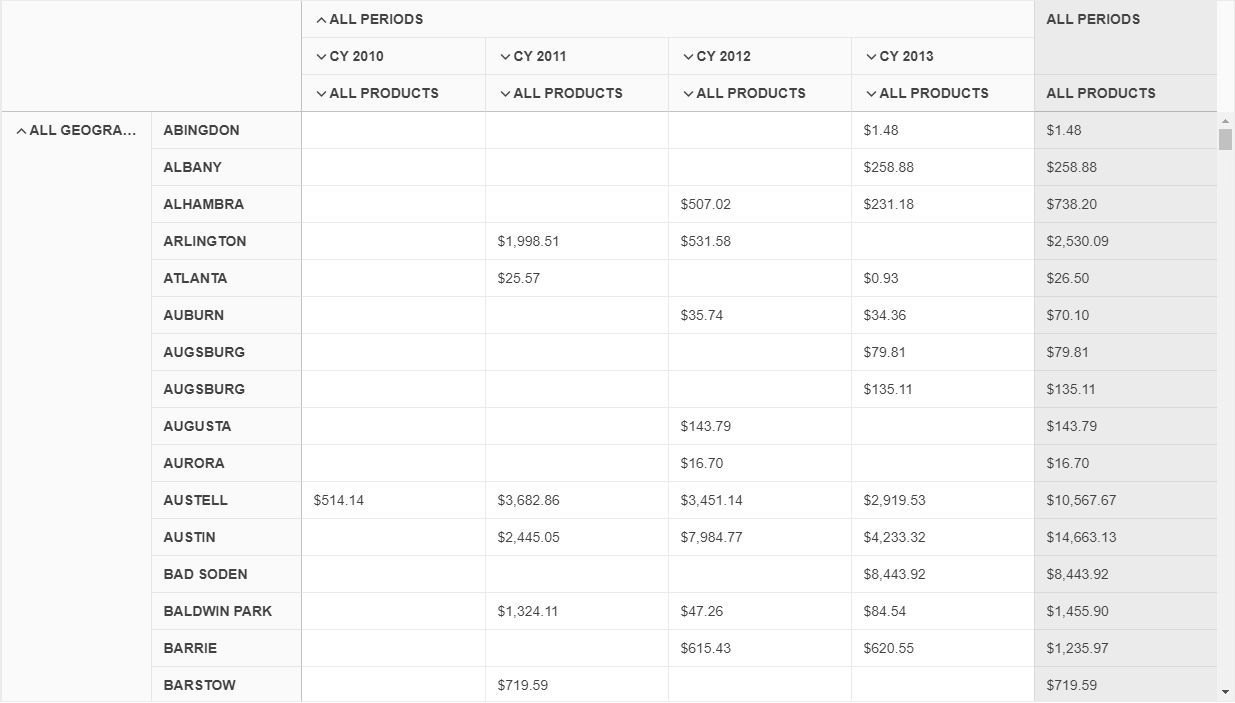
The following image demonstrates the output from the example.
## Functionality and Features
* [Comparison with the PivotGrid](https://www.telerik.com/aspnet-core-ui/documentation/html-helpers/data-management/pivotgridv2/comparison)—Learn more about the major differences between the PivotGrid and PivotGridV2 components.
* [Data binding](https://www.telerik.com/aspnet-core-ui/documentation/html-helpers/data-management/pivotgridv2/data-binding/overview)—You can bind the PivotGridV2 to [Online Analytical Processing (OLAP)](https://learn.microsoft.com/en-us/previous-versions/sql/sql-server-2005/ms175367\(v=sql.90\)) cube and or flat data.
* [Templates](https://www.telerik.com/aspnet-core-ui/documentation/html-helpers/data-management/pivotgridv2/templates)—The available templates allow you to control the rendering of the data cells and headers.
* [Excel export](https://www.telerik.com/aspnet-core-ui/documentation/html-helpers/data-management/pivotgridv2/export/excel-export)—Built-in support for exporting the component data to Excel.
* [PDF export](https://www.telerik.com/aspnet-core-ui/documentation/html-helpers/data-management/pivotgridv2/export/pdf-export)—You can export the component data to PDF through a single click.
* [Accessibility](https://www.telerik.com/aspnet-core-ui/documentation/html-helpers/navigation/actionsheet/accessibility/overview)—The PivotGridV2 is accessible for screen readers, supports WAI-ARIA, Section 508, WCAG 2.2, and delivers [keyboard shortcuts](https://www.telerik.com/aspnet-core-ui/documentation/html-helpers/data-management/pivotgridv2/accessibility/keyboard-navigation) for faster navigation.
## Next Steps
* [Getting Started with the PivotGridV2](https://www.telerik.com/aspnet-core-ui/documentation/html-helpers/data-management/pivotgridv2/getting-started)
* [Basic Usage of the PivotGridV2 HtmlHelper for ASP.NET Core (Demo)](https://demos.telerik.com/aspnet-core/pivotgridv2)
* [Basic Usage of the PivotGridV2 TagHelper for ASP.NET Core (Demo)](https://demos.telerik.com/aspnet-core/pivotgridv2/tag-helper)
* [PivotGridV2 in Razor Pages](https://www.telerik.com/aspnet-core-ui/documentation/html-helpers/data-management/pivotgridv2/data-binding/razor-page)
## See Also
* [Server-Side API of the PivotGridV2 HtmlHelper](https://www.telerik.com/aspnet-core-ui/documentation/api/pivotgridv2)
* [Server-Side API of the PivotGridV2 TagHelper](https://www.telerik.com/aspnet-core-ui/documentation/api/taghelpers/pivotgridv2)
* [Client-Side API of the PivotGridV2](https://docs.telerik.com/kendo-ui/api/ui/pivotgridv2)