

Telerik UI for ASP.NET MVC Controls
Deliver high-quality apps in the quickest timeframe using the 110+ ASP.NET MVC UI controls that cover any use case scenario.
30-day FREE trial. Free technical support and training during your trial. No credit card requred.
ASP.NET MVC UI components are also included in DevCraft bundles. Learn more.



Grid
Responsive and adaptive HTML5 Grid with multiple features like customizable and sortable columns, data editing, selection, filtering, grouping capabilities and much more!
More about GridGantt
Plan and schedule project start and end dates, visualize task progress, dependencies, milestones and more!
More about GanttEditor
Add predefined CSS classes or create your own custom tools, buttons, dropdowns, and dialogs with the MS Word-like ASP.NET MVC Editor component!
More about EditorTileLayout
Drag and rearrange your dashboard to fit your specific preferences. Control the rows, columns, and content of your layout, and let your users store their preferred setup.
More about TileLayout


Key Features
Performance optimized ASP.NET MVC controls for any scenario
Enjoy 110+ ASP.NET MVC components for every need: navigation and layout, data management and visualization, editing, interactivity and more.
Feature rich controls for powerful and responsive apps
Develop data-driven web applications using our full-featured UI controls such as MVC Grid, Editor, Scheduler and many more. Simple, yet powerful data binding and CRUD operations with multitude of options – EF Core, OData, Web API and SignalR.
Built-In & Customizable Theming
Apply one of 20+ professionally designed built-in themes or use the Telerik SAAS Theme Builder or Figma Kits to customize and deliver sophisticated applications in no time.
Detailed Documentation, Code Samples & Technical Trainings
Take advantage of the detailed documentation, free technical online trainings and live demos for every UI control to achieve meaningful results in no time.
Award-winning Support from the Minds Behind the Product
Develop your projects with ease knowing our outstanding technical support team will always have your back.
Web Apps Available to Any User Anywhere
Enjoy full support for accessibility standards, RTL support and keyboard navigation for the tech-savvy users & respond to the user's culture to correctly format numbers, dates and helper texts.
Awards
Greatness—it’s one thing to say you have it, but it means more when others recognize it. Telerik is proud to hold the following industry awards.



110+ ASP.NET MVC Controls
Data Management
- ASP.NET MVC Grid Control Updated
- Filter
- ListView
- Pager
- PivotGrid
- PivotGrid v.2
- Spreadsheet
- TaskBoard
- TreeList
Scheduling
Editors
- AutoComplete
- Captcha
- CheckBoxGroup
- Color Picker
- ColorGradient
- ColorPalette
- ComboBox
- Date & Time Pickers
- DateInput
- DatePicker
- DateRangePicker
- DateTimePicker
- DropDownList
- DropDownTree
- Editor
- FlatColorPicker
- Image Editor
- ListBox
- MaskedTextBox
- MultiColumnComboBox
- MultiSelect
- Numeric TextBox
- RadioGroup
- Rating
- Signature
- Switch
- TextArea
- TextBox
- TimeDurationPicker
- TimePicker
Data Visualization
- ArcGauge
- ASP.NET MVC Charts Control Updated
- Barcode
- Circular Gauge
- Gauges
- HeatMap
- LinearGauge
- OrgChart
- Pyramid Chart
- QR Code
- RadialGauge
- StockChart
- Timeline
- TreeMap
- Trendline Chart New
File Upload & Management
Interactivity & UX
Navigation
Layout
- Avatar
- Badge
- DockManager
- ExpansionPanel
- Form
- GridLayout
- Notification
- Popover
- Responsive Panel
- Splitter
- StackLayout
- TileLayout
- Tooltip
- Window
- Wizard
Diagramming
Geo Visualization
Document Processing
Media
Forms & Dialogs
See Them in Action
Launch demosSimple to Advanced, Style Your Components
the Easy Way
We combine our UI components with front-end documentation and tools into a Design System Kit to help you satisfy your styling requirements and produce consistent UI without hassle. You and/or designers can leverage these resources:



Flexible Packaging Tailored to Your Needs
You can buy Telerik UI for ASP.NET MVC individually or as a part of the DevCraft bundle. If you want to be covered for all .NET and JavaScript technologies or need a reporting, mocking or testing solution, the DevCraft bundles offers the most value for money—and the most power.

Buy Telerik UI for ASP.NET MVC
Buy the ultimate ASP.NET MVC suite to build your project on time using a highly customizable UI framework that delivers.
See PricingStarting at $999

Buy DevCraft Bundle
Get the complete bundle of .NET controls, JavaScript components, reporting, automated testing and productivity tools.
See PricingStarting at $1,499
We have integrated excel plugin for our software to make it dynamic and it's working very well.
Jigar Rathod
CTO, ADVAIT BUSINESS SOLUTIONS PRIVATE LIMITED
Our company like to use Telerik Controls Tools for Web and Windows projects. It provides rich UI with simple usability. I would recommend this tools to my friends and colleagues.
Kirtan Patel
Sr. Software Engineer, Parkway Corp
Telerik UI has helped us to reduce the coding time and thus speed up the project delivery. Also admirable support from Telerik team.
Rajesh Kumar Sivadasan Pillai
Director - Business Development, AFI infotech
I have been using this product for many years. This library has grown so much over the years and love it more and more each year. Telerik staff is quick to answer my requests and are very helpful. Overall I am very happy andwould recommend :)
Garðar Valur Hallfreðsson
Software Engineer, Austurnet ehf
Hi Telerik team working on Kendo UI, we wish to thank you for this awesome superset of products. Out of the box, work great, require tweaking for Web standards. Support is helpful, technically works as advertised.
Mohammed Al-Mosawi
Manager, Opus
I very much enjoy using Telerik UI for ASP.NET MVC. It is a huge time saver to not have to code commonly used widgets and write code to support various browsers/devices. Kendo support, documentation and demos have improved greatly over the years.
Neil Sowers
Programmer, Progresive Intellegence Technologies
What's New with Telerik UI for
ASP.NET MVC Controls Library

Adding a ToggleButton to the Telerik UI for ASP.NET MVC Library
Offer a simple and efficient way for users to control features and settings. Telerik UI for ASP.NET MVC ToggleButton enables you to group related options as well as to indicate whether the button is active or inactive.
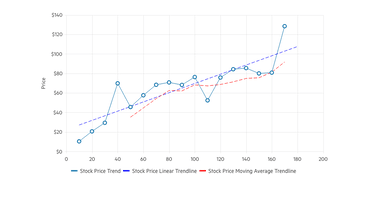
Meet the Telerik UI for ASP.NET MVC Trendline Chart
Visualize data points in a time series or sequential order with the new Telerik UI for ASP.NET MVC Trendline Chart. Effortlessly represent and analyze trends, patterns and relationships in the data over time.
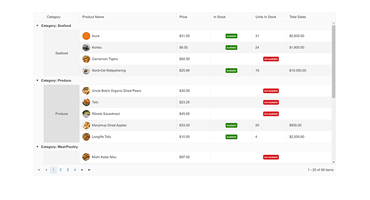
Multiple Improvements in Telerik UI for ASP.NET MVC Grid
Telerik UI for ASP.NET MVC Grid got improved with features like row and column spanning, selection aggregates, ability to paste from Excel, Toolbar Columns Menu and convenient tabbed Interface.
Telerik UI for ASP.NET MVC Support and Learning

Free Whitepaper
The Command Line: Reinvented for Modern Developers
This whitepaper provides insight into how modern development platforms cater to application development through CLI—for web, desktop and mobile channels.

Free Whitepaper
The Anatomy of Responsive ASP.NET Apps
This whitepaper will walk you through the must-know responsive web practices to help you succeed in building apps for any screen size.
Industry-Leading Support for ASP.NET MVC Controls
Expert and Timely Response
Telerik UI for ASP.NET MVC customers have the benefit of accessing Telerik premium support forums and getting answers from the engineers who built Telerik UI for ASP.NET MVC. Even during trial.
Contact Telerik supportNeed Evaluation Help?
No time to evaluate our ASP.NET MVC framework? Send us your project requirements. We will evaluate your required features for you and let you know how we can help.
Send us your requirements
Next Steps
See UI for ASP.NET MVC in action and check out how much it can do out-of-the-box.
Check out the offers. Purchase an individual suite, or treat yourself to one of our bundles.
Try UI for ASP.NET MVC with dedicated technical support.