Skip Navigation LinksHome / Community & Support / Code Library / ASP.NET and ASP.NET AJAX > FileExplorer > Customize the value shown in the Size column

Not answered Customize the value shown in the Size column

Feed from this thread
  • Posted on Dec 15, 2009 (permalink)

    Requirements

    RadControls version

    RadFileExplorer for ASP.NET AJAX
    .NET version

    2.0 / 3.5
    Visual Studio version

    2005 / 2008 /
    programming language JavaScript
    browser support

    all browsers supported by RadControls


    PROJECT DESCRIPTION
    Customize the value shown in the Size column

    THE IMPLEMENTATION
    • Attach a handler to the OnRowDataBound event of the RadGrid (embedded in RadFileExplorer) :
      protected void Page_Load(object sender, EventArgs e)
      {
          RadFileExplorer1.Grid.ClientSettings.ClientEvents.OnRowDataBound = "OnGridRowDataBound";
      }
    • Then implement the handler as follows:
      function OnGridRowDataBound(oGrid, args)
      {
          var dataItem = args.get_dataItem();
          if (dataItem.Length != null)
          {
              dataItem.Length = formatSizeValue(dataItem.Length);
          }
      }

    The full implementation of the described solution (including formatSizeValue method) can be found attached to the thread.

    THE RESULT
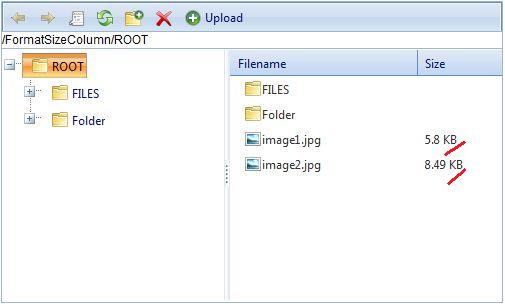
    Attached files

    Reply

  • WS avatar

    Posted on Jan 26, 2010 (permalink)

    For those that need a little more in the formatSizeValue method, I adapted this from my C# tool kit.  It's a bit of an over kill but you can edit it as needed.  Just replace the one in the example code.

    Hope you find it useful.

    Reply

  • Fiko Fiko avatar

    Posted on Jan 29, 2010 (permalink)

    Hello WS,

    Thank you for the provided code. I believe that the provided JavaScript function will be of help for our  community.

    Best wishes,
    Fiko
    the Telerik team

    Instantly find answers to your questions on the new Telerik Support Portal.
    Watch a video on how to optimize your support resource searches and check out more tips on the blogs.

    Reply

Back to Top

Skip Navigation LinksHome / Community & Support / Code Library / ASP.NET and ASP.NET AJAX > FileExplorer > Customize the value shown in the Size column